Introduction: How to Use AI for Debugging Python Code (Without Feeling Overwhelmed)
Learning Python is exciting — until your code suddenly stops working.
You run your script, and instead of the expected output, you see a long red error message. You don’t understand what it means. You try random fixes. Nothing works.
Every beginner faces this frustration.
The good news? In 2026, learning how to use AI for debugging Python code can completely change your experience.
Instead of guessing what went wrong, AI tools can:
✔ Explain errors in simple language
✔ Show you exactly what caused the problem
✔ Suggest corrected versions of your code
✔ Teach you better coding practices while fixing bugs
But here’s the important part: AI should help you learn — not think for you.
In this beginner-friendly guide, you’ll learn how to use AI for debugging Python code step by step, with real examples, smart prompts, and a simple workflow you can follow every time your code breaks.
Let’s turn debugging from frustration into progress.
👉 IIf you want to see how AI fits into the bigger learning journey, check out this complete Python roadmap with AI integration.
Why Learning How to Use AI for Debugging Python Code Matters in 2026
Understanding how to use AI for debugging Python code is becoming an essential skill for beginners. Python errors are unavoidable, but AI tools now allow you to analyze problems faster and learn the correct solution at the same time.
Instead of spending hours searching forums, beginners can use AI strategically to understand error messages, identify root causes, and improve coding habits.
The key is not just fixing errors — it’s learning how AI helps you debug intelligently.

Step 1: Identify the Python Error First
Before asking AI for help, always run your Python script and carefully read the error message.
Common Python errors include:
• SyntaxError – Missing parentheses, colons, or indentation
• NameError – Using variables that don’t exist
• TypeError – Mixing incompatible data types
• IndentationError – Incorrect spacing
• Logic errors – Code runs but produces wrong results
Example of a NameError
# Buggy code
print("The result is: " + result)
Error:
NameError: name 'result' is not defined
The key is to copy the exact error message before asking AI.
👉 For a deep dive into Python errors and exceptions, see the official documentation → official guide to Python errors and exceptions
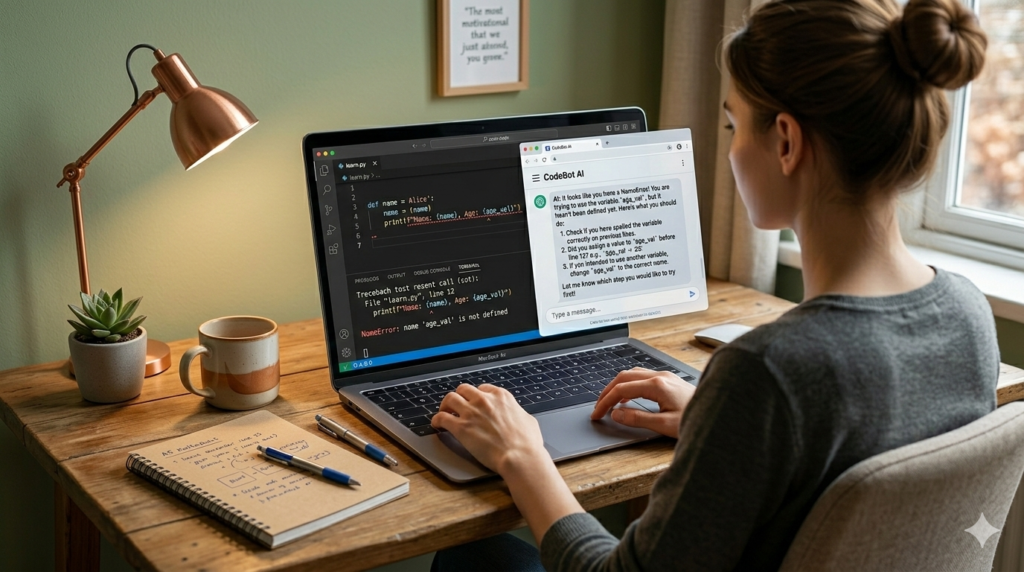
Step 2: Ask AI to Explain the Error Clearly
Instead of immediately asking for a fix, ask AI to explain the error in simple language.
Smart Prompt:
“Explain this Python error in simple terms: NameError: name ‘result’ is not defined.”
AI Explanation:
“This error occurs because the variable ‘result’ has not been created or assigned a value before being used.”
Now you understand the root cause — not just the symptom.
This step builds real debugging skills.
👉 To see which AI coding tools are best for Python developers in 2026, check out → which AI coding tools are best for Python developers
Step 3: Ask AI to Suggest a Fix
After understanding the issue, ask AI to provide a corrected version.
Prompt:
“Fix this code: print(‘The result is: ‘ + result)”
AI Corrected Version:
result = 42
print("The result is: " + str(result))
AI identifies that:
• The variable must be defined
• Numbers must be converted to strings when concatenating
This saves time while reinforcing proper Python rules.
Example 2: ZeroDivisionError (Common Beginner Mistake)
Buggy Code:
number = 10
print(number / 0)
Error:
ZeroDivisionError: division by zero
Prompt to AI:
“Explain this error like I’m a beginner.”
AI Explanation:
“You cannot divide any number by zero. In mathematics and Python, division by zero is undefined.”
Corrected Version:
number = 10
divisor = 2

if divisor != 0:
    print(number / divisor)
else:
    print("Cannot divide by zero")
👉 For a clear explanation of how AI models can assist with code reasoning and errors, see this introduction from OpenAI → how AI models assist with code reasoning and errors
Step 4: Improve the Code Using AI Best Practices
AI doesn’t just fix errors — it can improve readability and efficiency.
Prompt:
“Improve this code using Python best practices.”
AI Improved Version:
result = 42
print(f"The result is: {result}")
This version uses f-strings, which are:
✔ Cleaner
✔ More readable
✔ More modern
AI helps you level up beyond just fixing mistakes.
👉 For more real examples of how AI can help beginners accelerate Python learning, see → real examples of how AI can help beginners accelerate Python learning
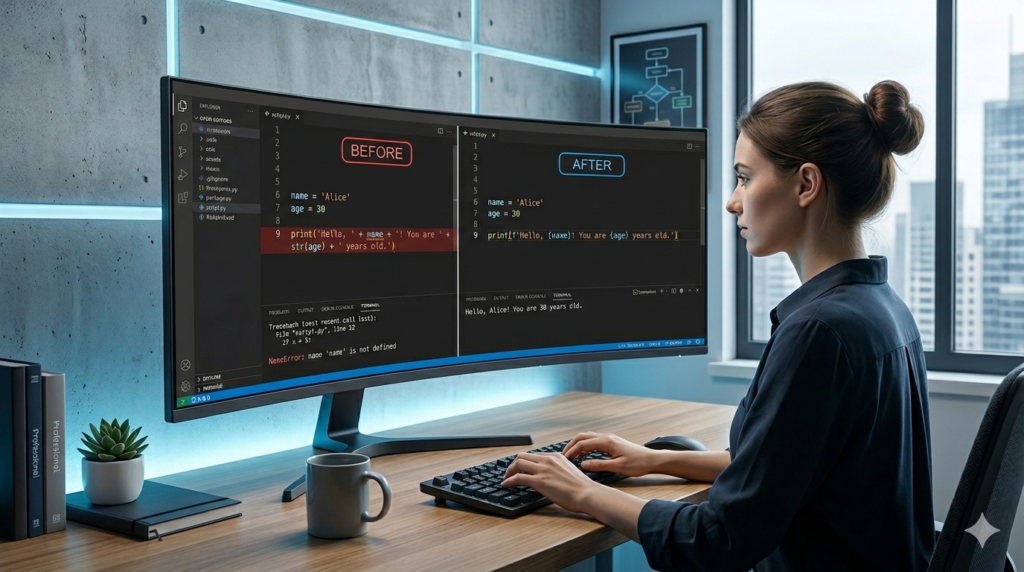
Step 5: Compare Before and After
Before:
print("The result is: " + result)
After (AI-Improved):
result = 42
print(f"The result is: {result}")
Now your code is:
✔ Error-free
✔ Cleaner
✔ More Pythonic
This is how debugging becomes a learning opportunity — not just problem-solving.
⚠ Don’t Let AI Think for You
If you copy AI-generated code without understanding it, you are slowing your own growth.
Always:
- Ask AI to explain
- Try fixing it yourself first
- Test the code manually
AI should support your thinking — not replace it.
By consistently applying this method, you will truly understand how to use AI for debugging Python code rather than relying on random fixes. Over time, your dependency decreases while your confidence increases.
Advanced AI Debugging Workflow (Smart Method)
To become stronger at debugging, follow this structure:
- Run your code manually
- Read the error carefully
- Ask AI to explain the issue
- Try fixing it yourself
- Ask AI to review your fix
- Test again
This ensures you stay in control — AI assists, but you learn.
Common Mistakes When Using AI for Debugging
❌ Copying AI code without understanding
❌ Ignoring the original error message
❌ Not testing after applying fixes
❌ Letting AI rewrite entire projects
AI should strengthen your skills — not replace your thinking.
Best AI Tools for Debugging Python
Popular AI debugging tools include:
• GitHub Copilot – Real-time suggestions inside IDE
• OpenAI ChatGPT – Step-by-step explanations
• Replit AI – Browser-based debugging
Each tool helps in different ways — but your learning method matters more than the tool.
| Tool | Best For | Beginner Friendly | IDE Integration |
|---|---|---|---|
| GitHub Copilot | Real-time suggestions | Medium | Yes |
| ChatGPT | Step-by-step explanations | High | No (browser-based) |
| Replit AI | Online coding & debugging | High | Browser IDE |
Why AI Debugging Is a Game-Changer for Beginners
Traditionally, debugging meant:
• Searching forums
• Reading long documentation
• Guessing fixes
Now, AI provides:
✔ Instant clarification
✔ Clear explanations
✔ Cleaner code suggestions
✔ Faster learning cycles
This shortens frustration and accelerates growth.
👉 After mastering debugging with AI, take your skills further with practical projects → practical projects to strengthen your skills
📌 Frequently Asked Questions:
Q1: Can AI fully debug Python code automatically?
When learning how to use AI for debugging Python code, it’s important to understand that AI cannot fully replace human reasoning. AI can analyze syntax errors, suggest improvements, and identify logical mistakes, but you must always verify and test the solution yourself.
AI can analyze error messages, suggest fixes, and improve your code structure. However, it does not truly “understand” your full project context unless you provide it.
When learning how to use AI for debugging Python code, remember:
AI suggestions can sometimes be incorrect.
You must always test the solution.
You should understand the explanation before applying the fix.
AI is a powerful assistant — not a replacement for logical thinking.
Q2: Is using AI for debugging cheating?
No.
Using AI for debugging is similar to:
Reading documentation
Searching Stack Overflow
Asking a mentor for help
The difference is speed.
It becomes harmful only if you copy code without understanding it. If you ask AI to explain errors and teach you concepts, you are accelerating your learning — not cheating.
Q3: What is the safest way for beginners to use AI for debugging Python code?
Follow this structured method:
Run your code manually.
Read and copy the full error message.
Ask AI to explain the error in simple terms.
Attempt to fix it yourself.
Ask AI to review your fix.
Test the updated code.
This workflow ensures that you stay in control while AI supports your learning process.
Q4: Which AI tool is best for beginners learning Python debugging?
For beginners:
OpenAI ChatGPT is best for step-by-step explanations.
GitHub Copilot is better for real-time coding suggestions inside an IDE.
Replit AI is useful for browser-based learning and quick experimentation.
If you’re just starting out, begin with ChatGPT for explanations before moving to advanced IDE integrations.
Q5: Can AI help with logical errors in Python (not just syntax errors)?
Yes — but you must provide context.
Syntax errors are easy for AI to detect because Python already reports them clearly.
Logical errors are different. The code runs, but the output is wrong.
To debug logical issues using AI:
Explain what your program is supposed to do.
Share the expected output.
Share the actual output.
AI can then analyze the logic and suggest improvements.
Q6: What are the most common Python errors beginners face?
The most common beginner errors include:
NameError (undefined variable)
SyntaxError (missing colon, bracket, or parenthesis)
IndentationError (incorrect spacing)
TypeError (mixing data types)
ZeroDivisionError (division by zero)
Learning how to use AI for debugging Python code makes handling these errors significantly easier because AI explains them in plain English.
Q7: How do I avoid becoming dependent on AI while debugging?
This is critical.
To avoid dependency:
Never apply AI fixes blindly.
Rewrite the corrected code yourself.
Ask AI to explain concepts, not just provide solutions.
Occasionally debug small issues without AI to test your understanding.
Think of AI as training wheels. Helpful — but temporary.
Q8: Can AI improve my Python code even if there is no error?
Absolutely.
AI can:
Suggest cleaner syntax
Replace outdated formatting
Improve readability
Optimize performance
Recommend best practices
For example, converting string concatenation into f-strings is a common improvement AI suggests.
This is where AI shifts from debugging assistant to coding mentor.
Q9: Is AI debugging reliable for large Python projects?
For small beginner scripts, AI works extremely well.
For larger projects:
Provide smaller sections of code.
Give clear context.
Mention libraries being used.
Share error messages exactly.
AI performance improves with clarity. Vague prompts lead to vague answers.
Q10: What is the biggest mistake beginners make when using AI for debugging?
The biggest mistake is skipping the explanation.
Beginners often:
Copy the fixed code.
Run it.
Move on.
That prevents real growth.
The real benefit of learning how to use AI for debugging Python code comes from understanding the root cause of errors — not just removing them.
🧠 Expert Insight: The Smart Way to Combine AI and Real Debugging Skills
After working with AI-assisted Python workflows, one thing becomes clear:
AI is most powerful when you use it as a thinking partner — not a problem replacer.
Beginners often assume that learning how to use AI for debugging Python code means asking for instant fixes. But real growth happens when you:
- Ask AI to explain the error first
- Break down the logic step-by-step
- Attempt your own correction
- Use AI to review and refine your solution
This turns debugging into a learning loop instead of a shortcut.
In practical AI workflows, the goal is not to eliminate struggle completely — it’s to reduce wasted time while keeping deep understanding intact.
The developers who grow fastest in 2026 are not the ones who avoid errors.
They are the ones who use AI strategically to understand errors faster.
That mindset shift changes everything.
🎯 Final Takeaway: Learn the Skill, Not Just the Fix
Debugging is not a problem to eliminate.
It is a skill to master.
When you truly understand how to use AI for debugging Python code, you stop fearing error messages. Instead, you treat them as feedback.
AI helps you:
- Understand problems faster
- Reduce frustration
- Write cleaner code
- Improve logical thinking
But your growth depends on how you use it.
If you use AI to replace thinking, you weaken your foundation.
If you use AI to strengthen understanding, you accelerate your progress.
That difference matters.
In 2026, the best beginner developers are not the ones who never make mistakes — they are the ones who debug smarter.
Use AI as a mentor.
Keep your thinking active.
Test everything yourself.
Do that consistently, and debugging will stop feeling like an obstacle — and start becoming your advantage.
When you fully understand how to use AI for debugging Python code, you stop fearing error messages and start using them as learning signals.
🚀 Level Up Your Python & AI Skills
🔹 Solid fundamentals → Python Basics Explained Simply
🔹 Best tools for learning → Top 5 AI Coding Assistants for 2026
🔹 Broader learning strategy → How to Build a Complete AI-Powered Python Learning System