Natural Language Processing (NLP) allows computers to understand and analyze human language. From chatbots and search engines to recommendation systems and sentiment analysis tools, NLP powers many modern AI applications.
However, before a machine learning model can process text data effectively, the raw text must go through several text preprocessing steps.
One of the most important steps in this process is stopword removal in Python.
Stopwords are extremely common words such as “the”, “is”, “and”, “in”, “to”, which appear frequently in language but usually do not carry significant meaning for machine learning models.
Removing these words helps NLP systems focus on the important words that actually carry semantic meaning.
In this beginner-friendly guide, you will learn:
- What stopwords are in NLP
- Why stopword removal is important
- When you should NOT remove stopwords
- How to implement stopword removal in Python using NLTK
- How to create custom stopword lists
- How to remove stopwords using SpaCy
- Best practices used in real-world NLP projects
By the end of this tutorial, you will clearly understand how stopword removal in Python works and when to use it in your NLP pipeline.
What Are Stopwords in NLP?
In Natural Language Processing, stopwords are common words that appear very frequently in a language but usually carry very little meaning when analyzing text for machine learning.
Examples of common English stopwords include:
the
is
am
are
was
were
in
on
at
to
of
and
for
with
These words are necessary for forming grammatically correct sentences, but they often provide little value when analyzing the meaning of text.
For example:
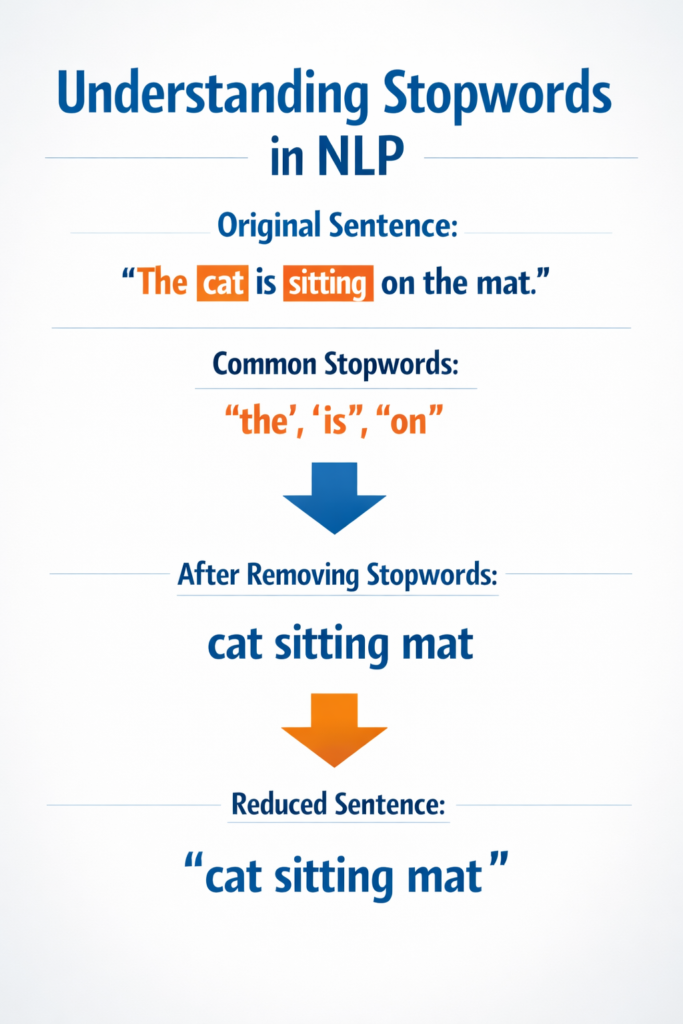
Original sentence:
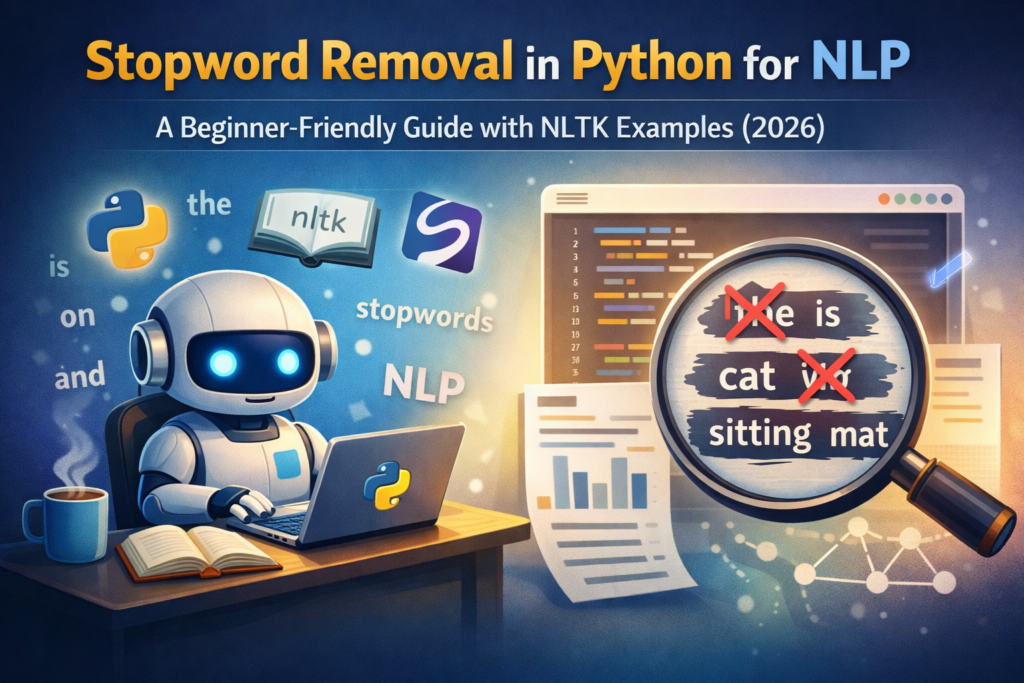
The cat is sitting on the mat
If we remove stopwords:
cat sitting mat
The important words remain, while filler words are removed.
This simplified version is easier for machine learning models to analyze.
This is why stopword removal in Python is commonly used as part of NLP preprocessing.
Why Stopword Removal Is Important in NLP
Stopword removal provides several important benefits when working with text datasets.
1. Reduces Noise in Text Data
Text datasets often contain many irrelevant words that do not contribute to the main meaning of the text.
Removing stopwords reduces noise and allows machine learning models to focus on meaningful terms.
Example:
Original text:
The movie was very good and the acting was amazing
After stopword removal:
movie good acting amazing
The sentence now highlights the important words.
2. Improves Machine Learning Performance
Machine learning models learn patterns from text data.
If the dataset contains too many irrelevant words, models may struggle to identify meaningful patterns.
Using stopword removal in Python helps models learn from important keywords instead of filler words.
3. Reduces Vocabulary Size
In NLP, vocabulary refers to the total number of unique words in a dataset.
Stopwords often make up a large portion of this vocabulary.
Removing them results in:
- Faster training time
- Reduced memory usage
- Simpler feature representations
This makes models more efficient.
4. Improves Feature Extraction
Many NLP techniques perform better when stopwords are removed.
These include:
- Bag of Words
- TF-IDF
- Text classification
- Topic modeling
- Document clustering
By removing stopwords, feature extraction focuses on words that carry meaningful information.
When You Should NOT Remove Stopwords
Although stopword removal is useful in many NLP tasks, it is not always the right choice.
In some situations, removing stopwords can change the meaning of a sentence.
Example:
Original sentence:
I do not like this movie
If we remove stopwords blindly:
like movie
The meaning has completely changed.
The word “not” is essential for understanding the sentiment.
This is why stopword removal in Python must be applied carefully depending on the NLP task.
Situations Where Stopwords Should Be Kept
Sentiment Analysis
Words like:
- not
- never
- no
are important for identifying positive or negative sentiment.
Removing them can produce incorrect predictions.
Question Answering Systems
Questions often rely on stopwords such as:
- what
- where
- when
- how
Removing them can make the question meaningless.
Machine Translation
Translation models require full sentence structure to produce accurate translations.
Removing stopwords may reduce translation accuracy.
Installing Required Python Libraries
To perform stopword removal in Python, we will use the NLTK library.
NLTK (Natural Language Toolkit) is one of the most popular Python libraries for NLP tasks.
Step 1: Install NLTK
Run the following command:
pip install nltk
Step 2: Download Required NLTK Resources
import nltknltk.download('stopwords')
nltk.download('punkt')
Some newer versions of NLTK may also require:
nltk.download('punkt_tab')These datasets allow NLTK to tokenize text and provide built-in stopword lists.
Stopword removal is one of several important steps in text preprocessing in Python, which prepares raw text data for Natural Language Processing models.
You can explore the official NLTK documentation to learn more about available NLP tools and datasets.
Stopword Removal in Python Using NLTK (Step-by-Step)
Now let’s implement stopword removal in Python using NLTK step by step.
Step 1: Import Required Libraries
from nltk.corpus import stopwords
from nltk.tokenize import word_tokenize
Step 2: Define Example Text
text = "This is a simple example showing how stopword removal works in NLP."
Step 3: Tokenize the Text
Tokenization splits text into individual words.
tokens = word_tokenize(text)print(tokens)
Output:
['This', 'is', 'a', 'simple', 'example', 'showing', 'how', 'stopword', 'removal', 'works', 'in', 'NLP', '.']
Step 4: Load Stopwords List
stop_words = set(stopwords.words('english'))This loads the built-in English stopword list provided by NLTK.
Step 5: Remove Stopwords
filtered_words = [word for word in tokens if word.lower() not in stop_words]
Step 6: View the Result
print(filtered_words)
Output:
['simple', 'example', 'showing', 'stopword', 'removal', 'works', 'NLP', '.']
Now the text contains only the most meaningful words.
This simple technique demonstrates how stopword removal in Python works using NLTK.
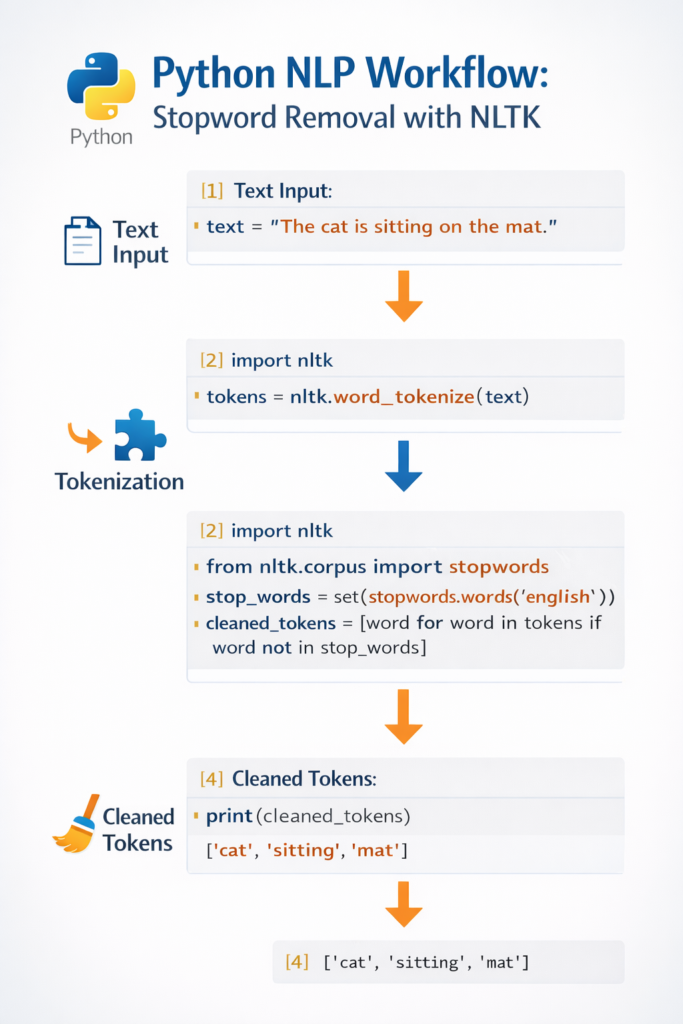
Before vs After Stopword Removal Example
Let’s analyze another example.
Original sentence:
Natural language processing is a fascinating field of artificial intelligence.
Tokenized Text
['Natural', 'language', 'processing', 'is', 'a', 'fascinating', 'field', 'of', 'artificial', 'intelligence']
After Stopword Removal
['Natural', 'language', 'processing', 'fascinating', 'field', 'artificial', 'intelligence']
Words like is, a, of are removed.
The remaining words represent the core meaning of the sentence.
Handling Punctuation During Stopword Removal
When performing stopword removal in Python, beginners often notice that punctuation marks still appear in the final output. This happens because punctuation characters are not included in most stopword lists.
For example, consider the following output after removing stopwords:
['simple', 'example', 'showing', 'stopword', 'removal', 'works', 'NLP', '.']
The period (.) remains in the list even after stopword removal. This is because punctuation marks are treated differently from stopwords. While stopwords are words that carry little semantic meaning, punctuation marks are symbols used for sentence structure.
In many Natural Language Processing tasks, punctuation does not add meaningful information and should also be removed during preprocessing.
To handle this issue while performing stopword removal in Python, we can filter punctuation using Python’s built-in string module.
Example:
import stringfiltered_words = [
    word for word in tokens
    if word.lower() not in stop_words and word not in string.punctuation
]
This code removes both stopwords and punctuation marks from the token list.
After applying this step, the output becomes cleaner:
['simple', 'example', 'showing', 'stopword', 'removal', 'works', 'NLP']
Handling punctuation properly is an important part of text preprocessing because it ensures that the dataset contains only meaningful tokens.
When building real-world NLP pipelines, developers often combine multiple preprocessing techniques such as:
- tokenization
- stopword removal
- punctuation removal
- text normalization
Together, these steps prepare the text data for machine learning models.
Handling Punctuation During Stopword Removal
When performing stopword removal in Python, punctuation marks may still appear in the output because they are not included in most stopword lists.
Example output:
['simple', 'example', 'showing', 'stopword', 'removal', 'works', 'NLP', '.']
The period (.) remains because it is punctuation rather than a stopword.
To remove punctuation along with stopwords, you can use Python’s string module.
Example:
import stringfiltered_words = [
    word for word in tokens
    if word.lower() not in stop_words and word not in string.punctuation
]
This ensures that both stopwords and punctuation are removed from the text.
Creating Custom Stopword Lists in Python
In real NLP projects, the default stopword list is often not enough.
Developers frequently create custom stopword lists based on the dataset.
Example Without Using NLTK
text = "This is a simple example for custom stopword removal"stop_words = ['this', 'is', 'a', 'for']tokens = text.split()filtered_words = [word for word in tokens if word.lower() not in stop_words]print(filtered_words)
Output:
['simple', 'example', 'custom', 'stopword', 'removal']
Extending NLTK Stopwords
You can also add domain-specific stopwords.
from nltk.corpus import stopwordsstop_words = set(stopwords.words('english'))custom_words = ['product','item','buy','price']stop_words.update(custom_words)This is useful in many real datasets.
Examples:
E-commerce datasets:
product
item
buy
price
Social media datasets:
lol
omg
haha
Custom stopwords make stopword removal in Python more flexible and accurate.
Popular Stopword Lists Used in NLP
In Natural Language Processing, several libraries provide predefined stopword lists that developers commonly use in text preprocessing pipelines.
The most popular stopword lists include:
NLTK Stopword List
NLTK provides one of the most widely used stopword collections. It supports multiple languages and is commonly used for learning NLP concepts.
Example:
from nltk.corpus import stopwords
stop_words = stopwords.words("english")
SpaCy Stopword List
SpaCy includes a built-in stopword list based on linguistic rules.
Example:
import spacy
nlp = spacy.load("en_core_web_sm")print(nlp.Defaults.stop_words)
Scikit-learn Stopword List
Scikit-learn also provides a built-in English stopword list often used in machine learning pipelines.
Example:
from sklearn.feature_extraction.text import ENGLISH_STOP_WORDS
print(ENGLISH_STOP_WORDS)
Understanding these different stopword lists helps developers choose the most suitable approach for their NLP project.
Stopword Removal Using SpaCy
Another popular NLP library is SpaCy.
SpaCy provides faster processing and advanced linguistic features.
Install SpaCy
pip install spacy
Download language model:
python -m spacy download en_core_web_sm
Example Code
import spacynlp = spacy.load("en_core_web_sm")doc = nlp("This is an example sentence for stopword removal")filtered_words = [token.text for token in doc if not token.is_stop]print(filtered_words)Output:
['example', 'sentence', 'stopword', 'removal']
SpaCy automatically identifies stopwords using built-in linguistic rules.
The SpaCy NLP library provides fast and production-ready tools for building modern Natural Language Processing applications.
Popular Stopword Lists Used in NLP
When performing stopword removal in Python, developers typically rely on predefined stopword lists provided by NLP libraries. These lists contain common words that frequently appear in language but usually carry limited meaning for text analysis.
Different libraries provide their own stopword lists, and each list may contain slightly different words depending on how it was designed.
Below are some of the most commonly used stopword lists in Natural Language Processing.
NLTK Stopword List
NLTK provides one of the most widely used stopword collections for NLP projects. It supports multiple languages and is commonly used in educational tutorials and research projects.
Example:
from nltk.corpus import stopwordsstop_words = stopwords.words("english")
print(stop_words[:20])
The NLTK stopword list contains many common English words such as:
the, is, in, at, of, on, and, to
Because NLTK is beginner-friendly, many developers start learning stopword removal in Python using this library.
SpaCy Stopword List
SpaCy also provides a built-in stopword list that is integrated into its language models. Unlike simple lists, SpaCy combines linguistic rules with its vocabulary system.
Example:
import spacynlp = spacy.load("en_core_web_sm")
print(nlp.Defaults.stop_words)
SpaCy is widely used in production NLP systems because it is faster and designed for large-scale text processing.
Scikit-learn Stopword List
Scikit-learn also includes a predefined English stopword list that is often used in machine learning pipelines.
Example:
from sklearn.feature_extraction.text import ENGLISH_STOP_WORDSprint(ENGLISH_STOP_WORDS)
This list is frequently used in algorithms such as:
- TF-IDF vectorization
- document classification
- clustering models
Understanding these different stopword lists helps developers choose the best approach when implementing stopword removal in Python for NLP tasks.
NLTK vs SpaCy for Stopword Removal
Both libraries support stopword removal in Python, but they have different strengths.
NLTK
Best for:
- learning NLP concepts
- research projects
- educational tutorials
SpaCy
Best for:
- production applications
- faster NLP pipelines
- advanced linguistic processing
Both libraries are widely used in the NLP community.
Best Practices for Stopword Removal
When implementing stopword removal in Python, follow these best practices.
Always Tokenize Text First
Stopwords should be removed after tokenization.
Convert Words to Lowercase
Use .lower() to ensure consistent comparison.
Example:
The
the
Both should be treated as the same word.
Preserve Important Context Words
Be careful when removing words such as:
not
never
no
These words may change sentence meaning.
Customize Stopword Lists
Generic stopword lists may not work for all datasets.
Customize them based on your project.
Test Model Performance
Always test your NLP model:
- with stopwords removed
- without stopwords removed
Sometimes keeping stopwords improves results.
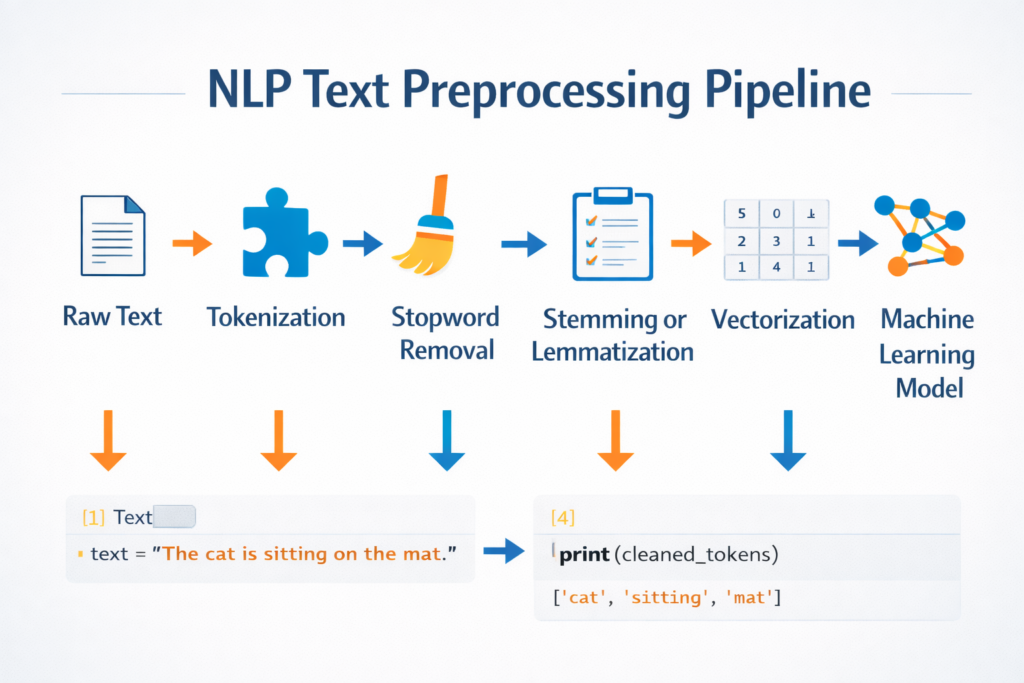
Stopword Removal in the NLP Pipeline
Stopword removal is one step in the larger NLP preprocessing pipeline.
Typical workflow:
Raw Text
↓
Tokenization
↓
Stopword Removal
↓
Stemming / Lemmatization
↓
Vectorization
↓
Machine Learning Model
Each step prepares text data for machine learning algorithms.
Stopword removal in Python simplifies the vocabulary before advanced processing begins.
If you want to see how text preprocessing techniques work in a real project, you can explore this AI text analyzer project in Python.
Real-World Applications of Stopword Removal
Stopword removal is widely used in real NLP applications.
Search Engines
Search engines remove stopwords to focus on important keywords.
Example:
User query:
the best restaurants in New York
Processed query:
best restaurants New York
Spam Detection
Email classification systems remove stopwords to focus on meaningful words.
Chatbots
Chatbots analyze user messages and identify intent by focusing on key terms.
Topic Modeling
Algorithms such as Latent Dirichlet Allocation (LDA) identify topics more effectively when stopwords are removed.
Document Clustering
Grouping similar documents becomes more accurate when irrelevant words are removed.
Common NLP Tasks That Use Stopword Removal
Stopword removal in Python is commonly used in several Natural Language Processing tasks.
Text Classification
Text classification systems categorize documents into predefined labels such as spam detection, sentiment analysis, or topic classification.
Removing stopwords helps models focus on important keywords.
Information Retrieval
Search engines use stopword removal to improve query matching and document ranking.
Topic Modeling
Topic modeling algorithms such as Latent Dirichlet Allocation (LDA) identify hidden themes within large text collections.
Removing stopwords helps reveal meaningful topics.
Document Clustering
Document clustering groups similar documents together based on content similarity.
Removing stopwords improves clustering accuracy by emphasizing meaningful words.
Common NLP Tasks That Use Stopword Removal
Stopword removal is one of the most commonly used preprocessing techniques in Natural Language Processing. By removing extremely common words, NLP systems can focus on meaningful keywords that carry important information.
Below are several NLP tasks where stopword removal in Python is frequently used.
Text Classification
Text classification is the process of assigning categories or labels to text documents.
Examples include:
- spam detection
- news article classification
- sentiment classification
In these tasks, removing stopwords helps models focus on important keywords instead of common filler words.
For example:
"The movie was extremely exciting and visually stunning"
After stopword removal:
movie extremely exciting visually stunning
This simplified representation helps machine learning models learn more useful patterns.
Search Engines and Information Retrieval
Search engines often remove stopwords when processing search queries. This helps match queries with relevant documents more effectively.
Example query:
the best restaurants in New York
After removing stopwords:
best restaurants New York
By focusing on the important keywords, search engines can deliver more accurate results.
Topic Modeling
Topic modeling algorithms such as Latent Dirichlet Allocation (LDA) analyze large collections of documents to identify hidden topics.
If stopwords are not removed, these algorithms may incorrectly identify topics based on extremely common words like “the” or “and”.
Using stopword removal in Python helps topic modeling algorithms discover meaningful themes within the text.
Document Clustering
Document clustering groups similar documents based on their content.
Removing stopwords improves clustering accuracy because the algorithm focuses on meaningful terms rather than extremely common words.
For example, clustering news articles about technology, politics, or sports becomes easier when stopwords are removed.
Chatbots and Conversational AI
Chatbots analyze user messages to understand intent and generate responses.
Stopword removal helps chatbot systems identify important keywords in user queries.
Example:
User message:
Can you tell me the best laptop for programming?
After preprocessing:
tell best laptop programming
This simplified text makes it easier for the chatbot to determine the user’s intent.
Conclusion
Stopword removal is a fundamental step in Natural Language Processing preprocessing pipelines.
By removing extremely common words that carry little meaning, NLP systems can focus on the words that truly matter.
In this guide, you learned:
- What stopwords are in NLP
- Why stopword removal is useful
- When stopwords should not be removed
- How to implement stopword removal in Python using NLTK
- How to create custom stopword lists
- How to remove stopwords using SpaCy
- Best practices for real-world NLP projects
While stopword removal is powerful, it should always be applied carefully depending on the NLP task.
Understanding when and how to apply stopword removal in Python will help you build more accurate and efficient NLP systems.
FAQ
What is stopword removal in Python?
Stopword removal in Python is a text preprocessing technique used in Natural Language Processing to remove very common words like the, is, and, in that usually do not carry important meaning for machine learning models.
Should I always remove stopwords in NLP?
No. In tasks like sentiment analysis or question answering, removing stopwords may change the meaning of a sentence.
Which Python library is best for stopword removal?
Two popular libraries are:
- NLTK
- SpaCy
Both provide built-in stopword lists and tools for NLP preprocessing.
Why do I get a LookupError when using word_tokenize?
You may need to download additional NLTK resources:
nltk.download('punkt')
nltk.download('punkt_tab')
This fixes tokenization errors in newer NLTK versions.
Further Learning
If you’re learning NLP step-by-step, you may also want to explore other important preprocessing techniques such as:
- Tokenization
- Text normalization
- Stemming
- Lemmatization
- Vectorization
These techniques together form the foundation of modern Natural Language Processing systems.