Introduction
Natural Language Processing (NLP) systems cannot understand text the same way humans do. Humans easily understand sentences, context, and meaning, but computers require numerical representations of data to process and analyze information.
This is where TF-IDF in Python becomes extremely useful.
TF-IDF is one of the most important techniques used in NLP to convert text into numbers. It helps machine learning models understand which words are important in a document and which words are less meaningful.
For example, if you analyze a group of documents about programming, words like “Python,” “data,” “model,” or “learning” may appear often and carry meaningful information. However, words like “the,” “is,” and “and” appear frequently but usually provide little value for understanding the main topic.
The TF-IDF algorithm helps solve this problem by assigning importance scores to words based on how frequently they appear in a document and how rare they are across other documents.
In this beginner-friendly guide, you will learn:
- What TF-IDF in Python means
- How TF-IDF works in NLP
- The mathematical concept behind TF-IDF
- How to implement TF-IDF in Python step by step
- Practical examples using real text data
- How TF-IDF fits into a complete NLP pipeline
By the end of this tutorial, you will understand how to use TF-IDF in Python to transform raw text into meaningful numerical features for machine learning models.
What is TF-IDF in NLP?
TF-IDF stands for:
Term Frequency – Inverse Document Frequency
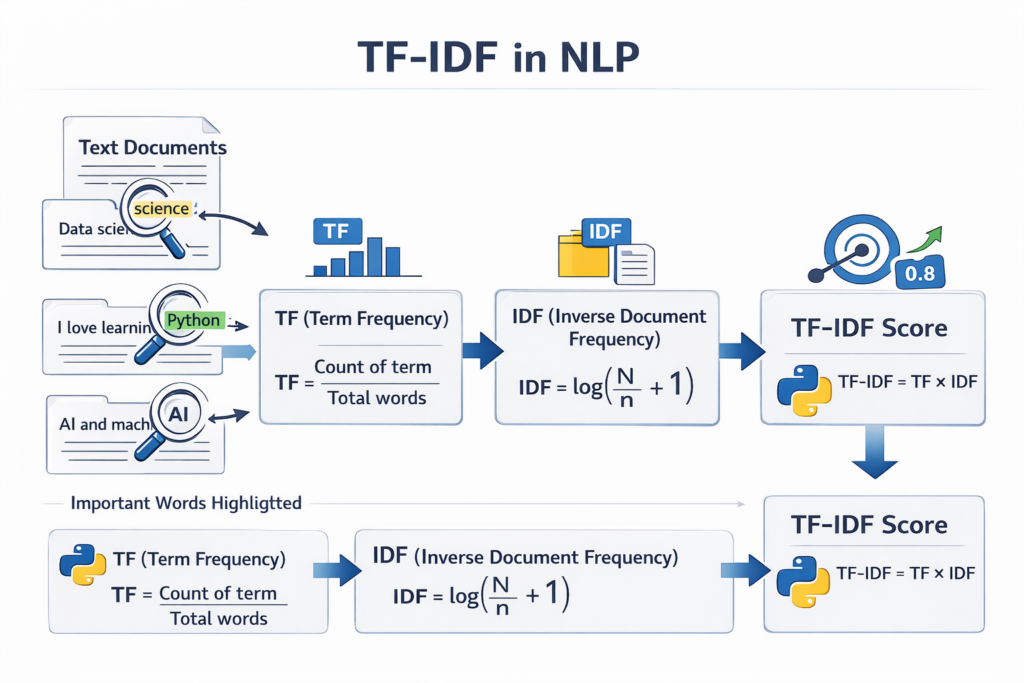
It is a statistical method used in Natural Language Processing to measure how important a word is within a document compared to a collection of documents.
In simple terms, TF-IDF in Python helps identify the most meaningful words in a document by analyzing two factors:
- How frequently a word appears in a specific document
- How rare that word is across all documents
Words that appear frequently in one document but rarely in others receive a higher TF-IDF score, meaning they are more important for understanding that document.
Simple Example
Imagine you have three short documents:
Document 1
Python is great for data science
Document 2
Python is widely used in machine learning
Document 3
Data science and machine learning use Python
In these documents, the word “Python” appears in every sentence. Because it appears everywhere, it does not help distinguish one document from another.
However, words like “science” or “machine” may appear less frequently across all documents, making them more useful for identifying the topic of a specific document.
TF-IDF assigns lower scores to common words and higher scores to rare but meaningful words.
This is why TF-IDF in Python is widely used in NLP applications such as:
- search engines
- document classification
- spam detection
- recommendation systems
- text similarity detection
Why TF-IDF is Important in NLP
Understanding the importance of words is critical for many NLP tasks. Without a proper method to measure word importance, machine learning models would treat all words equally.
This would create inaccurate models because common words like “the” or “is” would receive the same weight as important topic words like “Python” or “algorithm.”
The TF-IDF technique solves this problem by giving each word a numerical weight based on its significance.
The mathematical concept behind TF-IDF can be explored further in this detailed TF-IDF explanation.
1. Improves Text Understanding
When using TF-IDF in Python, words that represent the main idea of a document receive higher scores.
For example:
Document about programming → words like Python, coding, algorithm
Document about sports → words like football, team, match
TF-IDF helps distinguish these topics clearly.
2. Helps Machine Learning Models
Most machine learning algorithms cannot process text directly. They require numerical input.
TF-IDF converts text into a vector representation, which machine learning models can analyze.
This allows developers to build systems for:
- sentiment analysis
- spam detection
- document classification
- recommendation engines
3. Reduces the Impact of Common Words
Many words appear frequently in text but add little meaning.
Examples include:
- the
- is
- a
- and
- of
These are called stopwords.
TF-IDF automatically reduces the importance of such words, helping the model focus on more meaningful content.
4. Improves Search and Information Retrieval
Search engines rely heavily on methods similar to TF-IDF.
When you search for a phrase, the system identifies documents containing the most relevant keywords.
TF-IDF helps rank those documents based on how important the search words are within each document.
Understanding the TF-IDF Formula
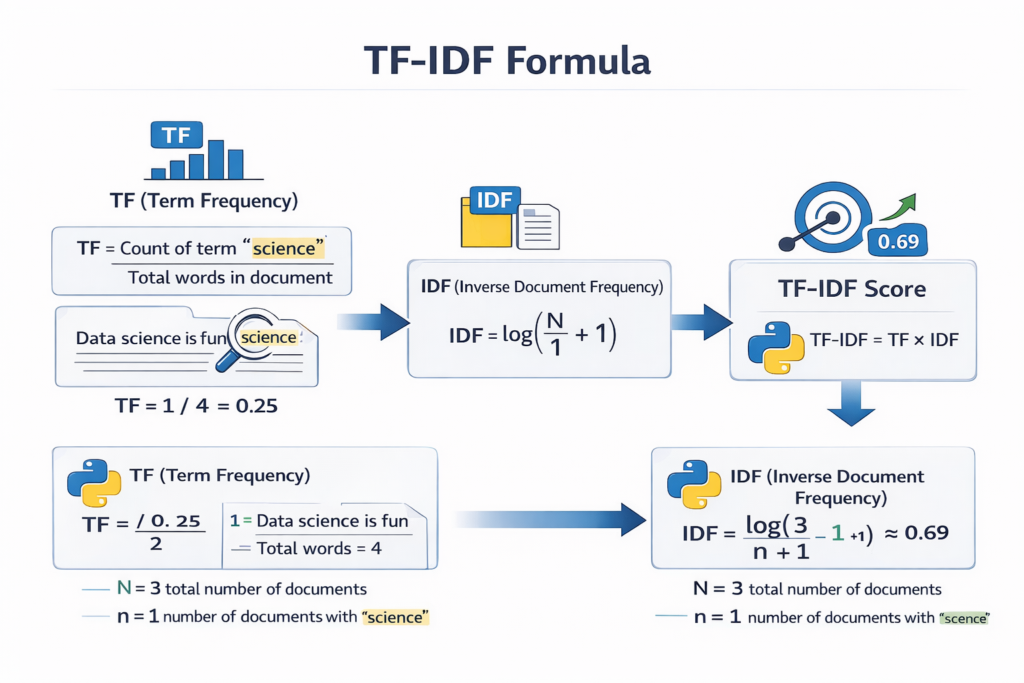
To fully understand TF-IDF in Python, it is important to understand the two main components behind the algorithm.
TF-IDF combines two mathematical concepts:
- Term Frequency (TF)
- Inverse Document Frequency (IDF)
Together, these two values determine the final TF-IDF score.
Term Frequency (TF)
Term Frequency measures how often a word appears in a document.
The basic formula for TF is:
TF = (Number of times the word appears in the document) / (Total number of words in the document)
Example
Consider the following sentence:
Python is easy and Python is powerful
Word counts:
Python → 2
is → 2
easy → 1
and → 1
powerful → 1
Total words = 7
So the Term Frequency for Python would be:
TF(Python) = 2 / 7
This value represents how common the word is within the document.
However, TF alone is not enough. Some words may appear frequently across many documents.
That is why we need the second component.
Inverse Document Frequency (IDF)
Inverse Document Frequency measures how rare a word is across all documents.
Words that appear in many documents are less useful for distinguishing between topics.
The IDF formula is:
IDF = log(Total number of documents / Number of documents containing the word)
Example
Suppose we have 3 documents.
If the word Python appears in all 3 documents:
IDF = log(3 / 3)
This gives a low score.
But if the word algorithm appears in only 1 document:
IDF = log(3 / 1)
This gives a higher score.
This means rare words receive higher importance.
Final TF-IDF Formula
The final TF-IDF score combines both components:
TF-IDF = TF × IDF
This means:
- Words frequent in one document receive higher scores
- Words common across many documents receive lower scores
As a result, TF-IDF highlights the most informative words in each document.
How TF-IDF Fits into an NLP Pipeline
Before applying TF-IDF in Python, text usually goes through several preprocessing steps.
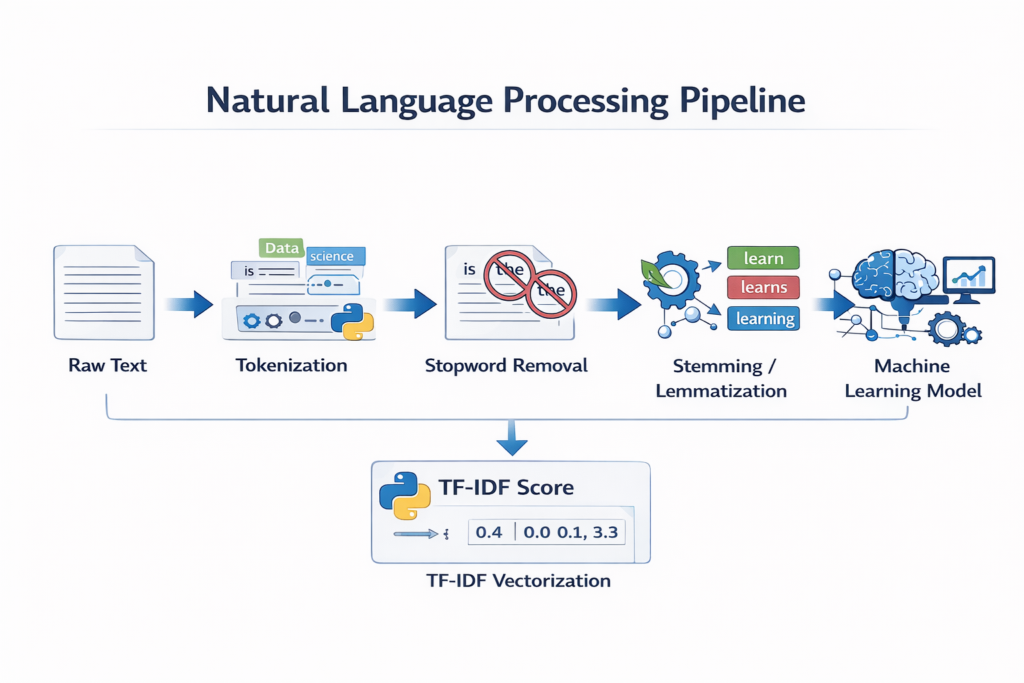
A typical NLP pipeline looks like this:
Raw Text
↓
Tokenization
↓
Stopword Removal
↓
Stemming or Lemmatization
↓
TF-IDF Vectorization
↓
Machine Learning Model
You have already covered some of these steps in previous tutorials:
- Tokenization
- Stemming vs Lemmatization
- Stopword Removal
- Named Entity Recognition
After these preprocessing steps, TF-IDF in Python converts cleaned text into numerical vectors that machine learning models can understand.
The first step in most NLP pipelines is tokenization in Python, where raw text is split into words or sentences.
Example Workflow
Consider the sentence:
Python is widely used in data science and machine learning
After preprocessing:
Tokens:
Python
widely
used
data
science
machine
learning
Then TF-IDF assigns a score to each word based on importance.
The final output becomes a vector of numerical values, which machine learning algorithms can use for training models.
After tokenization, developers often apply stemming vs lemmatization in Python to normalize words before calculating TF-IDF scores.
Implementing TF-IDF in Python Using Scikit-Learn
Now that we understand the concept behind TF-IDF, the next step is learning how to actually implement TF-IDF in Python.
In Python, one of the most commonly used libraries for Natural Language Processing and machine learning is Scikit-Learn. This library provides a built-in tool called TfidfVectorizer, which automatically calculates TF-IDF scores for text data.
Using this tool, developers can easily convert raw text into numerical vectors that machine learning models can understand.
The TfidfVectorizer class performs several operations automatically:
- Tokenizes the text
- Builds a vocabulary
- Calculates Term Frequency (TF)
- Calculates Inverse Document Frequency (IDF)
- Generates the final TF-IDF matrix
Because of this automation, implementing TF-IDF in Python becomes simple and efficient.
The Scikit-Learn library provides a built-in tool called TfidfVectorizer, which is widely used for implementing TF-IDF in Python.
Installing the Required Library
Before using TF-IDF in Python, you need to install the Scikit-Learn library if it is not already available on your system.
You can install it using the following command:
pip install scikit-learn
Once the installation is complete, you can start using TF-IDF in Python for text vectorization and machine learning workflows.
A Simple Example of TF-IDF in Python
Let’s start with a simple example where we convert a few documents into TF-IDF vectors.
from sklearn.feature_extraction.text import TfidfVectorizerdocuments = [
    "Python is great for data science",
    "Python is widely used in machine learning",
    "Data science and machine learning use Python"
]vectorizer = TfidfVectorizer()tfidf_matrix = vectorizer.fit_transform(documents)print(vectorizer.get_feature_names_out())
print(tfidf_matrix.toarray())
This code demonstrates a basic implementation of TF-IDF in Python.
It takes multiple text documents and converts them into a numerical matrix representing TF-IDF scores.
Understanding the Code Step by Step
Let’s break down the code to understand how TF-IDF in Python works internally.
Importing the Library
First, we import the TF-IDF vectorizer from Scikit-Learn.
from sklearn.feature_extraction.text import TfidfVectorizer
This module contains tools for converting text data into numerical feature vectors.
Creating a Dataset
Next, we create a small dataset containing three text documents.
documents = [
    "Python is great for data science",
    "Python is widely used in machine learning",
    "Data science and machine learning use Python"
]
Each sentence represents a document. In real NLP projects, datasets may contain thousands or millions of documents.
Creating the TF-IDF Vectorizer
Now we create a vectorizer object.
vectorizer = TfidfVectorizer()
This object will handle all TF-IDF calculations automatically.
When we use TF-IDF in Python, the vectorizer processes the text by:
- Tokenizing the words
- Building a vocabulary
- Calculating TF and IDF values
- Generating the TF-IDF feature matrix
Converting Text into TF-IDF Vectors
Next, we transform the documents into TF-IDF vectors.
tfidf_matrix = vectorizer.fit_transform(documents)
This function performs two operations:
fit()
Learns the vocabulary and IDF values from the dataset.
transform()
Converts each document into a TF-IDF vector.
The result is a TF-IDF matrix representing all documents.
Viewing the Vocabulary
To see the vocabulary extracted from the documents, we can run:
print(vectorizer.get_feature_names_out())
Example output may look like this:
['data', 'great', 'learning', 'machine', 'python', 'science', 'used', 'widely']
Each word represents a feature used in the TF-IDF vector space.
This vocabulary forms the columns of the TF-IDF matrix.
Understanding the TF-IDF Matrix
To see the actual TF-IDF values, we can print the matrix as an array.
print(tfidf_matrix.toarray())
Example output:
[[0.42 0.53 0.00 0.00 0.31 0.64 0.00 0.00]
 [0.00 0.00 0.46 0.46 0.27 0.00 0.53 0.53]
 [0.50 0.00 0.40 0.40 0.29 0.50 0.00 0.00]]
Each row represents a document, and each column represents a word from the vocabulary.
The numbers represent the TF-IDF score of that word in that document.
For example:
- Higher values mean the word is more important in that document.
- Lower values mean the word is less significant.
This matrix is the final output of TF-IDF in Python, and it can be used as input for machine learning models.
Visualizing TF-IDF as Vectors
In machine learning, each document is represented as a vector in a high-dimensional space.
For example:
Document:
“Python is great for data science”
May be represented as a vector like:
[0.42, 0.53, 0.00, 0.00, 0.31, 0.64, 0.00, 0.00]
Each number corresponds to the TF-IDF score of a specific word.
This numerical representation allows machine learning algorithms to analyze text data mathematically.
Important Parameters in TfidfVectorizer
When using TF-IDF in Python, the TfidfVectorizer class provides several useful parameters that allow you to customize the text processing.
Removing Stopwords
Many NLP tasks remove common words like “the”, “is”, and “and”.
You can do this automatically using:
TfidfVectorizer(stop_words='english')
This removes common English stopwords before calculating TF-IDF.
Removing common words using stopword removal in Python helps improve TF-IDF accuracy.
Limiting Vocabulary Size
Sometimes datasets contain thousands of words. To control the feature size, we can limit the number of words.
TfidfVectorizer(max_features=1000)
This keeps only the top 1000 most important words.
This technique helps reduce computational complexity.
Using N-grams
TF-IDF can also analyze phrases instead of single words.
For example:
“machine learning”
This is done using the ngram_range parameter.
TfidfVectorizer(ngram_range=(1,2))
This includes:
- single words (unigrams)
- two-word phrases (bigrams)
This improves context understanding in many NLP tasks.
Example with Stopwords Removed
Here is an improved example of TF-IDF in Python with stopwords removed.
from sklearn.feature_extraction.text import TfidfVectorizerdocuments = [
    "Python is great for data science",
    "Python is widely used in machine learning",
    "Data science and machine learning use Python"
]vectorizer = TfidfVectorizer(stop_words='english')tfidf_matrix = vectorizer.fit_transform(documents)print(vectorizer.get_feature_names_out())
print(tfidf_matrix.toarray())
In this example, common words such as “is”, “for”, and “and” will be removed automatically.
This allows the model to focus on meaningful keywords like:
- python
- data
- science
- machine
- learning
This is a common practice when applying TF-IDF in Python to real-world datasets.
Why TF-IDF is Useful for Machine Learning
After converting text into TF-IDF vectors, the data can be used for many machine learning tasks.
Some common applications include:
Text Classification
TF-IDF vectors are often used for training classifiers such as:
- Logistic Regression
- Naive Bayes
- Support Vector Machines
These models can classify documents into categories like:
- spam vs non-spam emails
- positive vs negative sentiment
- news topic classification
Document Similarity
TF-IDF vectors can be used to measure similarity between documents.
For example:
- detecting duplicate articles
- recommending related content
- clustering documents by topic
Search Engines
Many search systems use TF-IDF-based techniques to rank documents based on keyword relevance.
When a user enters a query, the system compares TF-IDF vectors to find the most relevant documents.
TF-IDF vs Bag of Words
Before TF-IDF became widely used, one of the most common techniques for converting text into numbers was the Bag of Words (BoW) model.
Both methods transform text into numerical vectors, but they handle word importance differently.
Understanding the difference between these two techniques helps clarify why TF-IDF in Python is often preferred in many NLP applications.
What is Bag of Words?
The Bag of Words model simply counts how many times each word appears in a document.
For example, consider this sentence:
Python is great for data science
A Bag of Words representation might look like this:
| Word | Count |
|---|---|
| python | 1 |
| great | 1 |
| data | 1 |
| science | 1 |
In this model, every word is treated equally. The algorithm only counts occurrences and does not consider whether a word is common across many documents.
This is the main limitation of Bag of Words.
Limitations of Bag of Words
The Bag of Words model has several drawbacks.
First, it gives the same importance to every word, even if the word appears in nearly every document.
For example, words like:
- the
- is
- and
may appear frequently, but they do not help distinguish one document from another.
Second, Bag of Words can produce very large feature spaces, especially when working with large datasets.
Finally, it does not capture the importance of rare words, which are often crucial for identifying topics.
Why TF-IDF is Better
This is where TF-IDF in Python provides a better solution.
Instead of just counting words, TF-IDF assigns a weight to each word based on two factors:
- How often the word appears in the document
- How rare the word is across all documents
Words that appear in many documents receive lower scores, while words that are unique to a document receive higher scores.
This makes TF-IDF more effective for many NLP tasks.
TF-IDF vs Bag of Words Comparison
| Feature | Bag of Words | TF-IDF |
|---|---|---|
| Word importance | Not considered | Considered |
| Common words | High weight | Lower weight |
| Rare words | Same weight | Higher importance |
| Accuracy for NLP tasks | Moderate | Higher |
| Use in search engines | Limited | Common |
Because of these advantages, TF-IDF in Python is widely used in text mining and machine learning applications.
Real-World Applications of TF-IDF
TF-IDF is one of the most practical techniques used in real-world Natural Language Processing systems.
Even though modern deep learning methods exist, TF-IDF remains extremely useful because it is simple, fast, and effective.
Let’s explore some common applications.
Search Engines
Search engines use TF-IDF-like techniques to rank web pages.
When a user enters a search query, the system analyzes which documents contain the most relevant keywords.
If a keyword appears frequently in one document but rarely in others, that document may be considered more relevant.
This principle is similar to how TF-IDF in Python calculates word importance.
Email Spam Detection
Spam detection systems often rely on TF-IDF features.
For example, spam emails may frequently contain words like:
- free
- offer
- winner
- money
By converting emails into TF-IDF vectors, machine learning models can detect patterns associated with spam messages.
Document Classification
Another common application of TF-IDF in Python is document classification.
Organizations often need to categorize large numbers of documents automatically.
Examples include:
- news categorization
- customer support ticket classification
- legal document organization
Using TF-IDF vectors, machine learning models can analyze the text and assign documents to the correct category.
Content Recommendation
Content recommendation systems also use TF-IDF.
For example, if two articles share many important keywords, they may be considered similar.
This allows platforms to recommend related content to users.
For instance:
If someone reads an article about Python machine learning, the system may recommend other articles about data science or AI programming.
Document Similarity Detection
TF-IDF vectors can also measure similarity between documents.
By comparing vector representations, we can determine how similar two pieces of text are.
This technique is useful for:
- plagiarism detection
- duplicate document detection
- clustering documents by topic
Common Mistakes When Using TF-IDF in Python
Although TF-IDF in Python is easy to implement, beginners often make several mistakes when applying it to NLP projects.
Avoiding these mistakes can significantly improve model performance.
Skipping Text Preprocessing
One of the most common mistakes is applying TF-IDF directly to raw text without preprocessing.
Before calculating TF-IDF, it is important to perform steps such as:
- tokenization
- converting text to lowercase
- removing stopwords
- stemming or lemmatization
These steps clean the text and improve feature quality.
Before applying TF-IDF, text usually goes through several preprocessing steps such as tokenization and cleaning. You can learn more in our guide on text preprocessing in Python.
Not Removing Stopwords
Stopwords are extremely common words that usually do not carry meaningful information.
Examples include:
- the
- is
- and
- of
If these words are not removed, they may still appear in the TF-IDF matrix and reduce model accuracy.
Fortunately, when using TF-IDF in Python, the stop_words parameter can remove them automatically.
Using Very Small Datasets
TF-IDF relies on analyzing patterns across multiple documents.
If the dataset contains only a few documents, the IDF calculation may not provide meaningful results.
For best performance, TF-IDF should be applied to datasets containing many documents.
Ignoring Feature Limits
Large datasets may produce thousands of features.
This can increase memory usage and slow down machine learning models.
Using parameters like max_features in TF-IDF vectorization can help control the number of features.
TF-IDF in a Complete NLP Pipeline
To better understand the role of TF-IDF, it helps to see how it fits within a typical Natural Language Processing pipeline.
A simplified NLP workflow might look like this:
Raw Text
↓
Tokenization
↓
Stopword Removal
↓
Stemming or Lemmatization
↓
TF-IDF Vectorization
↓
Machine Learning Model
In this pipeline, TF-IDF in Python plays the role of feature extraction.
It converts cleaned text into numerical vectors that machine learning algorithms can analyze.
Without this step, most machine learning models would not be able to process text data.
When to Use TF-IDF
TF-IDF works best for many traditional NLP tasks.
It is particularly useful when:
- building document classification models
- analyzing search queries
- identifying important keywords in text
- measuring document similarity
However, for advanced deep learning systems, methods like word embeddings or transformer models may provide better performance.
Still, TF-IDF remains one of the most important foundational techniques in NLP.
Frequently Asked Questions (FAQ)
What is TF-IDF in Python?
TF-IDF in Python is a method used to convert text data into numerical vectors based on word importance. It combines Term Frequency and Inverse Document Frequency to assign weights to words in a document.
Which Python library is used for TF-IDF?
The most commonly used library for implementing TF-IDF in Python is Scikit-Learn, which provides the TfidfVectorizer class for generating TF-IDF features.
Is TF-IDF better than Bag of Words?
Yes, TF-IDF is generally more effective than Bag of Words because it reduces the importance of very common words and highlights meaningful words that help identify document topics.
Can TF-IDF be used for machine learning?
Yes. TF-IDF vectors are commonly used as input features for machine learning models such as logistic regression, Naive Bayes, and support vector machines.
Is TF-IDF still used today?
Yes. Even though deep learning models are widely used today, TF-IDF is still very popular because it is simple, fast, and effective for many NLP tasks.
Conclusion
In this tutorial, we explored how TF-IDF in Python works and why it is an essential technique in Natural Language Processing.
We learned that TF-IDF combines Term Frequency and Inverse Document Frequency to determine the importance of words within a document.
Unlike simple word-count methods such as Bag of Words, TF-IDF assigns higher importance to meaningful words while reducing the influence of very common words.
Using Python libraries like Scikit-Learn, implementing TF-IDF becomes straightforward. With just a few lines of code, developers can convert large collections of text documents into numerical feature vectors suitable for machine learning models.
TF-IDF remains widely used in applications such as:
- search engines
- spam detection
- document classification
- recommendation systems
- text similarity analysis
If you are learning Natural Language Processing, mastering TF-IDF in Python is an important step toward building real-world AI and machine learning applications.
Understanding this technique will also help you build a strong foundation before moving on to more advanced NLP methods such as word embeddings and transformer models.