

Introduction
Machine learning has become one of the most important technologies in modern software development. From spam email filtering to recommendation systems used by companies like Netflix and Amazon, machine learning is now everywhere.
However, many beginners struggle when they first start learning machine learning with Python. Most tutorials focus on algorithms, but they rarely explain the complete process used to build machine learning systems.
This is where understanding the Machine Learning Workflow in Python becomes extremely important.
Instead of jumping directly into algorithms like linear regression or decision trees, professional data scientists follow a structured workflow. This workflow ensures that data is properly prepared, models are trained correctly, and results are evaluated accurately.
In this beginner-friendly guide, you will learn the complete Machine Learning Workflow in Python step by step. By the end of this tutorial, you will understand how machine learning projects actually work in real-world scenarios.
In this guide you will learn:
- What a machine learning workflow is
- The step-by-step process used in machine learning projects
- How Python is used in each stage
- The most common beginner mistakes
- The best libraries used in machine learning pipelines
If you are new to machine learning, this guide will give you a clear roadmap for building your first ML projects using Python.
What is a Machine Learning Workflow?
A machine learning workflow is the step-by-step process used to build, train, evaluate, and deploy machine learning models.
Instead of randomly applying algorithms, data scientists follow a structured pipeline that ensures reliable results.
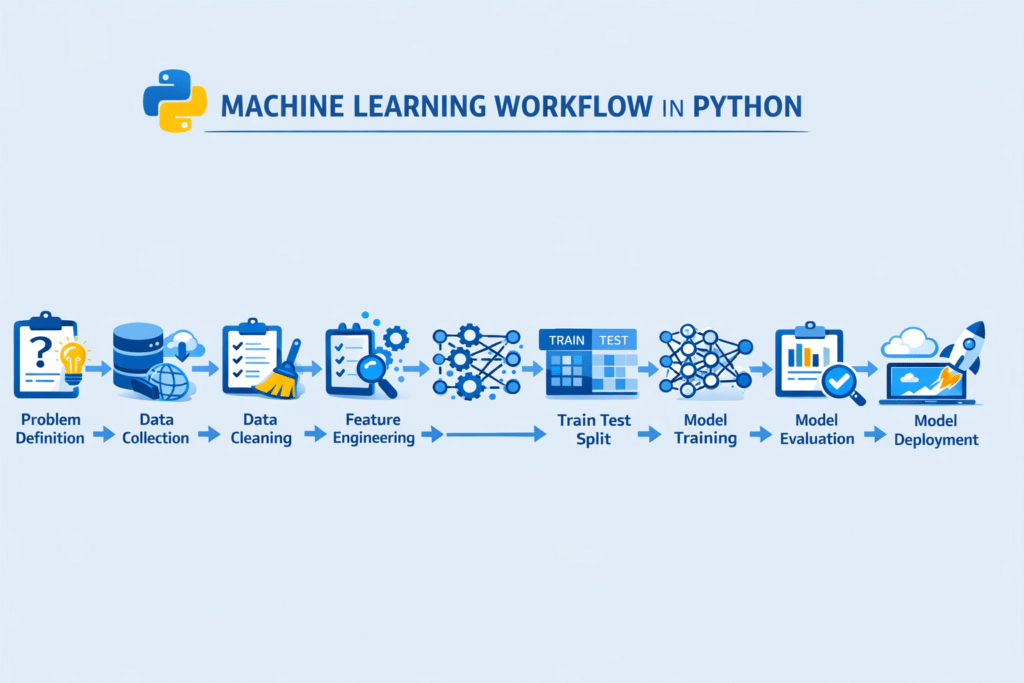
The Machine Learning Workflow in Python typically includes several stages, starting from problem definition and ending with model deployment.
Why Workflow Matters
Without a proper workflow:
- Models may produce incorrect predictions
- Data may contain errors
- Evaluation results may be misleading
- The model may fail in real-world applications
A structured workflow helps solve these problems.
Typical Machine Learning Workflow Steps
Most machine learning projects follow these steps:
- Define the problem
- Collect data
- Clean and preprocess data
- Perform feature engineering
- Split the dataset
- Choose a machine learning model
- Train the model
- Evaluate the model
- Improve the model
- Deploy the model
Understanding this Machine Learning Workflow in Python helps beginners build projects correctly instead of guessing what to do next.
Step 1 – Define the Machine Learning Problem
The first step in any Machine Learning Workflow in Python is clearly defining the problem.
Before writing code or training models, you must understand what you are trying to predict.
Example Machine Learning Problems
Some common machine learning tasks include:
- Email spam detection
- House price prediction
- Customer churn prediction
- Sentiment analysis
- Fraud detection
Each problem belongs to a specific category.
Types of Machine Learning Problems
Most machine learning problems fall into two main types.
1. Classification
Classification predicts categories.
Examples:
- Spam or not spam
- Positive or negative sentiment
- Fraud or legitimate transaction
2. Regression
Regression predicts numerical values.
Examples:
- House price prediction
- Stock price prediction
- Sales forecasting
Understanding the problem type helps you choose the correct algorithm later in the Machine Learning Workflow in Python.
Example Problem Definition
Imagine you want to predict house prices based on features like:
- number of bedrooms
- house size
- location
In this case:
Target variable → price
Features → bedrooms, size, location
Step 2 – Collect Data for Machine Learning
The second step in the Machine Learning Workflow in Python is collecting data.
Machine learning models learn patterns from data. Without high-quality data, even the best algorithms will fail.
Common Data Sources
Machine learning data can come from many sources:
- CSV files
- Databases
- APIs
- Web scraping
- Public datasets
- Sensors and IoT devices
Example: Loading Data in Python
Python makes it easy to load datasets using the Pandas library.
import pandas as pddata = pd.read_csv("housing_data.csv")
print(data.head())
This code loads a dataset and displays the first few rows.
Understanding the Dataset
After loading the data, you should always explore it.
Important questions include:
- How many rows and columns exist?
- Are there missing values?
- What are the data types?
- What is the target variable?
Exploring the dataset is a crucial part of the Machine Learning Workflow in Python because it helps identify potential issues early.
Step 3 – Data Cleaning and Preprocessing
Raw data is rarely perfect. In fact, most real-world datasets contain errors, missing values, and inconsistent formats.
That is why data cleaning is one of the most important steps in the Machine Learning Workflow in Python.
Data cleaning is a critical part of any machine learning project. Tools like Pandas make it easy to prepare datasets, as explained in our guide on data cleaning using Pandas in Python.
Tools like Pandas are widely used for cleaning and analyzing datasets. The Pandas official documentation provides detailed explanations of its powerful data manipulation features.
Poor data quality leads to poor model performance.
Common Data Cleaning Tasks
Data preprocessing usually includes:
- Handling missing values
- Removing duplicate records
- Fixing incorrect data formats
- Converting categorical variables
- Scaling numerical features
Example: Removing Missing Values
data = data.dropna()
This removes rows with missing values.
Removing Duplicate Data
data = data.drop_duplicates()
Duplicate records can bias the model, so removing them is important.
Data Normalization
Some machine learning algorithms perform better when numerical features are scaled.
Python libraries such as Scikit-learn provide tools for normalization and standardization.
Cleaning and preparing the dataset ensures that the next stages of the Machine Learning Workflow in Python run smoothly.
Step 4 – Feature Engineering
Feature engineering is the process of creating better input variables for machine learning models.
It is often the step that makes the biggest difference in model performance.
In many real-world projects, data scientists spend more time on feature engineering than model training.
Examples of Feature Engineering
Common feature engineering techniques include:
- Creating new columns
- Encoding categorical variables
- Feature scaling
- Combining multiple features
Example in Python
data["price_per_room"] = data["price"] / data["bedrooms"]
This creates a new feature called price_per_room.
Better features help machine learning models detect patterns more easily.
Feature engineering is a powerful part of the Machine Learning Workflow in Python because it directly impacts prediction accuracy.
Step 5 – Train-Test Split
Before training a model, the dataset must be divided into two parts:
- Training data
- Testing data
This step is critical in the Machine Learning Workflow in Python.
Why Train-Test Split is Important
If you train and test a model on the same data, the model may simply memorize the dataset instead of learning real patterns.
This leads to overfitting.
Splitting the dataset helps measure how well the model performs on unseen data.
Example in Python
from sklearn.model_selection import train_test_splitX = data.drop("price", axis=1)
y = data["price"]X_train, X_test, y_train, y_test = train_test_split(
    X, y, test_size=0.2, random_state=42
)
Here:
- 80% of the data is used for training
- 20% is used for testing
This prepares the dataset for the next stage of the Machine Learning Workflow in Python.
Step 6 – Choosing a Machine Learning Model
Once the data has been cleaned, prepared, and split into training and testing sets, the next step in the Machine Learning Workflow in Python is choosing the right machine learning model.
A machine learning model is the algorithm that learns patterns from data and makes predictions.
Python developers commonly use the Scikit-learn library for implementing algorithms, as explained in this Scikit-learn machine learning tutorial.
Different problems require different models.
Common Machine Learning Models in Python
Some of the most popular models used by beginners include:
Linear Regression
Used for predicting numerical values.
Examples:
- house prices
- sales forecasting
- temperature prediction
Logistic Regression
Used for classification problems.
Examples:
- spam email detection
- fraud detection
- customer churn prediction
Decision Trees
Decision trees split data into branches based on conditions.
They are easy to understand and commonly used in beginner projects.
Random Forest
Random Forest is an ensemble model that combines multiple decision trees to improve accuracy.
It is one of the most widely used machine learning models.
Support Vector Machines (SVM)
SVM models are often used for classification problems with complex boundaries.
Choosing the correct algorithm is an important stage in the Machine Learning Workflow in Python because it determines how the model learns from the data.
Beginners often start with simple models such as:
- Linear Regression
- Logistic Regression
- Decision Trees
These models are easy to understand and implement in Python.
Step 7 – Train the Machine Learning Model
After selecting the algorithm, the next step in the Machine Learning Workflow in Python is training the model.
Training means allowing the algorithm to learn patterns from the training dataset.
The model analyzes relationships between features and the target variable.
Example: Training a Linear Regression Model
Python’s Scikit-learn library provides simple tools for training machine learning models.
from sklearn.linear_model import LinearRegressionmodel = LinearRegression()model.fit(X_train, y_train)
In this example:
LinearRegression()creates the modelfit()trains the model using training data
The algorithm studies the relationship between input features and the target variable.
Once the model is trained, it can begin making predictions.
Training is a central part of the Machine Learning Workflow in Python, because this is where the model actually learns from data.
Python developers commonly use libraries such as Scikit-learn for building machine learning models. You can explore the official Scikit-learn documentation to learn more about available algorithms.
Step 8 – Making Predictions with the Model
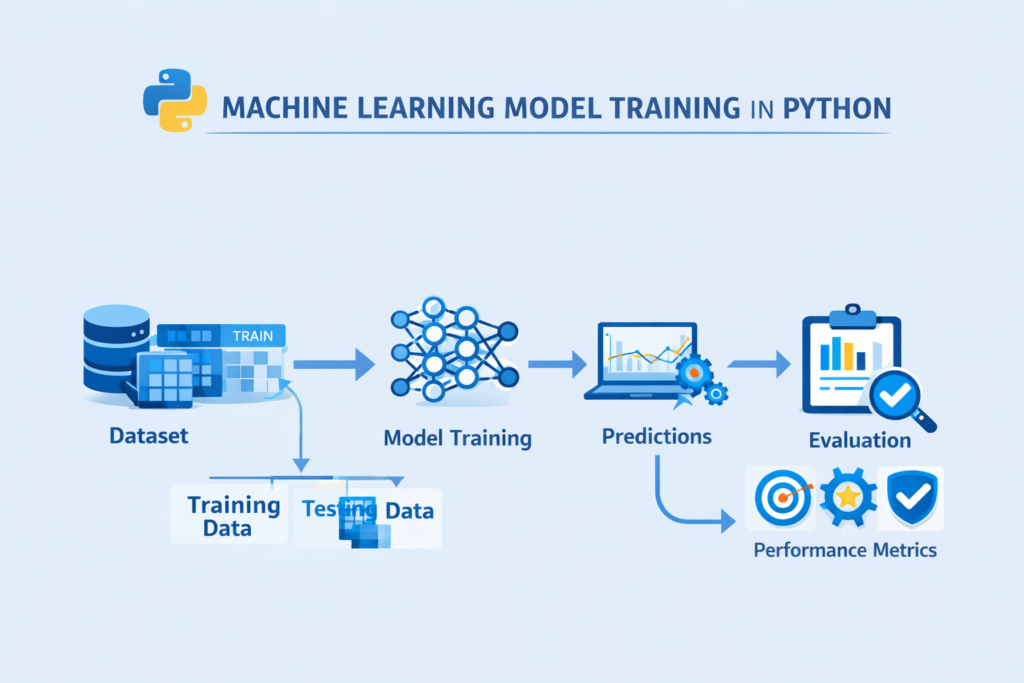
After training, the model can be used to make predictions on new data.
Predictions are generated using the testing dataset.
Example Prediction in Python
predictions = model.predict(X_test)print(predictions)
This code generates predicted values for the test dataset.
For example, if the model was trained to predict house prices, it will output predicted price values.
Comparing predictions with actual values helps evaluate how well the model performs.
This step connects training and evaluation in the Machine Learning Workflow in Python.
Step 9 – Model Evaluation
Model evaluation is one of the most critical stages in the Machine Learning Workflow in Python.
Even if a model is trained successfully, it must still be evaluated to determine how accurate it is.
Different metrics are used depending on the type of problem.
Evaluation Metrics for Regression
Regression models predict numerical values.
Common evaluation metrics include:
Mean Squared Error (MSE)
Measures the average squared difference between predicted and actual values.
Lower values indicate better performance.
Root Mean Squared Error (RMSE)
Represents the square root of MSE.
It is easier to interpret because it uses the same units as the target variable.
R² Score
R² measures how well the model explains variance in the dataset.
Values range from 0 to 1.
Higher values indicate better model performance.
Example: Regression Evaluation in Python
from sklearn.metrics import mean_squared_error, r2_scorepredictions = model.predict(X_test)mse = mean_squared_error(y_test, predictions)
r2 = r2_score(y_test, predictions)print("MSE:", mse)
print("R2 Score:", r2)
These metrics help measure the effectiveness of the model.
Evaluation ensures that the Machine Learning Workflow in Python produces reliable and meaningful results.
Evaluation Metrics for Classification
If the machine learning task is classification, different metrics are used.
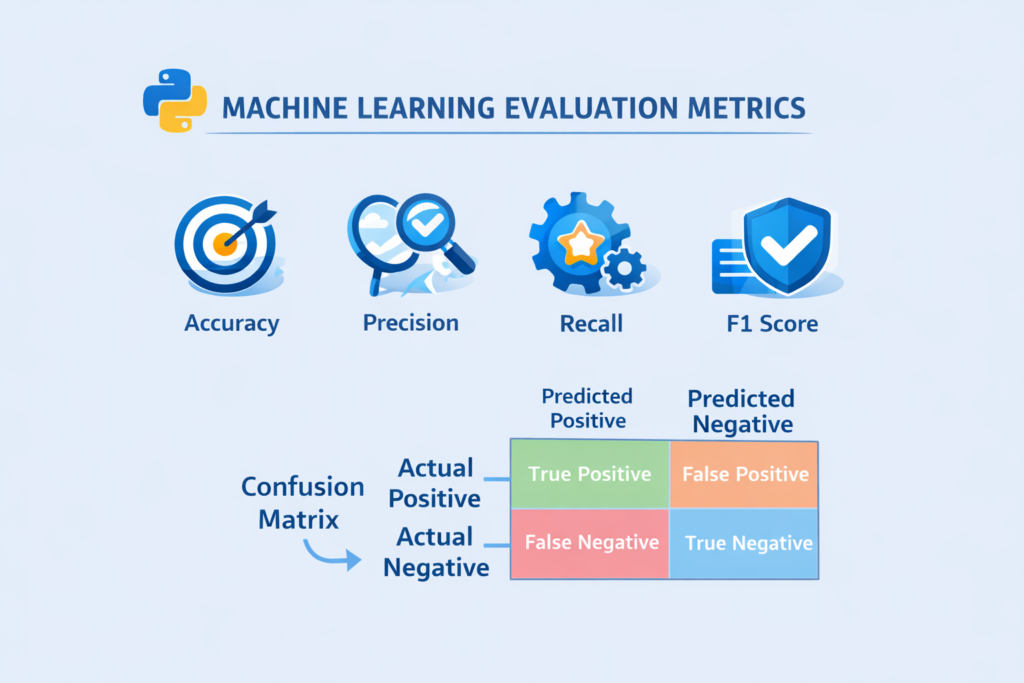
Common classification metrics include:
Accuracy
Accuracy measures how many predictions are correct.
Example:
If a model predicts 90 out of 100 emails correctly, accuracy is 90%.
Precision
Precision measures how many predicted positives are actually correct.
Recall
Recall measures how many actual positives were correctly identified.
F1 Score
The F1 score combines precision and recall into a single metric.
Confusion Matrix
A confusion matrix provides a detailed breakdown of predictions.
It includes:
- True Positive
- False Positive
- True Negative
- False Negative
Understanding these metrics is essential for evaluating models in the Machine Learning Workflow in Python.
Step 10 – Detecting Overfitting and Underfitting
Two major problems often appear during machine learning training.
These are overfitting and underfitting.
Overfitting
Overfitting occurs when the model learns the training data too well.
Instead of learning general patterns, it memorizes the dataset.
As a result:
- training accuracy becomes very high
- testing accuracy becomes low
Overfitting is a common challenge in the Machine Learning Workflow in Python.
Underfitting
Underfitting happens when the model is too simple to capture patterns in the data.
In this case:
- training accuracy is low
- testing accuracy is also low
Underfitting means the model has not learned enough from the data.
How to Reduce Overfitting
Several techniques help prevent overfitting:
- collecting more data
- feature selection
- cross validation
- regularization
- simplifying the model
Managing overfitting and underfitting is an important step in building reliable models within the Machine Learning Workflow in Python.
Step 11 – Improving the Machine Learning Model
After evaluating the model, the next step in the Machine Learning Workflow in Python is improving model performance.
Very rarely does a model perform perfectly on the first attempt.
Data scientists usually improve models through experimentation.
Common Model Improvement Techniques
Some of the most common strategies include:
Feature Engineering
Creating better features can significantly improve accuracy.
Hyperparameter Tuning
Hyperparameters control how the model learns.
Tuning these parameters can improve performance.
Cross Validation
Cross validation evaluates the model using multiple data splits.
This produces more reliable evaluation results.
Example: Hyperparameter Tuning in Python
from sklearn.model_selection import GridSearchCVparameters = {"fit_intercept": [True, False]}grid = GridSearchCV(LinearRegression(), parameters)grid.fit(X_train, y_train)This code tests different parameter combinations to find the best model.
Improving models through experimentation is a normal part of the Machine Learning Workflow in Python.
Step 12 – Understanding the Machine Learning Pipeline
In real-world projects, machine learning systems often combine multiple steps into a single pipeline.
A machine learning pipeline automates stages such as:
- preprocessing
- feature engineering
- model training
- prediction
Pipelines make the Machine Learning Workflow in Python more organized and reproducible.
Python libraries such as Scikit-learn allow developers to build pipelines easily.
Using pipelines ensures that every step of the workflow runs consistently.
Step 13 – Deploying the Machine Learning Model
After a model has been trained and evaluated successfully, the next stage in the Machine Learning Workflow in Python is deployment.
Model deployment means making the machine learning model available for real-world use.
Instead of running predictions only in a notebook, the model becomes part of an application or system.
For example:
- A website that predicts house prices
- An email service that detects spam messages
- A mobile app that recommends products
- A fraud detection system in banking
Deployment transforms a machine learning experiment into a practical solution.
Common Deployment Methods
There are several ways to deploy machine learning models built with Python.
1. Web APIs
One of the most common approaches is creating an API that receives input data and returns predictions.
Popular Python frameworks include:
- Flask
- FastAPI
These frameworks allow developers to connect machine learning models with web applications.
2. Web Applications
Machine learning models can also be integrated into web applications.
For example:
- a prediction dashboard
- a recommendation system
- a data analysis tool
Frameworks like Streamlit allow developers to create interactive machine learning apps quickly.
3. Cloud Deployment
Many companies deploy machine learning models on cloud platforms.
Examples include:
- AWS
- Google Cloud
- Microsoft Azure
Cloud deployment makes machine learning systems scalable and accessible to large numbers of users.
Deployment is the final stage of the Machine Learning Workflow in Python, where the model begins solving real-world problems.
Complete Machine Learning Workflow Example in Python
To better understand the Machine Learning Workflow in Python, let’s review a simplified example of the full process.
This example demonstrates the main stages used in a typical machine learning project.
# Import libraries
import pandas as pd
from sklearn.model_selection import train_test_split
from sklearn.linear_model import LinearRegression
from sklearn.metrics import mean_squared_error# Load dataset
data = pd.read_csv("housing_data.csv")# Define features and target
X = data.drop("price", axis=1)
y = data["price"]# Split dataset
X_train, X_test, y_train, y_test = train_test_split(
    X, y, test_size=0.2, random_state=42
)# Train model
model = LinearRegression()
model.fit(X_train, y_train)# Make predictions
predictions = model.predict(X_test)# Evaluate model
mse = mean_squared_error(y_test, predictions)print("Model Error:", mse)
This simple example demonstrates the essential stages of the Machine Learning Workflow in Python:
- Import libraries
- Load data
- Prepare features
- Split dataset
- Train model
- Make predictions
- Evaluate results
In real-world projects, this workflow may include additional steps such as feature engineering, hyperparameter tuning, and deployment.
Best Python Libraries for Machine Learning Workflow
Python is the most popular programming language for machine learning because it provides powerful libraries for every stage of the workflow.
Here are some of the most important tools used in the Machine Learning Workflow in Python.
NumPy
NumPy provides support for numerical computing and arrays.
Machine learning algorithms rely heavily on mathematical operations, and NumPy makes these computations efficient.
Many machine learning algorithms rely on numerical operations performed using NumPy arrays for machine learning.
Machine learning algorithms rely heavily on numerical computation, which is why libraries such as NumPy are essential. The NumPy documentation explains how arrays and mathematical operations work in Python.
Pandas
Pandas is used for data manipulation and analysis.
It allows developers to:
- load datasets
- clean data
- transform data
- explore data
Most machine learning projects begin with data analysis using Pandas.
Scikit-learn
Scikit-learn is one of the most important machine learning libraries in Python.
It provides tools for:
- machine learning algorithms
- model evaluation
- data preprocessing
- feature scaling
- model selection
Many beginners first experience the Machine Learning Workflow in Python through Scikit-learn.
Matplotlib
Matplotlib is used for data visualization.
It helps visualize patterns in datasets through charts such as:
- line charts
- scatter plots
- histograms
Visualization helps understand the dataset before building models.
Data visualization is important for understanding datasets before training models. Tools like data visualization with Matplotlib in Python help reveal patterns in data.
Seaborn
Seaborn builds on top of Matplotlib and provides more advanced statistical visualizations.
It is commonly used for:
- correlation heatmaps
- distribution plots
- regression plots
These libraries form the foundation of the Machine Learning Workflow in Python.
Real-World Machine Learning Workflow Example
To better understand how this process works, consider a real-world example.
Spam Email Detection System
Suppose you want to build a system that detects spam emails.
The Machine Learning Workflow in Python for this project might look like this:
Step 1 – Define the problem
Predict whether an email is spam or not.
Step 2 – Collect data
Gather email datasets containing spam and non-spam messages.
Step 3 – Data preprocessing
Clean the text data by:
- removing punctuation
- converting text to lowercase
- removing stopwords
Step 4 – Feature engineering
Convert text into numerical features using techniques such as:
- Bag of Words
- TF-IDF
Step 5 – Train-test split
Divide the dataset into training and testing sets.
Step 6 – Train the model
Train a classification model such as:
- Naive Bayes
- Logistic Regression
Step 7 – Evaluate the model
Measure accuracy and precision to evaluate performance.
Step 8 – Deploy the system
Deploy the spam detection model into an email filtering system.
This real-world example shows how the Machine Learning Workflow in Python connects multiple stages to build intelligent applications.
Common Beginner Mistakes in Machine Learning
Many beginners make mistakes when they first start learning machine learning.
Understanding these mistakes can help you improve faster.
Ignoring Data Quality
Machine learning models depend heavily on the quality of the data.
Poor data leads to poor predictions.
Skipping Data Exploration
Beginners sometimes jump directly to model training without understanding the dataset.
Exploratory data analysis is a crucial step.
Overfitting the Model
Overfitting happens when the model memorizes the training data instead of learning general patterns.
Proper evaluation techniques help prevent this problem.
Choosing Complex Models Too Early
Many beginners immediately try advanced algorithms.
However, simple models often perform surprisingly well.
Ignoring Feature Engineering
Feature engineering can dramatically improve model performance.
Even powerful algorithms cannot compensate for poor features.
Avoiding these mistakes helps build a stronger understanding of the Machine Learning Workflow in Python.
Why Learning the Machine Learning Workflow Matters
Understanding the Machine Learning Workflow in Python is more important than memorizing algorithms.
Machine learning success depends on the entire process, not just the model itself.
Professionals focus on:
- understanding data
- building proper pipelines
- evaluating models carefully
- improving models through experimentation
When beginners understand the workflow, they can build real machine learning projects more confidently.
Conclusion
Machine learning projects follow a structured process that ensures reliable results.
In this guide, we explored the complete Machine Learning Workflow in Python, including the essential steps used by data scientists.
The typical machine learning workflow includes:
- Defining the problem
- Collecting data
- Cleaning and preprocessing data
- Feature engineering
- Splitting the dataset
- Choosing a machine learning model
- Training the model
- Evaluating the model
- Improving the model
- Deploying the model
Understanding this process helps beginners move beyond theory and start building real machine learning applications.
Python makes this workflow easier by providing powerful libraries such as Pandas, NumPy, and Scikit-learn.
If you want to become skilled in machine learning, the best way to learn is by practicing small projects and gradually improving your models.
Once you understand the Machine Learning Workflow in Python, building machine learning systems becomes much more manageable.
FAQ
What is a machine learning workflow?
A machine learning workflow is the step-by-step process used to build, train, evaluate, and deploy machine learning models.
Why is the machine learning workflow important?
The workflow ensures that models are built systematically, data is properly prepared, and evaluation results are reliable.
Which Python library is best for machine learning?
Scikit-learn is one of the most popular libraries for building machine learning models in Python.
What is the difference between training data and testing data?
Training data is used to train the model, while testing data is used to evaluate how well the model performs on unseen data.
Can beginners learn machine learning with Python?
Yes. Python is widely considered the best programming language for beginners learning machine learning because of its simple syntax and powerful libraries.

