

Introduction
Artificial Intelligence and Machine Learning rely heavily on numerical computation. Behind almost every AI system are large datasets, matrix calculations, and mathematical operations that power predictions and decision-making. This is where NumPy in Python for AI becomes extremely important.
NumPy, short for Numerical Python, is one of the most widely used libraries in the Python ecosystem. It provides powerful tools for working with arrays, performing mathematical operations, and handling numerical data efficiently. Because AI and machine learning systems process large amounts of data, using standard Python lists is often too slow and inefficient. NumPy solves this problem by offering optimized array operations that run much faster.
Many popular AI and machine learning libraries rely heavily on NumPy. Frameworks such as TensorFlow, PyTorch, Scikit-learn, and Pandas all use NumPy arrays internally for numerical computations. This means that learning NumPy in Python for AI projects is often the first step toward building real machine learning applications.
In this beginner-friendly guide, you will learn:
- What NumPy is and why it is important for AI
- How NumPy arrays work
- How to create and manipulate arrays
- How NumPy performs fast mathematical operations
- How NumPy is used to prepare machine learning datasets
By the end of this tutorial, you will understand why NumPy is considered the foundation of AI development in Python.
For beginners entering the world of artificial intelligence, learning NumPy in Python for AI is one of the most important foundational skills.
If you are completely new to programming, it is helpful to first learn Python in 2026 before diving deeper into machine learning libraries.
What is NumPy in Python and Why is it Used in AI?
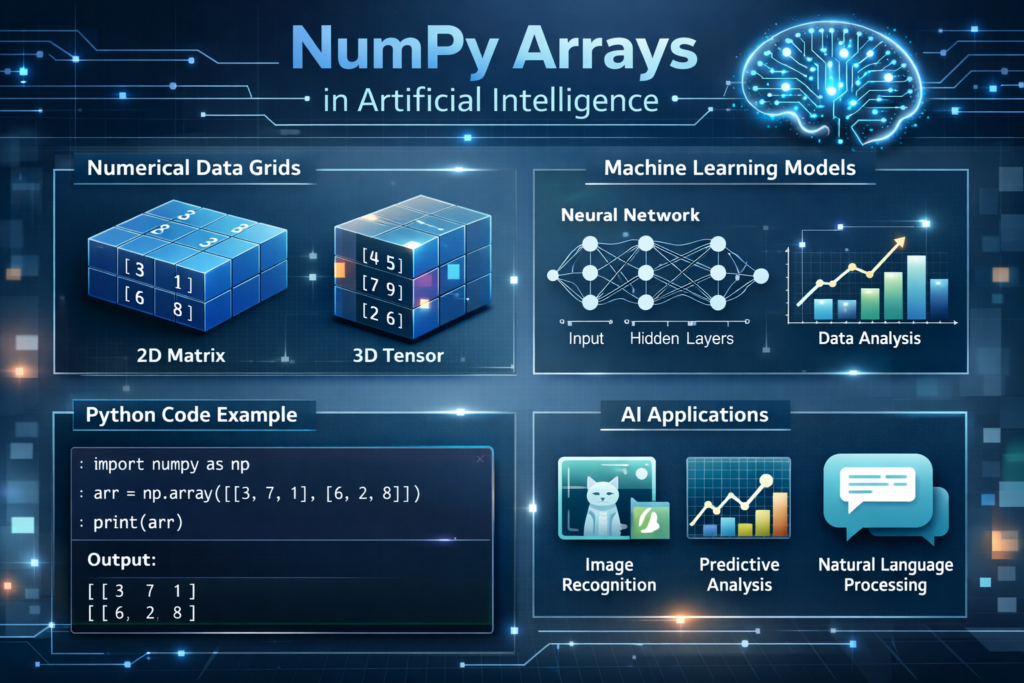
NumPy is an open-source Python library designed for high-performance numerical computing. It provides a powerful data structure called the ndarray (N-dimensional array) that allows developers to store and manipulate large sets of numerical data efficiently.
Unlike regular Python lists, NumPy arrays are optimized for speed and memory efficiency. They allow operations to be performed on entire datasets at once instead of processing elements one by one.
For example, imagine you want to add two lists using standard Python.
list1 = [1,2,3]
list2 = [4,5,6]result = []for i in range(len(list1)):
    result.append(list1[i] + list2[i])print(result)
This works, but it requires loops and extra code.
Now look at the same operation using NumPy.
import numpy as npa = np.array([1,2,3])
b = np.array([4,5,6])print(a + b)
Output:
[5 7 9]
NumPy performs the calculation instantly and with far less code. This efficiency is extremely important in artificial intelligence because models often work with:
- millions of data points
- large datasets
- complex mathematical operations
- matrix multiplications
Without tools like NumPy, many AI systems would be far too slow to run efficiently.
Why Arrays Matter in Artificial Intelligence
Before diving deeper into NumPy syntax, it is helpful to understand why arrays are so important in AI and machine learning.
Most AI systems represent information as numerical arrays or matrices. These arrays store data that algorithms use to learn patterns and make predictions.
Understanding arrays is therefore a key step when learning NumPy in Python for AI applications.
Preparing datasets is a common step in AI workflows such as text preprocessing in Python for NLP.
Images Are Stored as Arrays
Digital images are actually matrices of numbers. Each number represents the brightness or color value of a pixel.
For example, a small grayscale image might look like this internally:
[120, 135, 150]
[100, 115, 140]
[90, 110, 130]
In color images, three matrices are typically used:
- Red channel
- Green channel
- Blue channel
Machine learning models analyze these arrays to detect objects, faces, or patterns.
Machine Learning Datasets Use Arrays
Most machine learning datasets are handled using NumPy in Python for AI and data science projects.
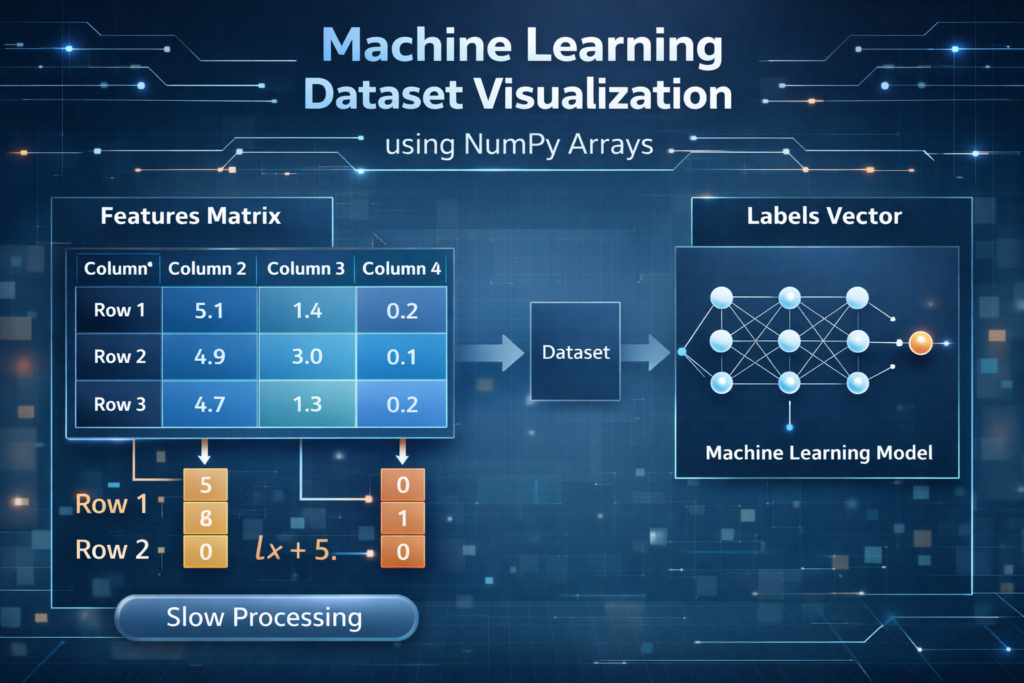
In machine learning, data is usually organized as rows and columns.
Example dataset:
| Height | Weight | Label |
|---|---|---|
| 170 | 65 | 1 |
| 180 | 75 | 1 |
| 160 | 55 | 0 |
Inside an ML model, this dataset is stored as arrays.
Features:
[[170,65],
 [180,75],
 [160,55]]
Labels:
[1,1,0]
These arrays are used to train machine learning models.
Many NLP pipelines start with steps like Python tokenization for NLP before converting text into numerical arrays.
Neural Networks Use Matrix Mathematics
Deep learning models rely heavily on matrix multiplication.
A simplified neural network calculation looks like this:
Output = Input × Weights + Bias
All these values are stored in arrays or matrices.
This is exactly why NumPy in Python for AI is so important — it allows Python to perform these mathematical operations efficiently.
In simple terms:
AI = Data + Mathematics + Arrays
NumPy provides the tools that make these calculations possible.
These datasets can then be used for tasks such as text classification in Python.
What is a NumPy ndarray?
The core data structure in NumPy is the ndarray, which stands for N-dimensional array.
The ndarray structure is the core component that makes NumPy in Python for AI applications efficient and powerful.
An ndarray stores multiple values of the same data type in a structured format. These arrays can have one or more dimensions.
Examples:
1D Array
[1,2,3,4]
2D Array (Matrix)
[[1,2,3],
 [4,5,6]]
3D Arrays
3-dimensional arrays are commonly used in image processing and deep learning models.
Creating an ndarray
Here is a simple example:
import numpy as npdata = np.array([[1,2,3],[4,5,6]])print(data)
Output:
[[1 2 3]
 [4 5 6]]
Important ndarray Properties
NumPy arrays provide useful information about their structure.
Shape
The shape tells us the size of the array.
print(data.shape)
Output:
(2,3)
This means the array contains:
- 2 rows
- 3 columns
Data Type (dtype)
Every NumPy array has a specific data type.
print(data.dtype)
Output:
int64
Common data types include:
- int32
- int64
- float32
- float64
Using consistent data types allows NumPy to perform calculations faster and more efficiently.
Why NumPy Arrays Are Faster Than Python Lists
NumPy arrays are faster because:
- data is stored in continuous memory blocks
- operations use optimized C code internally
- vectorized operations eliminate slow loops
These advantages make NumPy ideal for working with large datasets used in artificial intelligence and machine learning.
How Do You Create NumPy Arrays in Python?
NumPy provides several ways to create arrays depending on the type of data you need. These arrays are widely used when working with datasets, mathematical operations, and machine learning models.
Learning how to create arrays is an essential skill when working with NumPy in Python for AI projects.
When learning NumPy in Python for AI, understanding how to create arrays is one of the first practical skills you should develop.
Creating Arrays from Python Lists
The simplest way to create a NumPy array is by converting a Python list.
import numpy as npnumbers = np.array([10,20,30,40])print(numbers)
Output:
[10 20 30 40]
This creates a one-dimensional NumPy array.
Arrays created this way can later be used for mathematical calculations or machine learning datasets.
Creating Arrays Filled with Zeros
Sometimes machine learning experiments require arrays initialized with zero values.
Example:
zeros_array = np.zeros((3,3))print(zeros_array)
Output:
[[0. 0. 0.]
 [0. 0. 0.]
 [0. 0. 0.]]
This creates a 3 × 3 matrix filled with zeros.
Zero arrays are commonly used when initializing models or creating placeholder data.
Creating Arrays Filled with Ones
NumPy can also create arrays filled with ones.
ones_array = np.ones((2,4))print(ones_array)
Output:
[[1. 1. 1. 1.]
 [1. 1. 1. 1.]]
These arrays are useful in mathematical experiments and machine learning initialization processes.
Creating Arrays Using arange()
NumPy provides the arange() function to generate sequences of numbers.
arr = np.arange(0,10)print(arr)
Output:
[0 1 2 3 4 5 6 7 8 9]
This function behaves similarly to Python’s range() but returns a NumPy array instead.
Creating Random Arrays
Random numbers are extremely important in machine learning and AI experiments.
Example:
random_array = np.random.rand(3,3)print(random_array)
Output example:
[[0.42 0.75 0.61]
 [0.11 0.92 0.33]
 [0.55 0.28 0.77]]
Random arrays are commonly used for:
- testing algorithms
- initializing neural networks
- running simulations
How Does NumPy Perform Fast Mathematical Operations?
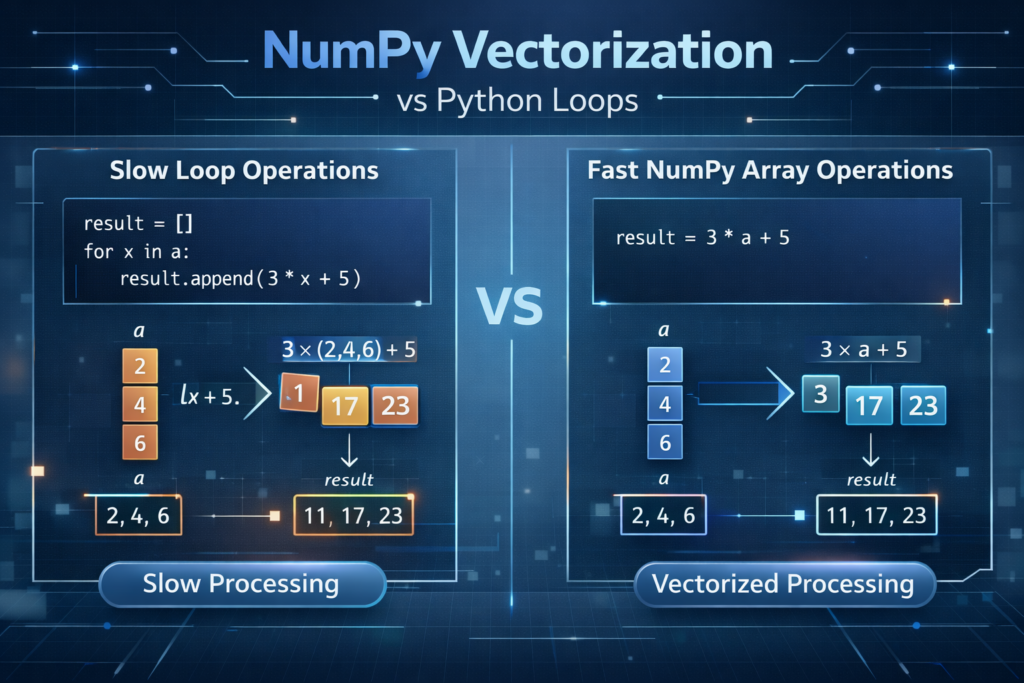
One of the biggest advantages of NumPy is its ability to perform vectorized operations.
Vectorization allows operations to be applied to entire arrays instead of processing elements one by one using loops.
This feature makes NumPy in Python for AI applications significantly faster than standard Python code.
Example Using Standard Python
list1 = [1,2,3]
list2 = [4,5,6]result = []for i in range(len(list1)):
    result.append(list1[i] + list2[i])print(result)
Output:
[5,7,9]
This method works but requires loops and additional code.
Vectorized NumPy Approach
Using NumPy arrays, the same operation becomes much simpler.
import numpy as npa = np.array([1,2,3])
b = np.array([4,5,6])print(a + b)
Output:
[5 7 9]
NumPy performs the operation on the entire array at once, making the code cleaner and faster.
Why Vectorization Matters in AI
Vectorization is essential in machine learning because algorithms perform thousands or even millions of calculations.
Vectorization is one of the main reasons developers prefer NumPy in Python for AI and machine learning tasks.
Examples include:
- gradient descent calculations
- neural network training
- feature scaling
- matrix multiplications
By using vectorized operations, NumPy eliminates slow loops and speeds up computations dramatically.
What is NumPy Broadcasting?
Another powerful feature of NumPy is broadcasting.
Broadcasting allows operations to be performed on arrays with different shapes without manually resizing them.
Broadcasting simplifies many calculations when using NumPy in Python for AI workflows.
This feature is commonly used when working with datasets and transformations in AI projects.
Broadcasting Example
import numpy as npa = np.array([1,2,3])
b = 10print(a + b)
Output:
[11 12 13]
NumPy automatically applies the value 10 to every element of the array.
Internally, NumPy treats the operation like this:
[1,2,3] + [10,10,10]
But it does this automatically without creating extra arrays.
Broadcasting with Matrices
Broadcasting also works with multi-dimensional arrays.
import numpy as npmatrix = np.array([[1,2,3],
                   [4,5,6]])vector = np.array([10,20,30])print(matrix + vector)
Output:
[[11 22 33]
 [14 25 36]]
NumPy automatically matches the vector with each row of the matrix.
Why Broadcasting Is Important
Broadcasting is frequently used in machine learning tasks such as:
- feature scaling
- data normalization
- neural network computations
- bias addition in deep learning
Without broadcasting, developers would need complex loops and reshaping operations.
How Do You Access and Slice NumPy Arrays?
When working with datasets, it is often necessary to access specific values or sections of an array.
NumPy allows this using indexing and slicing.
Accessing Individual Elements
Example:
import numpy as nparr = np.array([10,20,30,40,50])print(arr[0])
print(arr[2])
Output:
10
30
Like Python lists, indexing starts at 0.
Slicing Arrays
Slicing allows you to extract a portion of an array.
Example:
print(arr[1:4])
Output:
[20 30 40]
Explanation:
- start index = 1
- end index = 4 (not included)
Indexing in 2D Arrays
NumPy arrays can also contain multiple dimensions.
Example:
matrix = np.array([[1,2,3],
                   [4,5,6]])print(matrix[0,1])
Output:
2
Explanation:
- first number = row index
- second number = column index
Selecting Rows or Columns
Selecting an entire row:
print(matrix[0])
Output:
[1 2 3]
Selecting a column:
print(matrix[:,1])
Output:
[2 5]
These operations are extremely useful when working with machine learning datasets.
How Do You Reshape NumPy Arrays for Machine Learning?
Machine learning datasets usually follow a specific structure:
samples × features
For example:
| Height | Weight |
|---|---|
| 170 | 65 |
| 180 | 75 |
| 160 | 55 |
This dataset contains:
- 3 samples
- 2 features
NumPy provides the reshape() function to reorganize arrays into this structure.
Example of Reshaping
import numpy as nparr = np.array([1,2,3,4,5,6])reshaped = arr.reshape(2,3)print(reshaped)
Output:
[[1 2 3]
 [4 5 6]]
Here the array is reshaped into 2 rows and 3 columns.
Why Reshaping Is Important
Reshaping is commonly required when:
- preparing machine learning datasets
- converting data for neural networks
- formatting image data
- building deep learning models
Without reshaping, many machine learning libraries will not accept the input data.
NumPy vs Python Lists: Which One Is Better for AI?
When beginners start learning Python, they often use Python lists to store data. Lists are flexible and easy to use, but they are not optimized for heavy numerical computation.
This performance advantage explains why NumPy in Python for AI systems is widely used instead of Python lists.
NumPy arrays were designed specifically for scientific computing and data processing, which is why they are widely used in artificial intelligence and machine learning.
Understanding the difference between Python lists and NumPy arrays helps explain why NumPy in Python for AI projects is considered essential.
Key Differences
| Feature | Python Lists | NumPy Arrays |
|---|---|---|
| Performance | Slower | Much Faster |
| Memory Usage | Higher | More Efficient |
| Mathematical Operations | Limited | Advanced |
| AI & ML Compatibility | Rarely Used | Standard Tool |
| Data Processing | Loops Required | Vectorized Operations |
Performance Example
Consider adding two datasets.
Using Python Lists
list1 = [1,2,3,4,5]
list2 = [6,7,8,9,10]result = []for i in range(len(list1)):
    result.append(list1[i] + list2[i])print(result)
Using NumPy
import numpy as npa = np.array([1,2,3,4,5])
b = np.array([6,7,8,9,10])print(a + b)
NumPy performs the calculation on the entire array at once, which makes it significantly faster.
This speed advantage becomes extremely important when working with large machine learning datasets.
Essential NumPy Concepts Every Beginner Should Understand
Before moving into advanced machine learning frameworks, there are a few important NumPy concepts that beginners should understand.
These concepts appear frequently when working with datasets, AI algorithms, and data processing tasks.
ndarray
The ndarray is the main data structure used in NumPy. It stores numerical data in a structured format that allows efficient computation.
Arrays can have multiple dimensions.
1D Array
[1,2,3]
2D Array
[[1,2,3],
 [4,5,6]]
3D Arrays
Three-dimensional arrays are commonly used in:
- image processing
- deep learning models
- scientific computing
Shape
The shape of an array describes its dimensions.
Example:
import numpy as npdata = np.array([[1,2,3],[4,5,6]])print(data.shape)
Output:
(2,3)
This means the array contains:
- 2 rows
- 3 columns
Understanding array shapes is essential when preparing machine learning datasets.
dtype (Data Type)
NumPy arrays store elements of the same data type.
Example:
print(data.dtype)
Output might look like:
int64
Common data types include:
- int32
- int64
- float32
- float64
Using consistent data types improves both performance and memory efficiency.
Vectorization
Vectorization allows NumPy to apply operations to an entire array instead of processing each element individually.
Example:
a = np.array([1,2,3])
b = np.array([4,5,6])print(a + b)
Output:
[5 7 9]
Vectorization is one of the reasons NumPy is widely used in data science and AI development.
Broadcasting
Broadcasting allows NumPy to perform operations on arrays with different shapes.
Example:
a = np.array([1,2,3])print(a + 10)
Output:
[11 12 13]
This feature makes it easier to apply transformations to datasets.
Common NumPy Functions Used in Machine Learning
NumPy contains hundreds of functions, but beginners only need to learn a few core ones to start working with machine learning data.
np.array()
Creates a NumPy array.
arr = np.array([1,2,3])
np.arange()
Creates a sequence of numbers.
np.arange(0,10)
Output:
[0 1 2 3 4 5 6 7 8 9]
np.zeros()
Creates an array filled with zeros.
np.zeros((3,3))
np.ones()
Creates an array filled with ones.
np.ones((2,4))
np.reshape()
Changes the shape of an array.
arr = np.array([1,2,3,4])arr.reshape(2,2)
np.mean()
Calculates the average value.
np.mean([10,20,30])
np.sum()
Calculates the total sum.
np.sum([1,2,3])
np.random.rand()
Generates random numbers.
np.random.rand(3,3)
Random arrays are commonly used when initializing machine learning models.
What Should You Learn After NumPy?
Learning NumPy is an important step in becoming a Python AI developer, but it is only the beginning.
Once you understand arrays, vectorization, and numerical computation, the next step is learning how to analyze data and build machine learning models.
Here is a recommended learning path.
Before moving to advanced frameworks, mastering NumPy in Python for AI is strongly recommended.
1. Pandas for Data Analysis
Pandas is used for working with structured datasets.
With Pandas you can:
- load CSV files
- clean datasets
- filter data
- analyze statistics
Most machine learning workflows combine NumPy and Pandas.
2. Matplotlib for Data Visualization
Matplotlib allows you to create graphs and visualizations such as:
- line charts
- bar charts
- scatter plots
Visualization helps identify patterns in data before training machine learning models.
3. Scikit-learn for Machine Learning
Scikit-learn is one of the most popular machine learning libraries in Python.
It allows developers to build models such as:
- linear regression
- classification models
- clustering algorithms
- decision trees
Scikit-learn relies heavily on NumPy arrays.
Scikit-learn machine learning library
4. TensorFlow or PyTorch for Deep Learning
If you want to build advanced AI systems such as:
- image recognition systems
- chatbots
- recommendation engines
- natural language processing models
Then you will need deep learning frameworks like TensorFlow or PyTorch.
Both frameworks use concepts similar to NumPy arrays.
TensorFlow deep learning framework
Conclusion
NumPy is one of the most important libraries in the Python ecosystem and serves as a foundation for artificial intelligence and machine learning development.
In this guide, you learned:
- what NumPy is and why it is important
- how NumPy arrays (ndarray) work
- how to create and manipulate arrays
- how vectorization and broadcasting improve performance
- how NumPy helps prepare datasets for machine learning
Because NumPy allows Python to perform fast numerical computation, it has become the backbone of many AI tools and libraries.
For beginners entering the world of artificial intelligence, learning NumPy in Python for AI is one of the most valuable first steps.
With practice and experimentation, NumPy will become a powerful tool in your journey toward building real AI and machine learning projects.
Mastering NumPy in Python for AI gives beginners the foundation needed to work with machine learning datasets and numerical computations.
FAQ
What is NumPy used for in machine learning?
NumPy is used for numerical computation, matrix operations, and handling machine learning datasets efficiently. Many ML libraries rely on NumPy arrays for fast calculations.
What is ndarray in NumPy?
The ndarray (N-dimensional array) is the core data structure used in NumPy to store and manipulate numerical data.
Is NumPy required for AI?
Yes. Many AI frameworks such as TensorFlow, PyTorch, and Scikit-learn depend on NumPy for numerical operations.
Is NumPy better than Python lists?
NumPy arrays are faster, more memory efficient, and support advanced mathematical operations, making them ideal for data science and machine learning tasks.
How is NumPy used in AI projects?
NumPy is used to perform numerical calculations, manipulate arrays, and prepare datasets for machine learning algorithms.

