

Introduction: The Core Building Blocks of Python Programming
If you’re starting Python for the first time, don’t worry — this Python basics for beginners guide will explain variables, loops, and functions in the simplest way possible. No technical jargon. No confusing theory. Just clear examples you can try immediately.
Most beginners don’t quit Python because it’s difficult. They quit because they try to move too fast without fully understanding the basics.
This guide slows everything down.
By the end of this article, you will clearly understand:
- What is a variable?
- What is a loop?
- What is a function?
- How these three concepts work together in real programs
If you’re learning Python, these three ideas form the foundation of everything you will build.
They control:
- How information is stored
- How tasks are repeated
- How programs stay organized
From small automation scripts to large AI systems, every Python application relies on these basics.
These concepts may seem simple, but they form the backbone of every professional Python project. Mastering them now will save you months of confusion later.
Let’s explore each one step by step.
Learn Python in 2026: Complete Beginner Roadmap with AI
Why Python Basics for Beginners Matter
Understanding Python basics for beginners is the most important step in your programming journey. Without mastering variables, loops, and functions, advanced topics become confusing and overwhelming.
Mastering Python basics for beginners prepares you for automation scripts, web development, data analysis, and artificial intelligence projects.
Python Variables Explained for Beginners
What Is a Variable?
A variable is a container that stores data in a program.
Think of a variable like a labeled jar in your kitchen. Whatever you put inside stays there until you change it.
Instead of repeating values again and again, Python allows you to store information in a variable and reuse it whenever needed.
Here’s a simple example:
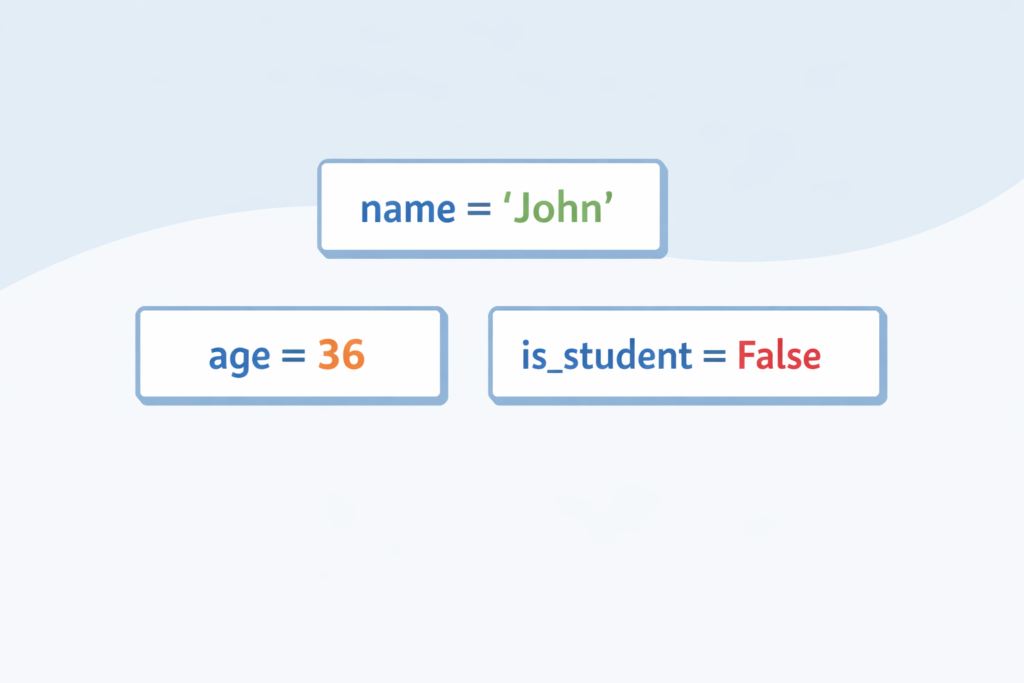
name = "John"
age = 36print(name)
print(age)
In this example:
nameis a variable"John"is a string (text)ageis a number36is an integer
Python automatically understands the data type. You don’t need to declare it manually. That’s one reason Python is beginner-friendly.
Here’s another example:
first_name = "Emma"
age = 28
is_student = False
In this example:
first_namestores textagestores a numberis_studentstores a Boolean value (True or False)
Each variable holds a specific type of data.
Using variables makes your code:
- Cleaner
- Easier to read
- Easier to update
Why Variables Matter
Without variables, you would need to rewrite values every time.
With variables, you change the value once — and the entire program updates automatically.
Here’s a practical example:
price = 50
discount = 10
final_price = price - discountprint(final_price)
If you change price or discount, the final result updates automatically.
That’s the real power of variables.
In larger programs, variables allow you to manage thousands of pieces of information efficiently.
Common Beginner Mistakes With Variables
1. Case Sensitivity
Age = 25
print(age)
This gives an error.
Python is case-sensitive.Age and age are two different variables.
2. Using a Variable Before Defining It
print(score)
If score hasn’t been defined yet, Python will raise an error.
3. Poor Variable Names
Avoid names like:
x = 10
y = 5
Instead, use meaningful names:
total_score = 10
bonus_points = 5
Clear naming makes your code professional.
What Is a Loop in Python?
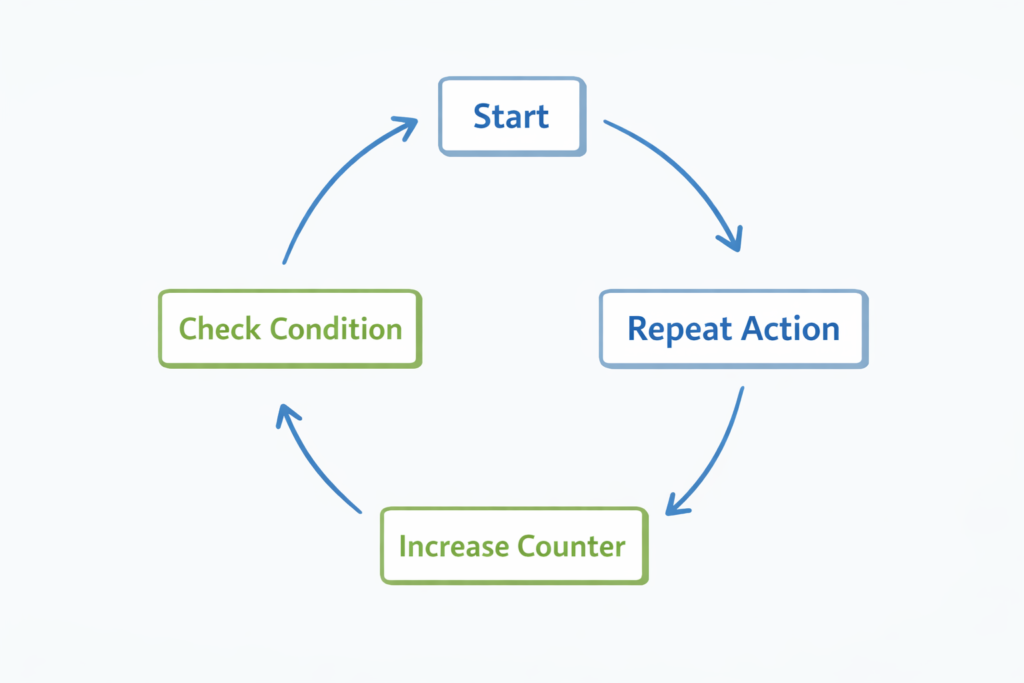
A loop repeats a task multiple times automatically.
Instead of writing the same code again and again, you use a loop.
For Loop Example
for i in range(5):
    print("Hello")
This prints:
Hello
Hello
Hello
Hello
Hello
The variable i automatically changes on each repetition. Even if we don’t use it directly, it controls how many times the loop runs.
Even if you don’t fully understand range() yet, focus on the key idea:
The loop repeats automatically.
That’s what matters most right now.
Example: Print Numbers from 1 to 10
for number in range(1, 11):
    print(number)
range(1, 11) means:
- Start at 1
- Stop before 11
Loops allow Python to perform actions multiple times without writing repeated code.
They are especially useful when working with:
- Lists
- Numbers
- Files
- Repetitive tasks
When to Use a For Loop
Use a for loop when:
- You know how many times something should repeat
- You are looping through a list
- You are counting numbers
While Loop Example
count = 1while count <= 3:
    print("Counting:", count)
    count += 1
Output:
Counting: 1
Counting: 2
Counting: 3
The loop continues while the condition remains True.
Be careful:
If the condition never becomes False, the loop will run forever. This is called an infinite loop.
When to Use a While Loop
Use a while loop when repetition depends on a condition rather than a fixed number.
For example:
- Waiting for user input
- Running until a value changes
- Checking a condition repeatedly
What Is a Function in Python?
A function is a reusable block of code that performs a specific task.
Instead of repeating logic throughout your program, you place it inside a function and call it whenever needed.
Functions make your code scalable.
Without functions, large programs become messy and hard to maintain.
Simple Function Example
def greet():
    print("Welcome to Python!")greet()
Explanation:
defmeans definegreetis the function name- The function runs when called
Function With Parameters
def greet_user(name):
    print("Hello", name)greet_user("James")
Output:
Hello James
Explanation:
nameis a parameter"James"is an argument
Parameters allow functions to work with different inputs.
Function With Return Value
def add(a, b):
    return a + bresult = add(5, 3)
print(result)
Explanation:
returnsends a value back- The function becomes reusable
- You can store the result in a variable
A function that returns a value gives you more flexibility than one that only prints something.
Why Functions Are Important
Functions help you:
- Keep code organized
- Avoid repetition
- Fix problems in one place
- Build large projects easily
Professional programmers rely heavily on functions to manage complex systems.
Easy Way to Remember
Function = recipe
Parameter = ingredient
Calling function = cooking
Simple analogy. Powerful understanding.
How Variables, Loops, and Functions Work Together
Now let’s combine everything.
def print_numbers():
    for i in range(1, 6):
        print(i)print_numbers()
Here:
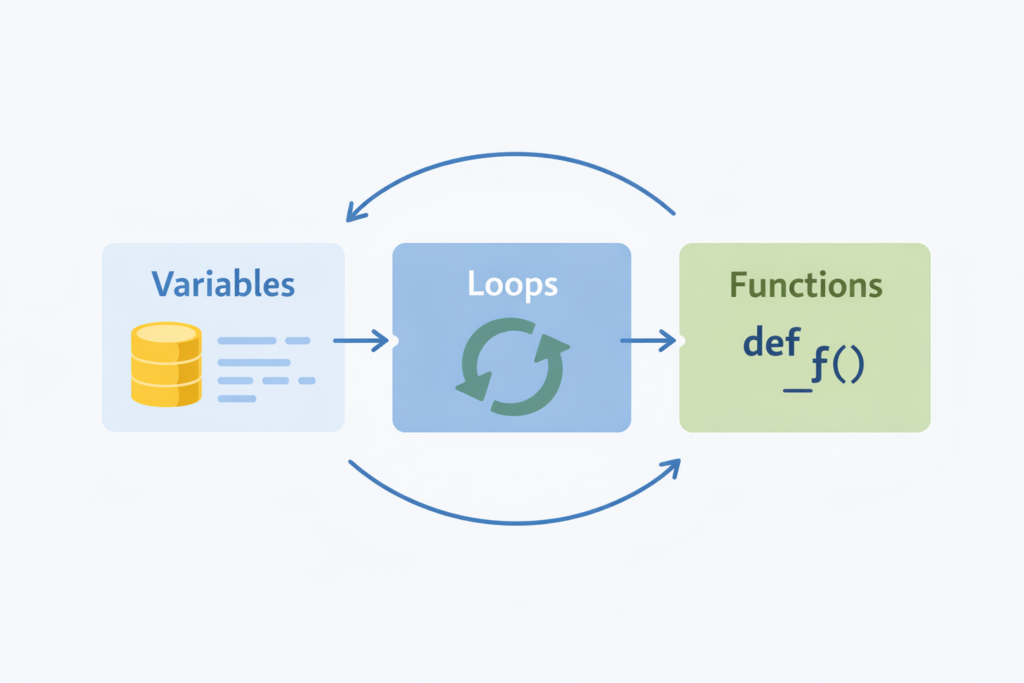
- The function organizes the logic
- The loop repeats the action
- Variables control the values
This is how real Python programs are structured.
Mini Python Project Using All Three Concepts
Let’s build a simple program.
def greet_user(name):
    print("Hello", name)names = ["Emma", "Ethan", "Sophia"]for n in names:
    greet_user(n)
Output:
Hello Emma
Hello Ethan
Hello Sophia
What this program uses:
- Variable →
nameslist - Loop → repeats greeting
- Function → reusable greeting logic
This is how real software works — by combining small building blocks.
Quick Comparison: Variables vs Loops vs Functions
| Concept | Purpose | Key Benefit | Beginner Tip |
|---|---|---|---|
| Variable | Store information | Makes code flexible | Use clear, descriptive names |
| Loop | Repeat tasks automatically | Saves time and reduces repetition | Always check your condition |
| Function | Organize reusable logic | Keeps programs clean and scalable | Use parameters to make it flexible |
Common Beginner Mistakes With These Basics
Here are mistakes many beginners make:
- Trying to memorize instead of practicing
- Forgetting indentation in loops and functions
- Using variables before assigning values
- Mixing tabs and spaces
- Skipping small practice exercises
Small mistakes are normal.
What matters is consistent practice.
Why Python Basics for Beginners Matter
Mastering Python basics for beginners prepares you for:
- Automation scripts
- Web development
- Data analysis
- Artificial intelligence
- Game development
Every advanced topic builds on these fundamentals.
Strong basics make advanced learning faster and easier.
If you can clearly explain variables, loops, and functions to someone else — you are no longer a beginner.
How AI Tools Can Help You Practice Faster
You can accelerate learning by using AI tools intelligently.
For example:
- Generate small practice exercises
- Ask AI to explain errors
- Create mini project ideas
- Get step-by-step breakdowns
Example prompt:
“Give me 5 beginner Python loop exercises.”
AI should assist your learning — not replace your thinking.
How to Think Like a Programmer as a Beginner
Learning Python basics for beginners is not just about syntax. It’s about learning how to think logically.
Many beginners focus too much on memorizing code. But programming is really about problem-solving.
Here’s how to start thinking like a programmer:
1️⃣ Break Problems Into Small Steps
Instead of thinking:
“How do I build a calculator?”
Think:
- I need to store numbers → use variables
- I need to perform calculations → use operators
- I may repeat operations → use loops
- I should organize logic → use functions
Large problems become easier when divided into smaller parts.
2️⃣ Focus on Logic, Not Syntax
If you forget exact syntax, that’s normal.
Ask yourself:
- What do I want the program to do?
- What information do I need?
- Should something repeat?
- Can I organize this into a function?
Syntax can be looked up.
Logical thinking is built through practice.
3️⃣ Practice Debugging Calmly
When your code gives an error:
- Read the error message carefully
- Check variable names
- Check indentation
- Check spelling
Most beginner errors are small and fixable.
Don’t panic. Debugging is part of programming.
4️⃣ Build Tiny Programs Daily
Instead of watching 10 tutorials, build:
- A simple greeting program
- A number guessing game
- A multiplication table generator
- A mini quiz
Small wins build confidence fast.
Why This Mindset Matters
Understanding Python basics for beginners becomes much easier when you stop trying to memorize everything.
Programming is not about remembering every rule.
It’s about solving problems step by step.
If you can think logically and stay patient, you are already on the right path.
Understanding Data Types in Python (Beginner-Friendly)
Understanding Basic Data Types in Python
When learning Python basics for beginners, it’s important to understand that variables store different kinds of data.
The most common data types you’ll use at the beginning are:
- Strings (text)
- Integers (whole numbers)
- Floats (decimal numbers)
- Booleans (True or False)
Example:
name = "Akbar"      # String
age = 25            # Integer
height = 5.9        # Float
is_student = True   # Boolean
Python automatically understands the type based on the value you assign.
You can check a variable’s type using the type() function:
print(type(name))
print(type(age))
Understanding data types helps you:
- Avoid errors
- Perform correct calculations
- Write cleaner code
At the beginner level, you don’t need to go deep — just recognize what type of data you are working with.
How Beginners Should Practice Python Basics
How to Practice Python Basics Effectively
Understanding Python basics for beginners is not about reading — it’s about doing.
Here’s a simple daily practice plan:
Step 1: Rewrite Examples
Don’t just read the code.
Rewrite every example manually.
Step 2: Modify the Code
Change:
- Numbers
- Names
- Conditions
See what happens.
Example:
for i in range(3):
    print("Practice makes progress")
Then change 3 to 10.
Step 3: Combine Concepts
Create small programs that combine:
- Variables
- Loops
- Functions
Example challenge:
Create a function that takes a number and prints its multiplication table using a loop.
This type of practice builds confidence fast.
A Simple Beginner Roadmap After Mastering Basics
What to Learn After Python Basics for Beginners
Once you’re comfortable with variables, loops, and functions, your next steps should be structured.
Here’s a simple roadmap:
1. Lists and Dictionaries
Learn how to store multiple values.
2. Conditional Statements (if / else)
Make your programs smarter.
3. File Handling
Learn how to read and write files.
4. Small Projects
Build:
- Calculator
- To-do list app
- Simple quiz program
5. Choose a Direction
After basics, choose one path:
- Web development
- Data analysis
- Automation
- Artificial intelligence
Strong Python basics for beginners make every path easier.
Practice Exercises
Try writing these programs yourself before checking any solution.
- Create a variable called
cityand print it. - Write a loop that prints numbers from 1 to 5.
- Print your name 3 times using a loop.
- Create a function that prints numbers from 1 to 5.
- Create a function that adds two numbers and prints the result.
Practice builds confidence.
Final Takeaway
Variables store data.
Loops automate repetition.
Functions organize and reuse logic.
Master these three concepts deeply, and 70% of beginner Python confusion disappears.
If you truly understand Python basics for beginners, you can confidently move toward more advanced programming concepts.
Learning Python does not require genius.
It requires patience and consistency.
Start small. Practice daily. Build gradually.
That’s how real programmers grow.
Frequently Asked Questions
❓ What are Python basics for beginners?
Python basics for beginners include understanding variables, loops, and functions. These three core concepts form the foundation of Python programming. Once you understand how to store data, repeat tasks, and organize reusable code, you can confidently move toward more advanced topics like data analysis, web development, and automation.
❓ Why are Python basics important before learning advanced topics?
Learning Python basics for beginners ensures you build a strong foundation before moving to complex areas like artificial intelligence or web frameworks. Without mastering variables, loops, and functions, advanced code will feel confusing and overwhelming. Strong fundamentals make future learning faster and easier.
❓ How long does it take to learn Python basics?
Most beginners can understand Python basics within 2–4 weeks with consistent daily practice. The key is not memorizing syntax but writing small programs regularly. Practicing variables, loops, and functions every day builds confidence quickly.
❓ What is the easiest way to understand variables in Python?
The easiest way to understand variables is to think of them as labeled containers that store information. For example, instead of writing the number 10 repeatedly, you can store it in a variable and reuse it whenever needed. Practicing small examples, like calculating prices or storing names, makes the concept clearer.
❓ What is the difference between a for loop and a while loop?
A for loop is typically used when you know how many times you want to repeat a task, such as looping through numbers or a list. A while loop runs as long as a condition remains True. If the condition never becomes False, the loop can run indefinitely, which is known as an infinite loop.
❓ Why are functions important in Python?
Functions help organize code into reusable blocks. Instead of rewriting the same logic multiple times, you define it once inside a function and call it whenever needed. This makes programs cleaner, easier to maintain, and more scalable in larger projects.
❓ Do I need to understand data types deeply at the beginner level?
At the beginner level, you only need to understand basic data types like strings (text), integers (numbers), and Boolean values (True/False). Python automatically detects the type when you assign a value, so you don’t need to declare it manually at this stage.
❓ What are common mistakes beginners make with Python basics?
Common beginner mistakes include:
Forgetting indentation in loops and functions
Using variables before defining them
Mixing tabs and spaces
Trying to memorize instead of practicing
Moving to advanced topics too quickly
Making mistakes is normal — consistent practice is what matters.
❓ Can I learn Python basics without a computer science background?
Yes. Python basics for beginners are designed to be accessible even if you have no programming experience. Python’s simple syntax makes it one of the easiest programming languages to start with.
❓ What should I learn after mastering Python basics?
After understanding variables, loops, and functions, you can move on to:
Lists and dictionaries
File handling
Object-oriented programming
Web development (Flask or Django)
Data analysis with pandas
Automation scripts
But make sure your foundation is strong first.
❓ How can I practice Python basics effectively?
The best way to practice Python basics is by writing small programs daily. Start with simple exercises, then build mini projects. You can also use AI tools to generate practice problems, but always try solving them yourself first.
❓ Is Python good for beginners in 2026?
Yes. Python remains one of the best programming languages for beginners because of its readability, versatility, and strong community support. It is widely used in automation, AI, web development, and data science.

