

Introduction
Machine learning models are only as good as the data used to train them. Even the most advanced algorithm cannot produce accurate predictions if the dataset contains errors, missing values, or inconsistent formatting. This is why python data cleaning for machine learning is one of the most important skills for any data scientist or machine learning engineer.
In real-world projects, raw datasets are rarely perfect. They often include problems such as:
- Missing values
- Duplicate rows
- Incorrect data types
- Outliers
- Inconsistent text formatting
Before building a machine learning model, these issues must be fixed. This process is called data cleaning or data preprocessing.
Many studies suggest that data scientists spend nearly 70–80% of their time preparing and cleaning data before actually training machine learning models. Without proper cleaning, the model may learn incorrect patterns and produce unreliable predictions.
The good news is that Python provides powerful tools that make data cleaning much easier. Libraries such as Pandas, NumPy, and visualization tools allow developers to quickly identify and fix problems in datasets.
In this step-by-step guide, you will learn:
- How to explore a dataset in Python
- How to handle missing values
- How to remove duplicate data
- How to fix incorrect data types
- How to detect and treat outliers
- How to prepare your dataset for machine learning models
By the end of this tutorial, you will understand the complete workflow of python data cleaning for machine learning projects and be able to apply these techniques to real datasets.
Before training any model, datasets are usually divided using techniques like train test split in Python to evaluate model performance.
Why Data Cleaning Is Important in Machine Learning
Data cleaning is a critical step in the machine learning pipeline. If your dataset contains errors, your model will learn incorrect information. This is often described with a simple rule:
Garbage In → Garbage Out
If poor-quality data is used during training, the model will produce poor predictions regardless of how advanced the algorithm is.
Common Data Problems
Real datasets typically contain several types of issues.
Missing Values
Some rows may contain empty or null values. For example, a dataset might contain missing entries in columns like age, salary, or location.
Duplicate Records
Sometimes the same record appears multiple times in a dataset. This can bias the machine learning model.
Incorrect Data Types
A numerical column may be stored as text, or dates may appear as strings.
Poor quality datasets can increase the risk of overfitting vs underfitting in machine learning models.
Outliers
Outliers are extreme values that differ significantly from the rest of the dataset.
Inconsistent Formatting
Text columns may contain variations such as:
New York
new york
NEW YORK
These inconsistencies confuse machine learning algorithms.
Impact on Machine Learning Models
Poor data quality can lead to several problems:
- Lower model accuracy
- Biased predictions
- Training instability
- Incorrect patterns learned by the algorithm
That is why python data cleaning for machine learning is considered the foundation of successful machine learning projects.
Data cleaning is one of the most important stages in the machine learning workflow in Python.
Python Tools for Data Cleaning
Python has become the most popular language for data science largely because of its powerful ecosystem of libraries.
Several tools are commonly used for cleaning datasets.
Pandas
The Pandas library is the most important tool for data cleaning in Python.
It allows you to:
- Load datasets
- Filter rows and columns
- Handle missing values
- Remove duplicates
- Transform data
Example:
import pandas as pd
Pandas provides a powerful structure called a DataFrame, which makes it easy to manipulate tabular data.
The Pandas official documentation provides detailed explanations of data manipulation and cleaning techniques.
NumPy
NumPy is another core library used in data science.
import numpy as np
NumPy helps with:
- Numerical operations
- Working with arrays
- Handling missing values
Many Pandas operations rely on NumPy internally.
Missingno (for Visualizing Missing Data)
A useful library called missingno helps visualize missing values in datasets.
This is helpful when dealing with large datasets where it is difficult to manually inspect missing data.
Example:
import missingno as msnomsno.matrix(df)
This visualization quickly shows which columns contain missing values and how they are distributed.
When performing python data cleaning for machine learning, these tools work together to simplify the entire workflow.
Step 1 — Load and Explore the Dataset
Before cleaning any dataset, the first step is exploration.
You must understand the dataset structure before making changes.
Load Dataset
import pandas as pddf = pd.read_csv("data.csv")This command loads the dataset into a Pandas DataFrame.
Preview the Dataset
You can inspect the first few rows using:
df.head()
Example output:
| Name | Age | Salary |
|---|---|---|
| John | 25 | 50000 |
| Sara | 29 | 60000 |
This helps verify that the dataset was loaded correctly.
Check Dataset Structure
Use the following command:
df.info()
This provides important information such as:
- Number of rows
- Number of columns
- Data types
- Missing values
Example output might show:
Age        float64
Salary     int64
City       object
If a numeric column appears as object, it means the data type needs correction.
Statistical Summary
You can also generate statistical summaries using:
df.describe()
This shows:
- mean
- minimum value
- maximum value
- standard deviation
These statistics help identify potential outliers or abnormal values.
Exploring the dataset is a critical step in python data cleaning for machine learning, because it reveals the problems that must be fixed.
Step 2 — Handle Missing Values
Missing values are one of the most common issues in real-world datasets.
If missing values are ignored, machine learning algorithms may fail or produce inaccurate results.
Detect Missing Values
First, identify where missing values exist.
df.isnull().sum()
This command shows the number of missing values in each column.
Example output:
Age       10
Salary     3
City       0
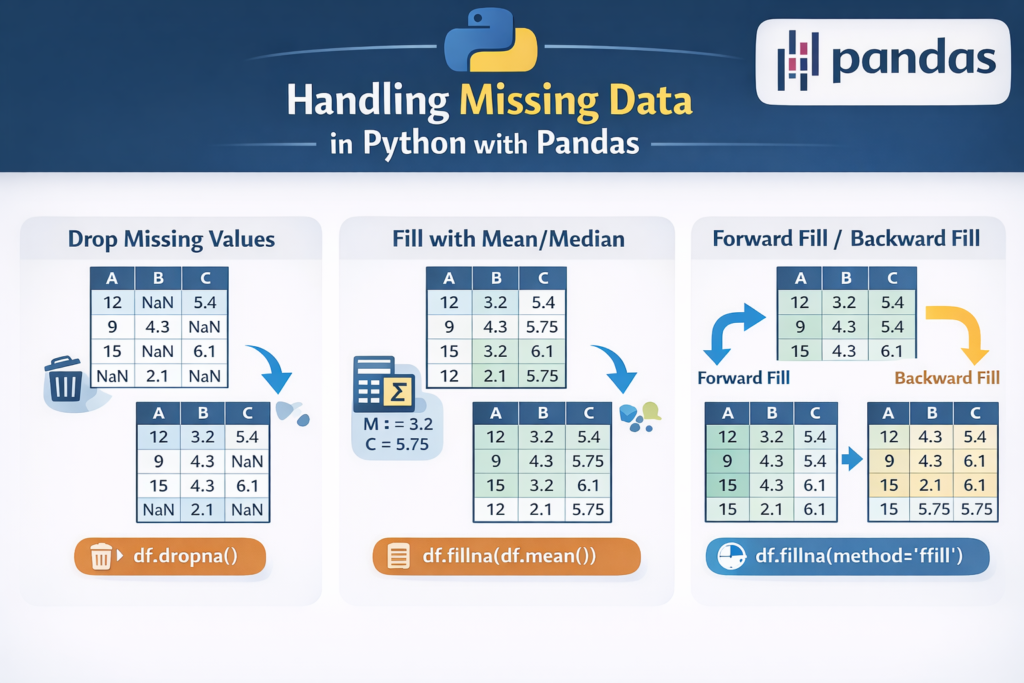
Removing Missing Values
If only a few rows contain missing values, it may be safe to remove them.
df = df.dropna()
This removes all rows that contain null values.
However, this method should be used carefully. If too many rows are removed, valuable data may be lost.
Filling Missing Values
Instead of removing rows, missing values can also be replaced.
Example:
df["Age"] = df["Age"].fillna(df["Age"].mean())
This replaces missing age values with the average age.
Another example:
df["Salary"] = df["Salary"].fillna(0)
This replaces missing values with zero.
The choice depends on the dataset and the meaning of the column.
Handling missing values properly is a major part of python data cleaning for machine learning projects.
Forward Fill and Backward Fill (Time Series Data)
For time-series datasets such as stock prices or weather data, forward and backward filling methods are often used.
Forward Fill
df.fillna(method="ffill")
Forward fill replaces missing values using the previous row’s value.
Example:
| Date | Temperature |
|---|---|
| Day 1 | 30 |
| Day 2 | NaN |
| Day 3 | 32 |
After forward fill:
| Date | Temperature |
|---|---|
| Day 1 | 30 |
| Day 2 | 30 |
| Day 3 | 32 |
Backward Fill
df.fillna(method="bfill")
Backward fill uses the next available value to fill missing entries.
These techniques are widely used in financial and sensor datasets.
Choosing the Right Method
There is no single best approach to handling missing data. Common strategies include:
- Removing rows with missing values
- Replacing with mean or median
- Using forward/backward fill
- Predicting missing values using machine learning
Choosing the correct strategy is a key part of python data cleaning for machine learning.
Step 3 — Remove Duplicate Data
Duplicate records are another common issue in real-world datasets. When the same row appears multiple times, it can distort the training process of machine learning models.
For example, imagine a dataset used to predict employee salaries. If the same employee record appears multiple times, the model may incorrectly assume that certain patterns occur more frequently than they actually do.
Because of this, removing duplicates is an essential step in python data cleaning for machine learning projects.
Detect Duplicate Rows
Pandas provides a simple method to detect duplicates.
df.duplicated().sum()
This command returns the total number of duplicate rows in the dataset.
Example output:
15
This means 15 rows are duplicates.
You can also inspect the duplicate rows directly:
df[df.duplicated()]
This helps you understand which records are duplicated.
Remove Duplicate Rows
To remove duplicates, use the following command:
df = df.drop_duplicates()
This removes duplicate rows while keeping the first occurrence.
If you want to reset the index after removing duplicates:
df = df.drop_duplicates().reset_index(drop=True)
Cleaning duplicate records improves dataset reliability and prevents machine learning models from learning misleading patterns.
Step 4 — Fix Incorrect Data Types
Another common issue in datasets is incorrect data types.
For example:
| Column | Expected Type | Actual Type |
|---|---|---|
| Age | Integer | Object |
| Salary | Float | String |
| Date | Datetime | Object |
Machine learning algorithms expect data in the correct format. If the data type is incorrect, the model may fail or produce inaccurate results.
Fixing these issues is a key part of python data cleaning for machine learning.
Check Data Types
You can check column data types using:
df.dtypes
Example output:
Name      object
Age       object
Salary    int64
Here, the Age column should be numeric but appears as object, which means it must be converted.
Convert Data Types
Pandas provides the .astype() method to convert data types.
Example:
df["Age"] = df["Age"].astype(int)
Another example converting salary to float:
df["Salary"] = df["Salary"].astype(float)
Convert Date Columns
Date columns are often stored as text. You can convert them using:
df["Date"] = pd.to_datetime(df["Date"])
After conversion, Python can easily perform time-based operations.
Ensuring correct data types helps machine learning algorithms process data more efficiently.
Step 5 — Detect and Handle Outliers
Outliers are extreme values that differ significantly from other observations in a dataset.
For example:
| Salary |
|---|
| 45000 |
| 52000 |
| 48000 |
| 49000 |
| 900000 |
The last value is an outlier.
Outliers can distort machine learning models by shifting averages or misleading algorithms.
Detecting and treating outliers is an important step in python data cleaning for machine learning.
Visualizing Outliers
One simple way to detect outliers is by using box plots.
import seaborn as sns
import matplotlib.pyplot as pltsns.boxplot(x=df["Salary"])
plt.show()
Box plots visually highlight extreme values outside the normal range.
IQR Method for Outlier Detection
One of the most common statistical techniques for detecting outliers is the Interquartile Range (IQR) method.
Steps:
- Calculate first quartile (Q1)
- Calculate third quartile (Q3)
- Compute IQR
- Define lower and upper limits
Example implementation:
Q1 = df["Salary"].quantile(0.25)
Q3 = df["Salary"].quantile(0.75)IQR = Q3 - Q1lower_bound = Q1 - 1.5 * IQR
upper_bound = Q3 + 1.5 * IQRdf = df[(df["Salary"] >= lower_bound) & (df["Salary"] <= upper_bound)]
This removes rows containing extreme values outside the acceptable range.
When Should You Remove Outliers?
Outliers should be removed only if they represent data errors or unrealistic values.
Examples where outliers may be valid:
- Luxury home prices
- Billionaire net worth
- Rare medical conditions
In these cases, removing outliers may remove important information.
Careful evaluation is necessary when performing python data cleaning for machine learning projects.
Step 6 — Clean Text and Categorical Data
Many real-world datasets contain categorical or text columns.
Examples include:
- city
- gender
- country
- product category
However, these columns often contain inconsistencies.
Example dataset:
New York
new york
NEW YORK
 New York
Although these represent the same city, they appear as different values.
Cleaning text data ensures consistency across the dataset.
Text datasets often require additional processing such as text preprocessing in Python before training models.
Convert Text to Lowercase
df["city"] = df["city"].str.lower()
After this step:
New York → new york
NEW YORK → new york
Remove Extra Spaces
Datasets often contain hidden spaces.
Example:
" New York"
"New York "
Remove spaces using:
df["city"] = df["city"].str.strip()
This removes leading and trailing whitespace.
Replace Inconsistent Categories
Sometimes categories appear with different spellings.
Example:
USA
U.S.A
United States
These can be standardized using replacement rules.
df["country"] = df["country"].replace({
    "U.S.A": "USA",
    "United States": "USA"
})
Consistent categorical values improve model training and avoid unnecessary category duplication.
Cleaning categorical columns is a crucial step in python data cleaning for machine learning.
Step 7 — Prepare Data for Machine Learning
After cleaning the dataset, the next step is preparing the data so that machine learning algorithms can understand it.
Most machine learning models cannot work directly with text categories.
For example:
Gender = Male / Female
City = London / Paris / Tokyo
These values must be converted into numerical form.
This step is called encoding categorical variables.
Label Encoding
Label encoding converts categories into numbers.
Example:
Male → 0
Female → 1
Implementation:
from sklearn.preprocessing import LabelEncoderencoder = LabelEncoder()df["Gender"] = encoder.fit_transform(df["Gender"])
Label encoding works best for ordinal categories where order matters.
Examples:
- Low
- Medium
- High
One-Hot Encoding
For categories without order, one-hot encoding is usually preferred.
Example:
City column:
London
Paris
Tokyo
After one-hot encoding:
| city_London | city_Paris | city_Tokyo |
|---|---|---|
| 1 | 0 | 0 |
| 0 | 1 | 0 |
| 0 | 0 | 1 |
Implementation:
df = pd.get_dummies(df, columns=["City"])
This method prevents the model from assuming an incorrect numerical relationship between categories.
Encoding categorical data is one of the final steps in python data cleaning for machine learning projects.

Step 8 — Feature Scaling for Machine Learning
After cleaning the dataset, the next step is preparing numerical features for machine learning models. Many algorithms perform better when features are on a similar scale.
For example, consider this dataset:
| Age | Salary |
|---|---|
| 25 | 50,000 |
| 30 | 60,000 |
| 35 | 120,000 |
Here, salary values are much larger than age values. Some algorithms such as K-Nearest Neighbors, Support Vector Machines, and gradient-based models can be influenced by these scale differences.
This is why feature scaling is often included in the final stage of python data cleaning for machine learning projects.
You can explore more scaling techniques in the scikit-learn preprocessing documentation.
Standardization
Standardization transforms data so that it has:
- Mean = 0
- Standard deviation = 1
This method is commonly used in machine learning workflows.
Example implementation:
from sklearn.preprocessing import StandardScalerscaler = StandardScaler()df["Age_scaled"] = scaler.fit_transform(df[["Age"]])
df["Salary_scaled"] = scaler.fit_transform(df[["Salary"]])
After standardization, features become easier for machine learning models to interpret.
Normalization
Normalization rescales values to a range between 0 and 1.
Example:
from sklearn.preprocessing import MinMaxScalerscaler = MinMaxScaler()df["Salary_scaled"] = scaler.fit_transform(df[["Salary"]])
Normalization is commonly used in:
- neural networks
- deep learning models
Understanding when to apply scaling is an important part of python data cleaning for machine learning.
Step 9 — Complete Data Cleaning Pipeline Example
Now that we have discussed each step individually, let’s look at a simplified workflow combining them together.
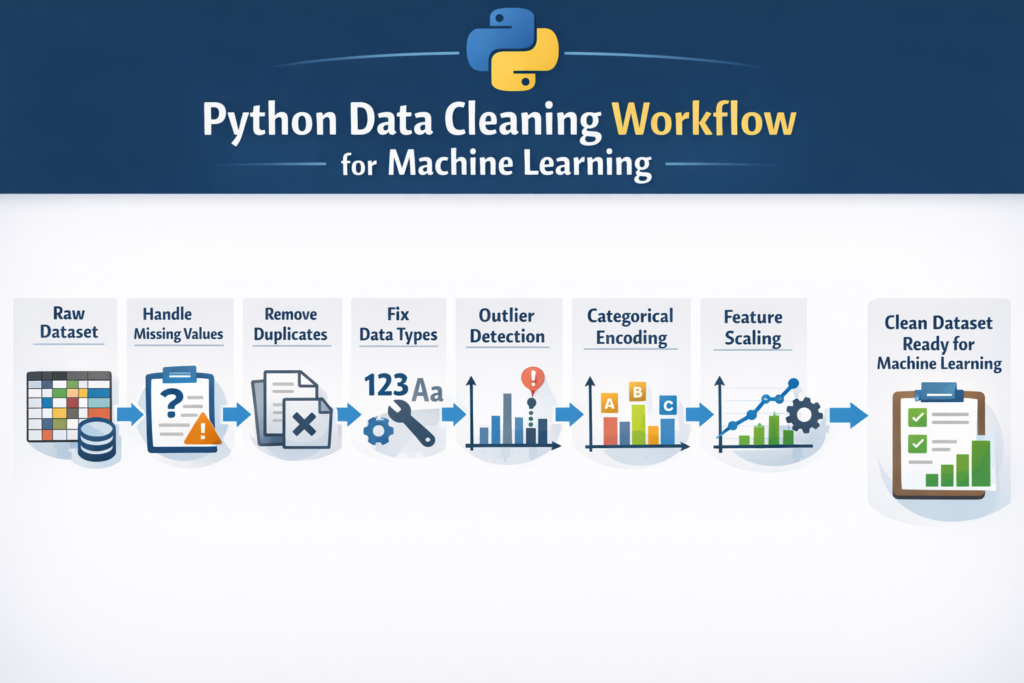
A typical python data cleaning for machine learning pipeline includes the following steps:
- Load dataset
- Explore data
- Handle missing values
- Remove duplicates
- Fix data types
- Handle outliers
- Encode categorical variables
- Scale features
Example pipeline:
import pandas as pd
from sklearn.preprocessing import StandardScalerdf = pd.read_csv("data.csv")# remove duplicates
df = df.drop_duplicates()# handle missing values
df["Age"] = df["Age"].fillna(df["Age"].mean())# convert data types
df["Age"] = df["Age"].astype(int)# encode categorical variables
df = pd.get_dummies(df, columns=["City"])# feature scaling
scaler = StandardScaler()
df["Age"] = scaler.fit_transform(df[["Age"]])
This simplified pipeline shows how different steps of python data cleaning for machine learning come together before training a model.
In real-world projects, pipelines may include many additional preprocessing techniques.
The official guide on handling missing data in pandas explains different strategies for working with null values.
Data Cleaning Do’s and Don’ts
When cleaning datasets for machine learning, beginners often make mistakes that reduce model performance. Following best practices helps avoid these problems.
Do: Explore the Dataset First
Before cleaning the dataset, always examine its structure.
Use commands like:
df.head()
df.info()
df.describe()
Understanding the dataset helps identify missing values, outliers, and incorrect data types.
Do: Keep a Backup of the Original Dataset
Always keep a copy of the raw dataset.
This allows you to return to the original data if a cleaning step removes important information.
Do: Understand the Meaning of Each Feature
Blindly modifying or removing data without understanding its meaning can damage the dataset.
For example, a high value might appear to be an outlier but could represent a legitimate observation.
Don’t: Remove Too Much Data
Dropping large numbers of rows may shrink the dataset and reduce model performance.
Instead of removing rows, consider:
- filling missing values
- imputing values using statistics
- predicting missing data
Don’t: Ignore Outliers Completely
Outliers can sometimes represent data errors.
Ignoring them may cause machine learning algorithms to learn incorrect patterns.
Don’t: Perform Data Cleaning After Training the Model
Data cleaning must be done before training the machine learning model.
Otherwise, the model may already have learned patterns from incorrect data.
Applying these principles ensures that python data cleaning for machine learning projects produces reliable datasets.
When Is Your Dataset Clean Enough?
Many beginners ask an important question:
How do you know when your dataset is clean enough for machine learning?
In practice, datasets are rarely perfectly clean. The goal is not perfection but reducing noise and inconsistencies so the model can learn useful patterns.
A dataset is generally considered ready for machine learning when the following conditions are met:
- Missing values have been handled
- Duplicate records have been removed
- Data types are correct
- Outliers have been examined and treated
- Categorical variables are encoded
- Numerical features are scaled when necessary
Once these steps are completed, the dataset is typically ready for model training.
This stage marks the final step in python data cleaning for machine learning workflows.
Conclusion
Data cleaning is one of the most important steps in any machine learning project. Even the most advanced algorithms cannot compensate for poor-quality data.
Real-world datasets frequently contain issues such as missing values, duplicate records, inconsistent formatting, and outliers. If these problems are not addressed, machine learning models may produce inaccurate predictions.
In this guide, we explored the complete workflow of python data cleaning for machine learning projects, including:
- exploring datasets using Pandas
- handling missing values
- removing duplicates
- fixing incorrect data types
- detecting and handling outliers
- cleaning text and categorical data
- encoding categorical variables
- applying feature scaling
By applying these techniques, developers can transform raw datasets into clean, structured data suitable for machine learning models.
Learning python data cleaning for machine learning is a foundational skill for anyone interested in data science, artificial intelligence, or analytics. With practice, these techniques become a natural part of every machine learning workflow.
You can apply these techniques when you build an AI text analyzer with Python or other machine learning projects.
FAQ
What is data cleaning in machine learning?
Data cleaning is the process of identifying and fixing errors, missing values, duplicates, and inconsistencies in datasets before training machine learning models.
Which Python library is best for data cleaning?
The Pandas library is the most widely used tool for data cleaning in Python. It provides powerful features for manipulating and preprocessing datasets.
Why is data cleaning important for machine learning?
Machine learning algorithms rely on accurate data. If the dataset contains errors or inconsistencies, the model may learn incorrect patterns and produce unreliable predictions.
How long does data cleaning take in real projects?
In many real-world machine learning projects, data scientists spend 60–80% of their time cleaning and preparing data before training models.
Can machine learning models handle missing values automatically?
Some algorithms can handle missing values, but most machine learning models perform better when datasets are cleaned and preprocessed beforehand.

