

Artificial intelligence is no longer a futuristic concept reserved for research labs and tech giants. In 2026, it is the engine behind the tools we use daily—from voice assistants on our phones to recommendation systems on streaming platforms. As AI continues to reshape industries, the question for many beginners is: how do I start learning Python for AI?
The answer is clear: Python for AI has become the standard approach for building intelligent systems. Its clean syntax, massive ecosystem of specialized libraries, and supportive community make it the ideal entry point for anyone wanting to build AI systems. When you search for Python for AI tutorials online, you’ll find countless resources because Python dominates this field.
However, beginners often face common challenges when starting their AI journey. The field is vast, the mathematics can seem intimidating, and knowing where to begin among countless tutorials and libraries is overwhelming. Many aspiring AI practitioners get stuck in “tutorial hell,” watching endless videos without building anything practical, or they jump into complex deep learning without understanding the fundamentals.
This guide is designed to solve exactly these problems. By the end, you will understand what artificial intelligence truly means, why Python is your best tool for exploring it, and how to build your first real AI model. We will cover machine learning foundations, essential Python libraries, a complete AI workflow, and practical project ideas that will transform you from a curious beginner into someone who can actually build working AI applications. Let’s begin your journey into artificial intelligence with Python.
What is Artificial Intelligence?
Before writing any Python for AI code, we need to understand what artificial intelligence actually means. At its simplest, artificial intelligence is the field of computer science focused on creating systems that can perform tasks requiring human-like intelligence. When you study Python for AI, you’re learning to build these systems.
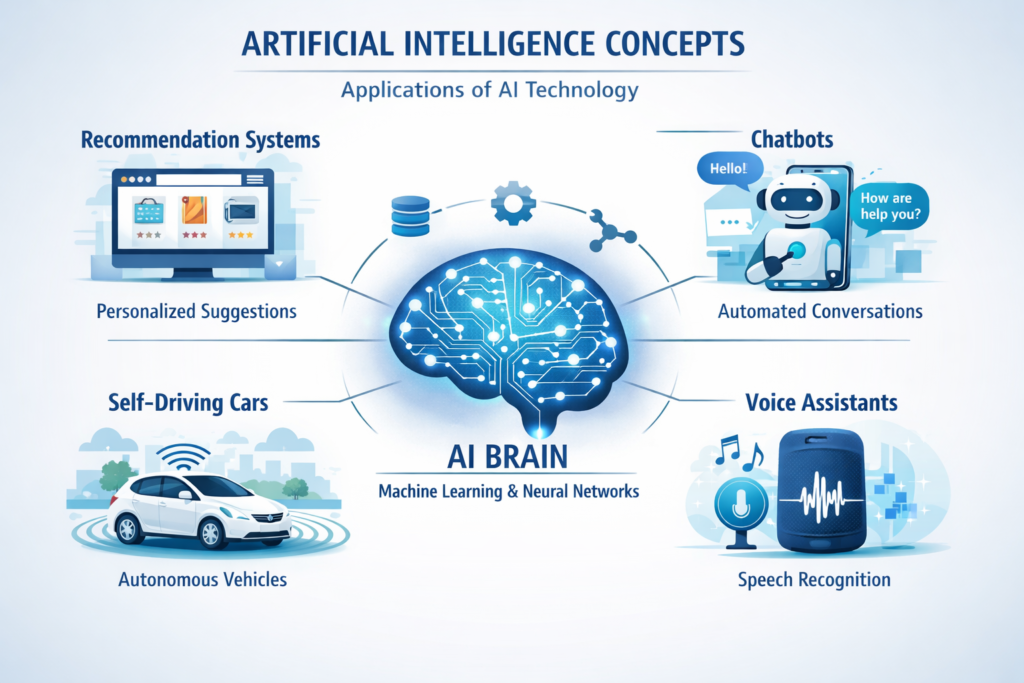
You interact with AI systems constantly, perhaps without realizing it. When Netflix suggests a movie you might enjoy, that is an AI recommendation engine analyzing your viewing history. When your email provider filters out spam, that is an AI classification model at work. When you ask Siri or Google Assistant for the weather forecast, that is an AI system understanding your speech and retrieving information. When Tesla’s Autopilot keeps your car centered in its lane, that is computer vision AI processing camera feeds in real time .
Types of AI
AI researchers typically categorize artificial intelligence into three levels based on capability and scope:
Narrow AI (Weak AI) refers to systems designed to perform specific tasks. Every successful AI application today falls into this category. Your spam filter cannot drive a car, and your navigation app cannot write poetry. Narrow AI excels at its designated function but cannot generalize beyond it. This is what we build with Python libraries today.
General AI (Strong AI) would possess human-level intelligence across domains. While this remains theoretical, Python for AI research continues pushing toward this goal.
Super AI represents intelligence that surpasses human capabilities across all domains—scientific creativity, social skills, and general wisdom. This remains purely speculative and the subject of much philosophical debate among technologists and ethicists.
For this guide, we focus exclusively on narrow AI—the practical, buildable systems you can create with Python today.
Why Python is the Best Language for AI
Python’s dominance in artificial intelligence is not accidental. Several key factors combine to make it the natural choice for both beginners and experienced practitioners.
Python has become the dominant programming language for AI development. You can explore the official documentation on the Python official website.
Simple and Easy Syntax
When you learn Python for AI, you benefit from Python’s clean, readable syntax. This means you spend less time wrestling with compiler errors and more time understanding AI concepts. Python for AI code often reads like pseudocode, making it easier to translate mathematical ideas into working programs. This accessibility is why Python for AI is recommended for beginners worldwide.
Massive AI Libraries
Python boasts the richest ecosystem of AI and data science libraries of any programming language. These libraries abstract away the complex mathematics and implementation details, allowing you to build sophisticated models with relatively little code . The core libraries you will encounter include:
- NumPy: Fundamental package for numerical computing with powerful array operations
- Pandas: Data manipulation and analysis library, essential for preparing datasets
- Scikit-learn: Comprehensive machine learning library with classic algorithms
- TensorFlow: Deep learning framework developed by Google
- PyTorch: Flexible deep learning framework popular in research
We will explore each of these in detail shortly.
Large Community
When you learn Python for AI, you join millions of other developers, data scientists, researchers, and students worldwide. This massive community means abundant learning resources, countless tutorials, active forums like Stack Overflow, and open-source projects you can study and contribute to. When you encounter problems—and you will—solutions are almost certainly available online . The community also drives continuous improvement of libraries and tools.
Strong Data Science Ecosystem
Beyond AI-specific libraries, Python for AI benefits from a mature data science ecosystem. Visualization libraries like Matplotlib, Jupyter Notebooks for experimentation, and Scikit-learn’s utilities all make Python for AI development more productive.
Fast Development
Python enables rapid iteration. You can try an idea, test it, and refine it much faster than in compiled languages like C++ or Java . This speed of experimentation is crucial in AI development, where you often need to test different algorithms, adjust parameters, and preprocess data in various ways. Python’s interpreted nature and rich library support mean you go from idea to working prototype quickly, accelerating your learning and productivity.
Python Libraries Used in Artificial Intelligence
Understanding the key Python libraries for AI is essential. Each serves specific purposes in your workflow, and knowing when to use each tool is as important as knowing how to import it .
NumPy
NumPy is the foundation of scientific computing in Python for AI. It provides multidimensional arrays and tools for working with them efficiently. Almost every other Python for AI library builds on NumPy.
python
import numpy as np

# Create arrays
arr = np.array([1, 2, 3, 4, 5])
matrix = np.array([[1, 2, 3], [4, 5, 6]])

# Basic operations
print(arr.mean())           # Mean: 3.0
print(arr.sum())            # Sum: 15
print(matrix.shape)         # Dimensions: (2, 3)
print(np.sqrt(arr))         # Element-wise square root
NumPy’s real power lies in vectorized operations that execute quickly without explicit Python loops. This performance is critical when working with large datasets common in AI .
Pandas
Pandas builds on NumPy to provide data structures and tools for data manipulation and analysis. Its primary data structure, the DataFrame, represents tabular data similar to spreadsheets or SQL tables. Most AI projects begin with loading and cleaning data using Pandas .
python
import pandas as pd

# Create a DataFrame from dictionary
data = {
    "Name": ["Ali", "Sara", "John", "Emma"],
    "Age": [22, 25, 30, 28],
    "City": ["Karachi", "Lahore", "New York", "London"]
}

df = pd.DataFrame(data)
print(df)

# Basic data exploration
print(df.head())              # First few rows
print(df.info())               # Data types and missing values
print(df.describe())           # Statistical summary
print(df[df.Age > 25])         # Filtering data
Scikit-learn
Scikit-learn is the go-to library for classical machine learning algorithms. It provides consistent interfaces for classification, regression, clustering, dimensionality reduction, and model evaluation. For beginners, scikit-learn offers the perfect balance of power and simplicity .
Scikit-learn provides powerful machine learning tools for classification, regression, and clustering. You can explore its full documentation on the Scikit-learn official site.
python
from sklearn.ensemble import RandomForestClassifier
from sklearn.model_selection import train_test_split
from sklearn.metrics import accuracy_score

# Prepare data (assuming X features and y labels)
X_train, X_test, y_train, y_test = train_test_split(X, y, test_size=0.2)

# Create and train model
model = RandomForestClassifier()
model.fit(X_train, y_train)

# Make predictions and evaluate
predictions = model.predict(X_test)
accuracy = accuracy_score(y_test, predictions)
TensorFlow
TensorFlow, developed by Google, is a comprehensive framework for deep learning in Python for AI. It allows you to build and train neural networks of varying complexity.
TensorFlow is one of the most widely used deep learning frameworks developed by Google. You can learn more from the TensorFlow documentation.
PyTorch
PyTorch, developed by Meta, has become the preferred framework for AI research due to its intuitive design and dynamic computation graphs. It feels more “Pythonic” than TensorFlow and offers seamless GPU acceleration. Many state-of-the-art models and research papers are released with PyTorch implementations first .
Both TensorFlow and PyTorch are powerful, and learning either provides a strong foundation for deep learning work. Many practitioners learn both over time.
AI Workflow with Python (Step-by-Step)
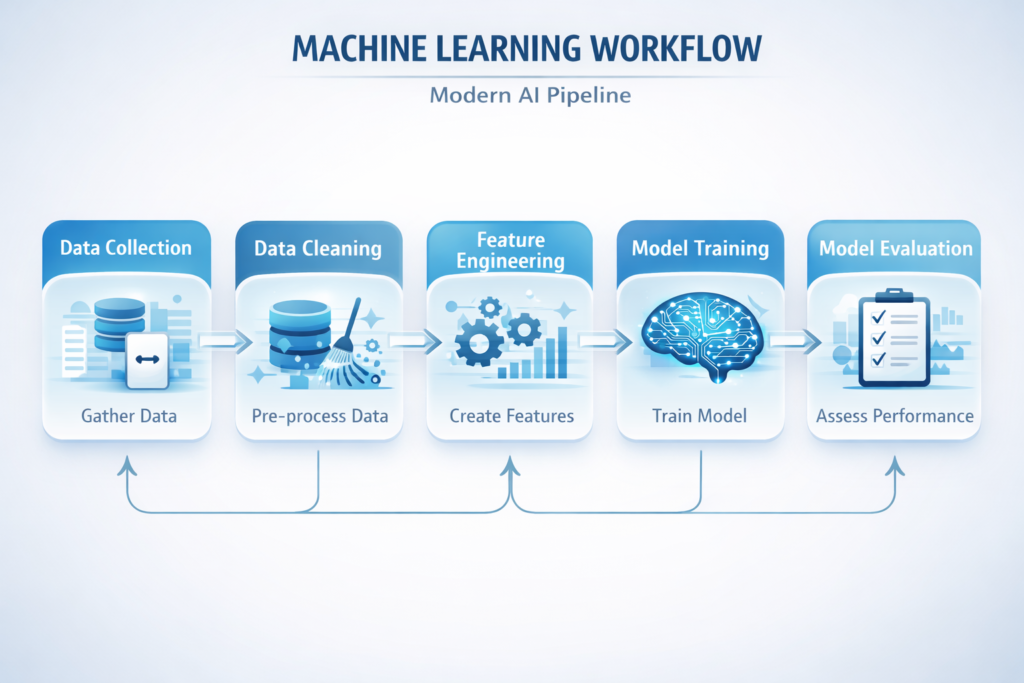
Building AI systems follows a consistent pipeline. Understanding this workflow helps you approach projects systematically rather than haphazardly.
Step 1 – Data Collection
Every AI project starts with data. Your model learns patterns from examples, so the quality and quantity of your data directly impact results. Data can come from various sources:
- Public datasets: Kaggle, UCI Machine Learning Repository, government data portals
- APIs: Twitter API, weather APIs, financial data services
- Web scraping: Extracting data from websites using tools like BeautifulSoup or Scrapy
- Databases: Querying SQL databases containing business data
- Manual collection: Creating your own datasets through surveys or measurements
Step 2 – Data Cleaning
Real-world data is messy. It contains missing values, inconsistent formatting, outliers, and errors. Cleaning this data is often the most time-consuming part of AI projects .
python
import pandas as pd

# Load data
df = pd.read_csv("data.csv")

# Handle missing values
df.dropna()                    # Remove rows with missing data
df.fillna(df.mean())           # Fill missing with mean values

# Remove duplicates
df.drop_duplicates()

# Fix data types
df["date"] = pd.to_datetime(df["date"])
df["amount"] = df["amount"].astype(float)
Step 3 – Feature Engineering
Raw data rarely comes in a format suitable for machine learning. Feature engineering transforms your data into representations that algorithms can learn from effectively .
Before converting text into machine learning features, it is important to clean and prepare the data properly. You can learn this in detail in our guide on Text Preprocessing in Python for NLP.
This might involve:
- Creating numerical representations of text (TF-IDF, word embeddings)
- Normalizing numerical features to similar scales
- Creating interaction features from existing columns
- Encoding categorical variables as numbers
python
from sklearn.feature_extraction.text import TfidfVectorizer
from sklearn.preprocessing import StandardScaler

# Convert text to TF-IDF features
vectorizer = TfidfVectorizer(max_features=1000)
X_text = vectorizer.fit_transform(text_data)

# Scale numerical features
scaler = StandardScaler()
X_numerical_scaled = scaler.fit_transform(X_numerical)
Reducing words to their root form can improve NLP models. This technique is explained in our guide on Stemming vs Lemmatization in Python for NLP.
Step 4 – Train Machine Learning Model
With prepared data, you split it into training and testing sets, then train your chosen algorithm .
python
from sklearn.model_selection import train_test_split
from sklearn.ensemble import GradientBoostingClassifier

# Split data
X_train, X_test, y_train, y_test = train_test_split(
    X, y, test_size=0.2, random_state=42
)

# Train model
model = GradientBoostingClassifier()
model.fit(X_train, y_train)
Step 5 – Model Evaluation
Evaluation measures how well your model performs on unseen data—a crucial step in any Python for AI project.
python
from sklearn.metrics import accuracy_score, confusion_matrix, classification_report

# Predict on test data
y_pred = model.predict(X_test)

# Calculate metrics
accuracy = accuracy_score(y_test, y_pred)
conf_matrix = confusion_matrix(y_test, y_pred)
report = classification_report(y_test, y_pred)

print(f"Accuracy: {accuracy}")
print(f"Confusion Matrix:\n{conf_matrix}")
print(f"Classification Report:\n{report}")
Another important preprocessing step is removing unnecessary words. Learn how this works in our article on Stopword Removal in Python for NLP.
Build Your First AI Model in Python
Let’s build a complete, working AI model. We’ll create a spam detection system that classifies messages as either “spam” or “ham” (not spam). This project introduces text classification, a fundamental NLP task, using scikit-learn.
Spam detection is a classic example of text classification. If you want to explore this topic further, check out our detailed tutorial on Text Classification in Python.
Step 1: Import Libraries
python
import pandas as pd
from sklearn.feature_extraction.text import CountVectorizer
from sklearn.model_selection import train_test_split
from sklearn.naive_bayes import MultinomialNB
from sklearn.metrics import accuracy_score, classification_report
Text vectorization works better when text is properly tokenized. If you want to understand how tokenization works, read our tutorial on Python Tokenization for NLP.
Step 2: Prepare Data
For this example, we’ll create a small dataset. In practice, you would load a larger dataset from a file.
python
# Sample data
texts = [
    "Win a free iPhone now!",
    "Meeting at 3pm tomorrow",
    "Congratulations you've won $1000",
    "Can you pick up milk on your way home?",
    "URGENT: Your account needs verification",
    "See you at the party tonight",
    "Get rich quick with this one trick",
    "Don't forget to submit the report",
    "You have been selected for a prize",
    "What time are we meeting for lunch?"
]

labels = [1, 0, 1, 0, 1, 0, 1, 0, 1, 0]  # 1 = spam, 0 = ham
Step 3: Convert Text to Vectors
Machine learning models work with numbers, not raw text. We convert each message into a numerical vector representing word frequencies.
python
# Create vectorizer
vectorizer = CountVectorizer()

# Convert text to word count vectors
X = vectorizer.fit_transform(texts)

# Check the feature names (words)
print(vectorizer.get_feature_names_out())
Step 4: Split Data
python
# Split into training and testing sets
X_train, X_test, y_train, y_test = train_test_split(
    X, labels, test_size=0.3, random_state=42
)
Step 5: Train Model
python
# Create and train Naive Bayes classifier
model = MultinomialNB()
model.fit(X_train, y_train)
Step 6: Evaluate Model
python
# Make predictions on test data
y_pred = model.predict(X_test)

# Calculate accuracy
accuracy = accuracy_score(y_test, y_pred)
print(f"Accuracy: {accuracy:.2f}")

# Detailed classification report
print(classification_report(y_test, y_pred, target_names=["Ham", "Spam"]))
Step 7: Make Predictions on New Messages
python
# Test with new messages
new_messages = [
    "Free money now!!!",
    "Are we still meeting for coffee?",
    "You've won a luxury vacation"
]

# Transform new messages using the same vectorizer
X_new = vectorizer.transform(new_messages)

# Predict
predictions = model.predict(X_new)

for msg, pred in zip(new_messages, predictions):
    print(f"Message: {msg}")
    print(f"Prediction: {'Spam' if pred == 1 else 'Ham'}\n")
Congratulations! You have just built your first AI model. This same workflow—data preparation, vectorization, training, evaluation, prediction—applies to countless other problems .
Python AI Project Ideas for Beginners
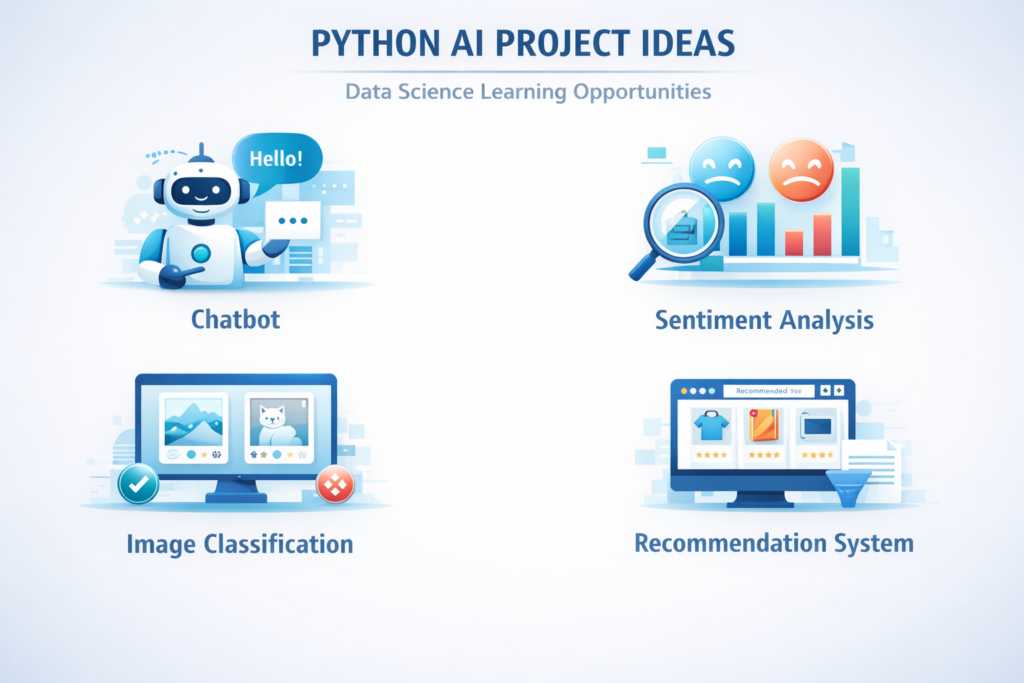
Building projects is the most effective way to solidify your Python for AI skills. Here are five beginner-friendly AI projects that will teach you different aspects of artificial intelligence with Python.
Sentiment Analysis
Build a model that determines whether a piece of text expresses positive, negative, or neutral sentiment. This is widely used for analyzing product reviews, social media monitoring, and customer feedback. You can use scikit-learn with TF-IDF features, or explore more advanced options with transformer models from Hugging Face .
Skills learned: Text preprocessing, classification, model evaluation
Simple Chatbot
Create a rule-based chatbot using Python’s regular expressions and conditional logic. Start with simple pattern matching, then expand to incorporate intent classification using machine learning. Your chatbot could answer FAQs for a specific domain like customer support or educational tutoring .
Skills learned: NLP basics, conversation flow design, API integration
Image Classifier
Build a system that recognizes objects in images. Using TensorFlow or PyTorch, you can train a convolutional neural network on datasets like CIFAR-10 or create your own custom dataset. Start with pre-trained models and fine-tune them for your specific needs .
Skills learned: Deep learning, computer vision, transfer learning
Recommendation System
Create a movie or product recommendation engine using collaborative filtering or content-based approaches. The MovieLens dataset is perfect for this project. You can implement simple popularity-based recommendations, then progress to personalized suggestions using matrix factorization .
Skills learned: Data manipulation, similarity metrics, matrix operations
Text Summarizer
Build an extractive text summarizer that identifies the most important sentences in an article. This introduces you to more advanced NLP concepts like sentence scoring, text ranking, and extractive algorithms. Later, you can explore abstractive summarization using transformer models .
Skills learned: Advanced NLP, text ranking, transformer architectures
Real-World Applications of Python in AI
Python’s versatility means it powers AI applications across virtually every industry. Understanding these real-world uses provides context for your learning and inspiration for future projects.
Healthcare
Medical institutions use Python for disease prediction from patient data, medical image analysis for detecting tumors or fractures, drug discovery through molecular modeling, and personalized treatment recommendations based on patient history .
Finance
Banks and financial firms deploy Python models for fraud detection in real-time transactions, algorithmic trading systems that execute trades based on market patterns, credit risk assessment for loan applications, and customer churn prediction .
Marketing
Marketing teams leverage Python for customer segmentation to target campaigns effectively, sentiment analysis of brand mentions on social media, churn prediction to identify at-risk customers, and marketing mix modeling to optimize budget allocation.
E-commerce
Online retailers use recommendation engines to suggest products, demand forecasting to manage inventory, dynamic pricing to optimize revenue, and visual search allowing customers to find products using images .
Self-Driving Cars
Autonomous vehicle companies rely on Python for computer vision to detect objects, pedestrians, and lane markings, sensor fusion combining camera, radar, and LiDAR data, path planning algorithms for safe navigation, and simulation environments for testing .
Best Resources to Learn Python for AI
Quality resources accelerate your Python for AI journey. Here are highly recommended options for 2026:
Kaggle offers free micro-courses on Python, Pandas, machine learning, and deep learning. Their community competitions provide real-world practice with datasets and notebooks .
Coursera hosts comprehensive specializations like Andrew Ng’s Machine Learning and Deep Learning Specializations, plus numerous Python for AI courses from top universities.
Fast.ai provides practical deep learning courses designed to get you building state-of-the-art models quickly, with a focus on code-first teaching.
HuggingFace has become essential for NLP and transformer models. Their free courses and documentation teach you to use thousands of pre-trained models .
YouTube channels like Sentdex, StatQuest with Josh Starmer, and TensorFlow’s official channel offer excellent free tutorials.
GitHub hosts millions of Python for AI projects you can study, fork, and contribute to. Following open-source Python for AI libraries helps you learn from production-quality code.
Books like “Python für KI- und Daten-Projekte” (2026) provide structured, project-based learning for German readers .
Common Mistakes Beginners Make in AI
Avoiding these pitfalls will save you time and frustration on your Python for AI learning journey. Learn from others’ mistakes rather than making them yourself.
Skipping Python basics: Many beginners jump directly to AI without mastering Python fundamentals. Solid Python skills are essential for Python for AI success.
Not understanding data preprocessing: Beginners often focus on model selection while neglecting data quality. Remember: garbage in, garbage out. Most of your time should be spent understanding, cleaning, and preparing your data .
Ignoring statistics: Machine learning is applied statistics. Without understanding concepts like distributions, variance, bias, and p-values, you cannot properly evaluate or debug your models.
Using too many libraries: It is tempting to import every library you have heard of. Start with basics—NumPy, Pandas, scikit-learn—and add others only when you have a specific need.
Not building projects: Reading tutorials without building projects leads to superficial understanding. Code every day, start small, and gradually increase complexity . Solution: Code every day. After each tutorial, build something similar but different. Start with simple Python for AI projects and gradually increase complexity.
Python AI Learning Roadmap (2026)
Follow this structured path to go from complete beginner to confident Python for AI practitioner. This roadmap is designed for 2026, incorporating the latest tools and best practices.
1️⃣ Python Basics (4-6 weeks): Learn syntax, data types, control flow, functions, file handling, and error management. Complete small coding challenges daily .
2️⃣ Data Science Libraries (4-6 weeks): Master NumPy for numerical computing and Pandas for data manipulation. Practice loading, cleaning, and exploring datasets.
3️⃣ Machine Learning (8-12 weeks): Study supervised learning (regression, classification), unsupervised learning (clustering), and model evaluation. Implement algorithms using scikit-learn .
4️⃣ Deep Learning (8-12 weeks): Learn neural network fundamentals, then explore TensorFlow or PyTorch. Understand architectures like CNNs for images and RNNs/transformers for sequences .
5️⃣ AI Projects (Ongoing): Build increasingly complex projects. Participate in Kaggle competitions. Contribute to open-source AI projects. Create a portfolio showcasing your work .
Conclusion
Python for AI has earned its place as the standard for artificial intelligence development through simplicity, power, and community support. Its gentle learning curve makes AI accessible to beginners, while its extensive libraries enable building sophisticated systems.
Throughout this guide, you have learned what AI truly means, why Python is your ideal companion for exploring it, and how to build your first spam detection model. You have discovered essential libraries, understood the complete AI workflow, and gained ideas for projects that will deepen your skills.
The field of artificial intelligence evolves rapidly, but the fundamentals remain constant. Data preparation, model building, evaluation, and iteration form the core of every AI project, whether you are classifying emails or building the next generation of autonomous systems.
Your next step is simple: start building. Take the spam detector we built together and expand it. Add more data, try different algorithms, or turn it into a web application. Choose one project from our list and begin today. The journey of mastering artificial intelligence with Python is challenging but immensely rewarding. Every expert was once a beginner who decided to start and persevered through difficulties. Your journey begins now.
Remember that learning Python for AI is not a destination but a continuous journey. The field advances constantly, with new libraries, techniques, and applications emerging regularly. Embrace this evolution as an opportunity for lifelong learning and growth. The skills you develop today will enable you to contribute to tomorrow’s breakthroughs.
Ready to build your first Python for AI project? Open your Python environment, import your libraries, and start coding. The world of artificial intelligence awaits your contributions.
FAQs
What is Python used for in AI?
Python for AI is used throughout the development lifecycle: data collection, cleaning, model building, training, evaluation, and deployment. It supports machine learning, deep learning, NLP, and computer vision.
Is Python necessary for AI?
Can beginners learn AI with Python?
Absolutely. Python for AI is the best combination for beginners due to Python’s readability and the abundance of beginner-focused resources. Many successful AI practitioners began with no programming experience and learned through Python. The key is to start with Python basics, then gradually add AI concepts, always building projects to solidify understanding.
How long does it take to learn Python for AI?
Which Python library is best for AI?
Do I need a strong math background for Python for AI?
A strong mathematical foundation becomes increasingly important as you advance in Python for AI. Key areas include:
Linear algebra: Vectors, matrices, eigenvalues for understanding neural networks
Calculus: Derivatives and gradients for optimization algorithms
Probability and statistics: Distributions, hypothesis testing, Bayesian thinking
Optimization: Gradient descent, convex optimization
However, you can start with basic concepts and learn mathematics alongside coding. Many Python for AI libraries abstract away the math, but deeper understanding helps you debug and improve models.
What hardware do I need for Python for AI?
For learning and small projects, a standard laptop with 8-16GB RAM is sufficient. For deep learning with large datasets, you benefit from:
GPU (NVIDIA preferred) for faster neural network training
More RAM (16-32GB) for working with large datasets
SSD storage for faster data loading
Cloud options: Google Colab (free GPU), Kaggle (free GPU), AWS, GCP, Azure for larger projects

