

Introduction
Machine learning is transforming the way software applications work. From recommendation systems on streaming platforms to fraud detection in banking, machine learning models help computers learn patterns from data and make intelligent decisions.
Python has become the most popular programming language for machine learning because of its powerful ecosystem of libraries. Among these libraries, Scikit-Learn stands out as one of the best tools for learning and implementing machine learning algorithms.
If you are new to machine learning, understanding Scikit-Learn for Beginners is one of the most practical ways to start. The library provides simple, well-structured tools for building machine learning models without requiring deep mathematical knowledge.
Scikit-Learn simplifies many complex tasks such as:
- Data preprocessing
- Model training
- Predictions
- Model evaluation
Instead of implementing algorithms from scratch, developers can use Scikit-Learn’s built-in functions to train models quickly and efficiently.
Another reason why Scikit-Learn is ideal for beginners is its consistent design. Most machine learning algorithms in the library follow the same workflow:
- Import the algorithm
- Train the model using
.fit() - Make predictions using
.predict()
This consistency makes it easier for new developers to understand how machine learning works in practice.
In this Scikit-Learn for Beginners guide, you will learn:
- What Scikit-Learn is and why it is important
- How Scikit-Learn fits into the Python machine learning ecosystem
- How to install Scikit-Learn in Python
- The basic machine learning workflow
- How to build your first machine learning model
By the end of this tutorial, you will have a clear understanding of how machine learning models are created using Python.
Let’s start by understanding what Scikit-Learn actually is.
If you are new to artificial intelligence, you may want to start with our Python for AI complete beginner guide before learning machine learning libraries like Scikit-Learn.
Machine learning development is heavily powered by the Python programming language, which offers a rich ecosystem of data science libraries.
What is Scikit-Learn in Python?
Scikit-Learn is an open-source machine learning library for Python that provides simple and efficient tools for data analysis and predictive modeling.
The library was designed to make machine learning accessible to developers, researchers, and beginners who want to build machine learning applications without implementing algorithms from scratch.
Scikit-Learn is one of the most widely used machine learning libraries in Python. According to the Scikit-learn official documentation, the library provides efficient tools for data mining and data analysis.
Scikit-Learn is built on top of several powerful scientific computing libraries, including:
- NumPy
- SciPy
- Matplotlib
These libraries handle the heavy mathematical computations, while Scikit-Learn provides an easy-to-use interface for applying machine learning algorithms.
Because of this design, developers can train powerful models with only a few lines of Python code.
For example, using Scikit-Learn you can quickly implement algorithms such as:
- Linear Regression
- Decision Trees
- Random Forest
- Support Vector Machines
- K-Nearest Neighbors
- K-Means Clustering
These algorithms allow developers to solve a wide variety of machine learning problems.
Another major advantage of learning Scikit-Learn for Beginners is the library’s consistent API design. Most models follow the same structure:
- Create the model
- Train the model with
.fit() - Generate predictions with
.predict()
This predictable workflow helps beginners understand machine learning concepts much faster.
Example: Checking Scikit-Learn Installation
Before using the library, you can verify that Scikit-Learn is installed properly.
import sklearn
print(sklearn.__version__)
If Python prints a version number, it means the library is installed successfully.
It is also important to understand that Scikit-Learn focuses mainly on classical machine learning algorithms rather than deep learning models.
For deep learning tasks such as neural networks or computer vision, frameworks like TensorFlow or PyTorch are typically used.
However, for most beginner machine learning projects involving structured data, Scikit-Learn remains one of the best tools available.
Python Machine Learning Ecosystem: Where Scikit-Learn Fits
Machine learning projects rarely rely on a single library. Instead, developers use multiple libraries together to complete different stages of the machine learning pipeline.
Understanding this ecosystem will help beginners see how Scikit-Learn for Beginners fits into real machine learning workflows.
Below is a simplified overview of the Python machine learning ecosystem.
| Library | Purpose |
|---|---|
| NumPy | Numerical computing |
| Pandas | Data analysis and manipulation |
| Matplotlib | Data visualization |
| Scikit-Learn | Machine learning algorithms |
| TensorFlow | Deep learning models |
| PyTorch | Neural network research |
Each of these libraries plays a specific role in the machine learning process.
For example, a typical workflow might look like this:
- Use Pandas to load and clean datasets
- Use NumPy for numerical operations
- Use Matplotlib to visualize data patterns
- Use Scikit-Learn to train machine learning models
In this workflow, Scikit-Learn acts as the core machine learning engine that builds predictive models.
Many beginners start learning machine learning by combining these tools together.
For example, a developer might:
- Load a dataset using Pandas
- Visualize patterns using Matplotlib
- Train a classification model using Scikit-Learn
This combination allows developers to complete the entire machine learning pipeline within Python.
Compared to advanced frameworks like TensorFlow, Scikit-Learn has a much simpler learning curve. This is why many courses and tutorials recommend starting with Scikit-Learn for Beginners before exploring deep learning frameworks.
Machine learning libraries often work together. For example, NumPy for AI beginners is commonly used for numerical computations before training models with Scikit-Learn.
Installing Scikit-Learn in Python
Before building machine learning models, you need to install Scikit-Learn in your Python environment.
The easiest way to install the library is by using pip, Python’s package manager.
Install Scikit-Learn
Open your terminal or command prompt and run the following command:
pip install scikit-learn
This command downloads the latest version of Scikit-Learn and installs all required dependencies automatically.
These dependencies usually include libraries such as:
- NumPy
- SciPy
- Joblib
Once the installation is complete, you can verify that the library is working correctly.
Verify Installation
Run the following code in Python:
import sklearn
print(sklearn.__version__)
If Python prints a version number such as 1.4.0, the installation was successful.
Installing with Anaconda
If you are using Anaconda, you can install Scikit-Learn using the following command:
conda install scikit-learn
Anaconda environments are commonly used in data science because they simplify dependency management and package installation.
After installation, you are ready to begin working with machine learning models.
However, before building your first model, it is important to understand the basic machine learning workflow used in most projects.
Developers often visualize patterns in datasets using Matplotlib data visualization in Python before training machine learning models.
Understanding the Machine Learning Workflow
When learning Scikit-Learn for Beginners, it is helpful to understand the steps involved in building a machine learning system.
Most machine learning projects follow a structured workflow.
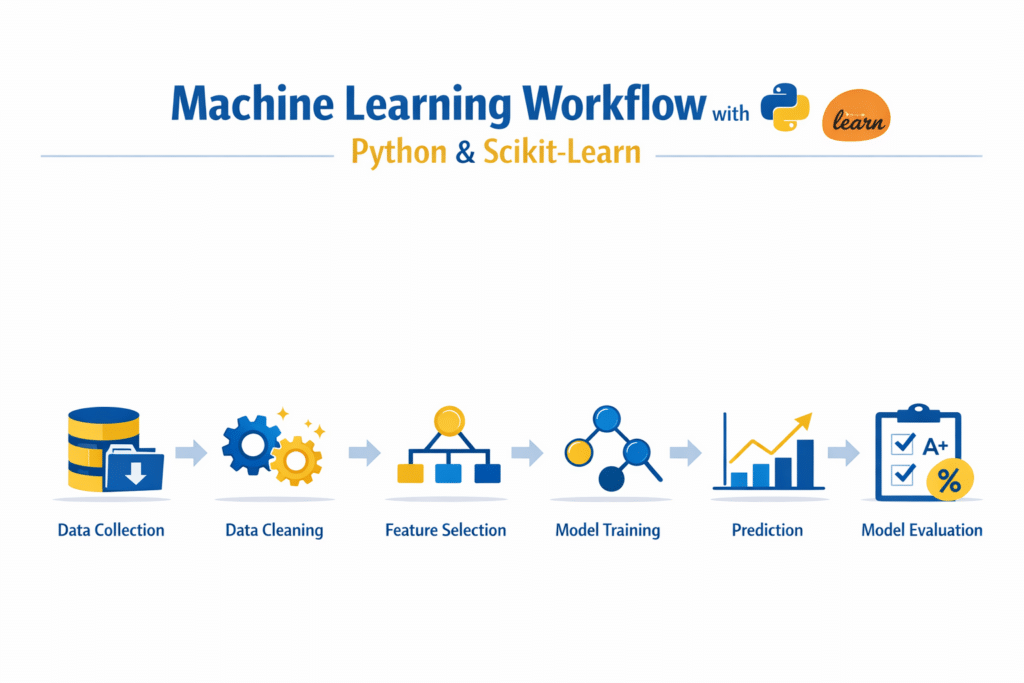
Below are the six main steps in a typical machine learning pipeline.
1. Data Collection
Machine learning models require data in order to learn patterns.
This data can come from various sources, such as:
- Databases
- CSV files
- APIs
- Sensors
- User activity logs
The quality and quantity of the dataset strongly influence the performance of a machine learning model.
Beginners can practice machine learning by downloading real-world machine learning datasets on Kaggle.
2. Data Cleaning
Real-world datasets are rarely perfect. They often contain:
- Missing values
- Duplicate records
- Incorrect data formats
Data cleaning involves preparing the dataset so it can be used effectively by machine learning algorithms.
In many projects, datasets are loaded and cleaned using Pandas for data analysis in Python before being used for machine learning models.
3. Feature Selection
Features are the input variables used by the machine learning model.
For example, if we want to predict house prices, features might include:
- House size
- Location
- Number of bedrooms
- Property age
Choosing meaningful features is essential for building accurate models.
4. Model Training
During training, a machine learning algorithm learns patterns from the dataset.
Scikit-Learn provides many algorithms that can be used for this step, including classification and regression models.
5. Prediction
Once the model is trained, it can analyze new data and generate predictions.
For example, a trained model could predict:
- Whether an email is spam
- The price of a house
- Customer purchasing behavior
6. Model Evaluation
Finally, the model must be evaluated to determine how well it performs.
Evaluation metrics such as accuracy score, confusion matrix, and mean squared error help measure model performance.
Scikit-Learn provides built-in tools for calculating these metrics easily.
Important Scikit-Learn Modules Every Beginner Should Know
When learning Scikit-Learn for Beginners, it is important to understand the key modules used in most machine learning projects. Scikit-Learn is organized into multiple modules that help developers perform tasks such as loading datasets, preparing data, training models, and evaluating results.
Instead of learning every module at once, beginners should focus on the core modules that appear in most machine learning workflows.
Below are the most commonly used modules in Scikit-Learn.
sklearn.datasets
The datasets module provides several built-in datasets that are commonly used for learning and testing machine learning algorithms.
These datasets are extremely useful for beginners because they eliminate the need to download external datasets.
Some popular datasets include:
- Iris dataset
- Wine dataset
- Digits dataset
- Breast cancer dataset
These datasets are small but structured well enough to demonstrate how machine learning algorithms work.
Example of loading a dataset:
from sklearn.datasets import load_irisiris = load_iris()
Using built-in datasets makes learning Scikit-Learn for Beginners much easier because you can start experimenting immediately.
sklearn.model_selection
The model_selection module contains tools for splitting datasets into training and testing sets.
Machine learning models must be tested on data that was not used during training. This helps measure how well the model generalizes to new data.
The most commonly used function is:
train_test_split()
Example:
from sklearn.model_selection import train_test_split
This function divides the dataset into two parts:
- Training dataset
- Testing dataset
Proper data splitting is one of the most important steps when working with Scikit-Learn for Beginners.
sklearn.preprocessing
Machine learning models often require data to be scaled or normalized before training.
The preprocessing module provides tools that prepare datasets for machine learning algorithms.
Some common preprocessing techniques include:
- Feature scaling
- Data normalization
- Encoding categorical variables
Example:
from sklearn.preprocessing import StandardScaler
Feature scaling ensures that all variables contribute equally to the machine learning model.
sklearn.metrics
The metrics module contains functions used to evaluate machine learning models.
After training a model, we need to measure how well it performs.
Common evaluation metrics include:
- Accuracy score
- Confusion matrix
- Mean squared error
Example:
from sklearn.metrics import accuracy_score
These evaluation tools are essential when practicing Scikit-Learn for Beginners, because they help determine whether a model is accurate and reliable.
Build Your First Machine Learning Model with Scikit-Learn
The best way to understand Scikit-Learn for Beginners is by building a simple machine learning model.
In this tutorial, we will use the Iris dataset, which is one of the most famous datasets in machine learning.
The Iris dataset contains measurements of flowers and is used to classify them into three species.
The dataset includes:
- 150 samples
- 4 input features
- 3 output classes
Our goal is to train a machine learning model that predicts the species of a flower based on its measurements.
Step 1: Import Required Libraries
First, we import the necessary libraries.
import pandas as pd
from sklearn.datasets import load_iris
from sklearn.model_selection import train_test_split
from sklearn.tree import DecisionTreeClassifier
Explanation of imports:
- load_iris() loads the dataset
- train_test_split() divides the dataset into training and testing sets
- DecisionTreeClassifier is the machine learning algorithm we will use
This setup prepares the environment for our Scikit-Learn for Beginners tutorial.
Step 2: Load the Dataset
Next, we load the Iris dataset using Scikit-Learn.
iris = load_iris()X = iris.data
y = iris.target
In this dataset:
- X contains the input features
- y contains the target labels
The four features represent measurements of flower petals and sepals.
These features allow the model to determine which flower species the sample belongs to.
Using built-in datasets like Iris is very common when learning Scikit-Learn for Beginners, because it allows you to focus on understanding the algorithm rather than data collection.
Step 3: Split the Dataset
Machine learning models should always be tested on data they have never seen before.
This is why we split the dataset into training and testing sets.
X_train, X_test, y_train, y_test = train_test_split(
    X, y, test_size=0.2, random_state=42
)
Explanation:
- 80% of the data is used for training
- 20% of the data is used for testing
The parameter random_state=42 ensures that the dataset split remains consistent every time the code runs.
Dataset splitting is one of the most important concepts when learning Scikit-Learn for Beginners.
Step 4: Train the Machine Learning Model
Now we train our machine learning model using the training dataset.
model = DecisionTreeClassifier()model.fit(X_train, y_train)
Here:
DecisionTreeClassifier()creates the model.fit()trains the model using the training data
During training, the algorithm learns patterns that connect input features with the correct flower species.
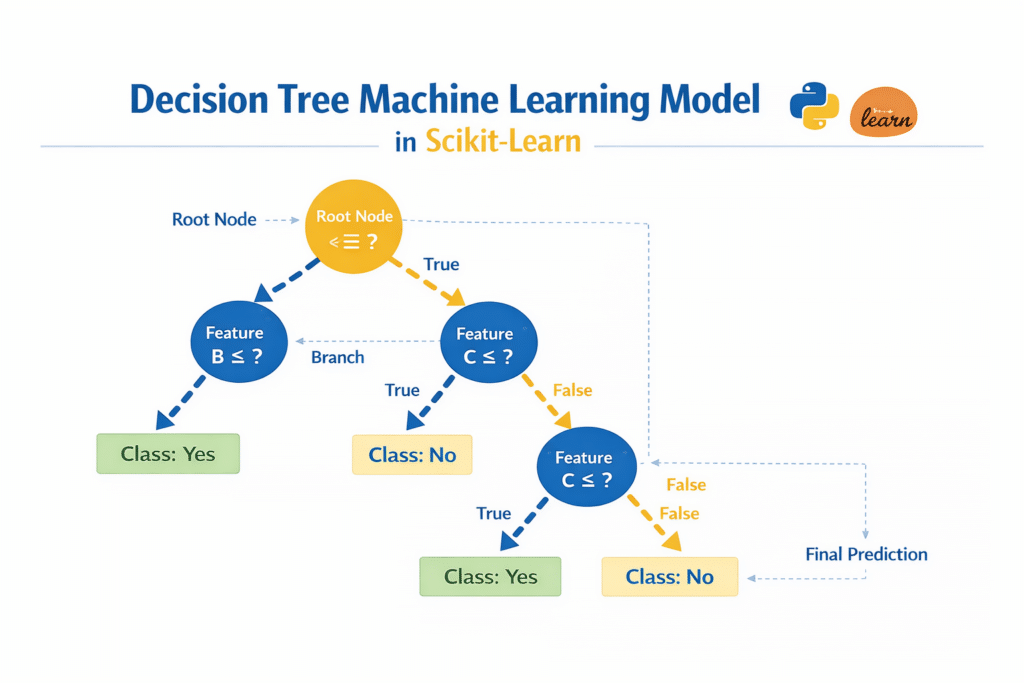
Decision trees are commonly used when teaching Scikit-Learn for Beginners because they are easy to understand and visualize.
Step 5: Make Predictions
After training the model, we can use it to make predictions.
predictions = model.predict(X_test)
The model analyzes the test dataset and predicts the flower species for each sample.
These predictions can then be compared with the real labels to measure model accuracy.
Evaluating a Machine Learning Model
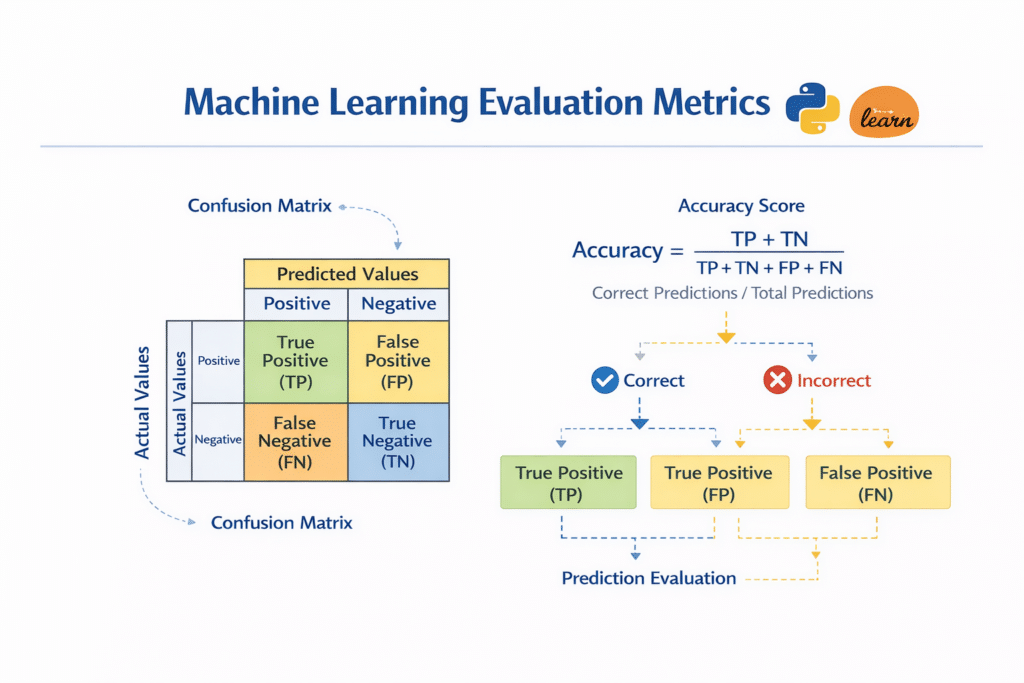
Building a model is only the first step. We must also evaluate how well the model performs.
Evaluation metrics help determine whether the machine learning model is accurate and reliable.
When learning Scikit-Learn for Beginners, two important evaluation metrics are commonly used for classification problems.
Accuracy Score
Accuracy measures the percentage of correct predictions made by the model.
Example:
from sklearn.metrics import accuracy_scoreaccuracy = accuracy_score(y_test, predictions)print("Accuracy:", accuracy)If the accuracy is 0.95, this means the model correctly predicted 95% of the test samples.
Accuracy is one of the simplest metrics used when studying Scikit-Learn for Beginners.
Confusion Matrix
A confusion matrix provides deeper insight into the model’s predictions.
It shows how many predictions were correct and how many were incorrect for each class.
Example:
from sklearn.metrics import confusion_matrixcm = confusion_matrix(y_test, predictions)print(cm)
The confusion matrix helps identify patterns in prediction errors.
This information can be used to improve machine learning models.
Mean Squared Error (Regression Metric)
Mean Squared Error (MSE) is commonly used for regression models.
It measures the difference between predicted values and actual values.
Example:
from sklearn.metrics import mean_squared_error
Although our Iris example uses classification, understanding MSE is still useful when learning Scikit-Learn for Beginners.
Popular Machine Learning Algorithms in Scikit-Learn
One of the biggest advantages of learning Scikit-Learn for Beginners is the wide variety of machine learning algorithms available in the library. These algorithms allow developers to solve many types of problems such as prediction, classification, and clustering.
Understanding the most common algorithms will help beginners choose the right model for their projects.
Below are some of the most widely used algorithms available in Scikit-Learn.
Linear Regression
Linear regression is one of the simplest machine learning algorithms and is widely used for predicting numerical values.
This algorithm finds a relationship between input variables and a target variable. For example, linear regression can be used to predict:
- House prices
- Sales revenue
- Product demand
- Temperature trends
Linear regression is often the first algorithm introduced in Scikit-Learn for Beginners tutorials because it is easy to understand and implement.
Example:
from sklearn.linear_model import LinearRegression
This model works well when the relationship between variables is approximately linear.
Decision Trees
Decision trees are powerful algorithms used for both classification and regression tasks.
They work by splitting data into branches based on feature values. Each branch represents a decision that helps the model determine the final output.
Decision trees are popular in Scikit-Learn for Beginners projects because they are easy to interpret and visualize.
Example:
from sklearn.tree import DecisionTreeClassifier
Decision trees are also the algorithm we used earlier in this tutorial when building our first machine learning model.
Random Forest
Random Forest is an advanced algorithm that improves decision trees.
Instead of relying on a single tree, the algorithm builds multiple decision trees and combines their predictions. This method improves accuracy and reduces overfitting.
Random Forest is widely used in real-world machine learning applications because it performs well even with complex datasets.
Example:
from sklearn.ensemble import RandomForestClassifier
For many data scientists learning Scikit-Learn for Beginners, Random Forest becomes a reliable baseline model.
K-Nearest Neighbors (KNN)
K-Nearest Neighbors is a simple and intuitive classification algorithm.
The model works by comparing a new data point with the closest data points in the training dataset. The most common class among the neighbors determines the final prediction.
Example:
from sklearn.neighbors import KNeighborsClassifier
KNN is useful for small datasets and helps beginners understand how similarity-based algorithms work.
K-Means Clustering
K-Means is an unsupervised learning algorithm used for grouping similar data points into clusters.
Unlike classification models, clustering algorithms do not require labeled data.
K-Means is commonly used in tasks such as:
- Customer segmentation
- Market analysis
- Pattern discovery
Example:
from sklearn.cluster import KMeans
Exploring clustering algorithms is an important step when moving beyond Scikit-Learn for Beginners into more advanced machine learning concepts.
Real-World Applications of Scikit-Learn
Machine learning is used across many industries, and Scikit-Learn provides tools that can support many real-world applications.
Below are some common ways machine learning models are used in practical scenarios.
Spam Email Detection
Email services use machine learning models to detect spam messages.
The algorithm analyzes features such as:
- Email content
- Sender information
- Message patterns
Based on these features, the model can classify emails as spam or legitimate.
Fraud Detection
Financial institutions use machine learning systems to detect fraudulent transactions.
These systems analyze patterns such as:
- Transaction amount
- Location
- Spending behavior
If unusual activity is detected, the system can flag the transaction for investigation.
Recommendation Systems
Streaming platforms and e-commerce websites use recommendation systems powered by machine learning.
These systems analyze user behavior to recommend:
- Movies
- Products
- Music
- Articles
Learning Scikit-Learn for Beginners can help developers understand the basic concepts behind recommendation systems.
Customer Segmentation
Businesses often group customers based on purchasing behavior.
Clustering algorithms like K-Means can identify groups such as:
- High-value customers
- Frequent buyers
- Discount-focused shoppers
These insights help businesses improve marketing strategies.
Predictive Analytics
Many organizations use machine learning models to predict future outcomes.
Examples include:
- Forecasting sales trends
- Predicting product demand
- Identifying equipment failures
Predictive analytics helps companies make better data-driven decisions.
Common Beginner Mistakes When Using Scikit-Learn
While learning Scikit-Learn for Beginners, many developers make common mistakes that can affect model performance.
Understanding these mistakes can help beginners build better machine learning models.
Not Cleaning the Data
Real-world datasets often contain missing values and incorrect entries.
If the dataset is not cleaned properly, the machine learning model may produce inaccurate predictions.
Always inspect and prepare data before training a model.
Data Leakage
Data leakage happens when information from the test dataset accidentally influences the training process.
This can make the model appear more accurate than it actually is.
Properly splitting the dataset using train_test_split() helps prevent this issue.
Overfitting the Model
Overfitting occurs when a model memorizes the training data instead of learning general patterns.
Such models perform well on training data but fail when tested on new data.
Techniques like cross-validation can help reduce overfitting.
Ignoring Feature Scaling
Some machine learning algorithms require features to be scaled to similar ranges.
If features are not normalized, certain algorithms may produce poor results.
Scikit-Learn provides preprocessing tools like StandardScaler to handle feature scaling.
Learning Path After Scikit-Learn
After completing this Scikit-Learn for Beginners tutorial, you will have a solid foundation in classical machine learning.
After learning machine learning fundamentals, many developers move toward text analysis and Python NLP tutorials.
However, there are many advanced topics you can explore next.
Feature Engineering
Feature engineering involves creating better input variables for machine learning models.
Better features often lead to improved model performance.
Hyperparameter Tuning
Machine learning models have parameters that can be optimized to improve results.
Scikit-Learn provides tools such as:
- GridSearchCV
- RandomizedSearchCV
These tools help find the best parameters for a model.
Natural Language Processing
Natural Language Processing (NLP) focuses on analyzing text data.
Common NLP applications include:
- Sentiment analysis
- Chatbots
- Text classification
Libraries like NLTK and spaCy are often used for NLP projects.
Deep Learning
Deep learning frameworks allow developers to build neural networks for complex AI tasks.
Popular frameworks include:
- TensorFlow
- PyTorch
These tools are used for applications like image recognition, speech processing, and advanced AI systems.
Conclusion
In this Scikit-Learn for Beginners guide, we explored how Python developers can start building machine learning models using one of the most powerful libraries in the Python ecosystem.
We began by understanding what Scikit-Learn is and how it fits into the Python machine learning ecosystem. Because the library is built on top of tools like NumPy and SciPy, it provides efficient algorithms for implementing machine learning solutions.
We then explored the typical machine learning workflow and learned how to install Scikit-Learn in a Python environment.
Next, we built our first machine learning model using the Iris dataset, where we trained a decision tree classifier and generated predictions.
We also discussed evaluation metrics such as accuracy score and confusion matrix, which help measure model performance.
Finally, we explored common machine learning algorithms, real-world applications, beginner mistakes, and the next steps in the machine learning learning journey.
Practicing with real projects is the best way to master machine learning concepts.
Start experimenting with different algorithms such as Random Forest or K-Nearest Neighbors, and observe how model performance changes.
With consistent practice, Scikit-Learn for Beginners can become the foundation for your journey into machine learning and artificial intelligence.
FAQ: Scikit-Learn for Beginners
What is Scikit-Learn used for in Python?
Scikit-Learn is a popular Python library used for building machine learning models. It provides simple tools for tasks such as classification, regression, clustering, and data preprocessing. Developers use Scikit-Learn to train models, analyze data, and evaluate machine learning performance without implementing complex algorithms from scratch.
Is Scikit-Learn good for beginners?
Yes, Scikit-Learn is one of the best machine learning libraries for beginners. It provides a simple and consistent API that makes it easy to train models, make predictions, and evaluate results. Because most algorithms follow the same workflow using .fit() and .predict(), beginners can quickly learn how machine learning models work.
Do I need to learn Python before using Scikit-Learn?
Yes. Since Scikit-Learn is a Python library, you should understand basic Python programming before using it. Knowledge of Python fundamentals such as variables, functions, and importing libraries will make it easier to learn Scikit-Learn.
What is the difference between Scikit-Learn and TensorFlow?
Scikit-Learn is mainly used for classical machine learning algorithms, while TensorFlow is designed for deep learning and neural networks.
Scikit-Learn is easier to learn and is ideal for beginners, while TensorFlow is used for more advanced AI tasks such as image recognition and natural language processing.
Is Scikit-Learn used in real-world projects?
Yes, Scikit-Learn is widely used in real-world machine learning applications. Companies use it for tasks such as fraud detection, recommendation systems, predictive analytics, and customer segmentation. Many data scientists use Scikit-Learn as a baseline tool before moving to more advanced AI frameworks.

