

Machine learning models can sometimes behave like students who memorize answers instead of truly understanding a subject.
Imagine a student preparing for an exam. Instead of learning concepts, the student memorizes the exact answers from practice questions. When the actual exam arrives with slightly different questions, the student fails.
Machine learning models can fall into the same trap.
If a model is trained and tested on the same dataset, it may memorize patterns instead of learning how to generalize. The model might show perfect performance during training but fail when it encounters new real-world data.
This is exactly why Train Test Split in Python is one of the most important steps in the machine learning workflow.
By splitting a dataset into two parts:
- Training data
- Testing data
we ensure that the model is evaluated on data it has never seen before.
In this beginner-friendly guide, you will learn:
- What Train Test Split in Python means
- Why it is important in machine learning
- How to implement it using Scikit-Learn
- A complete example including model training and evaluation
By the end of this tutorial, you will understand how train_test_split in Python works and how it fits into a real machine learning workflow.
Before building models, it’s important to understand the complete machine learning workflow in Python, including data preparation, training, and evaluation.
What is Train Test Split in Python
Train Test Split in Python is a technique used in machine learning to divide a dataset into two separate parts.
These parts are called:
- Training dataset
- Testing dataset
The training dataset is used to train the machine learning model, while the testing dataset is used to evaluate how well the model performs.
Instead of evaluating the model on the same data used for training, we test the model on unseen data.
This approach helps us measure how well the model can generalize to new information.
For example, imagine you have a dataset containing house prices.
Your dataset might include:
- house size
- number of rooms
- location
- price
If we train a model on the entire dataset and evaluate it on the same data, the model might appear perfect.
However, when we try to predict prices for new houses, the model may perform poorly.
Using Train Test Split in Python solves this problem by ensuring that some data remains unseen during training.
The workflow usually looks like this:
Dataset → Split → Train Model → Test Model
This simple step dramatically improves the reliability of machine learning models.
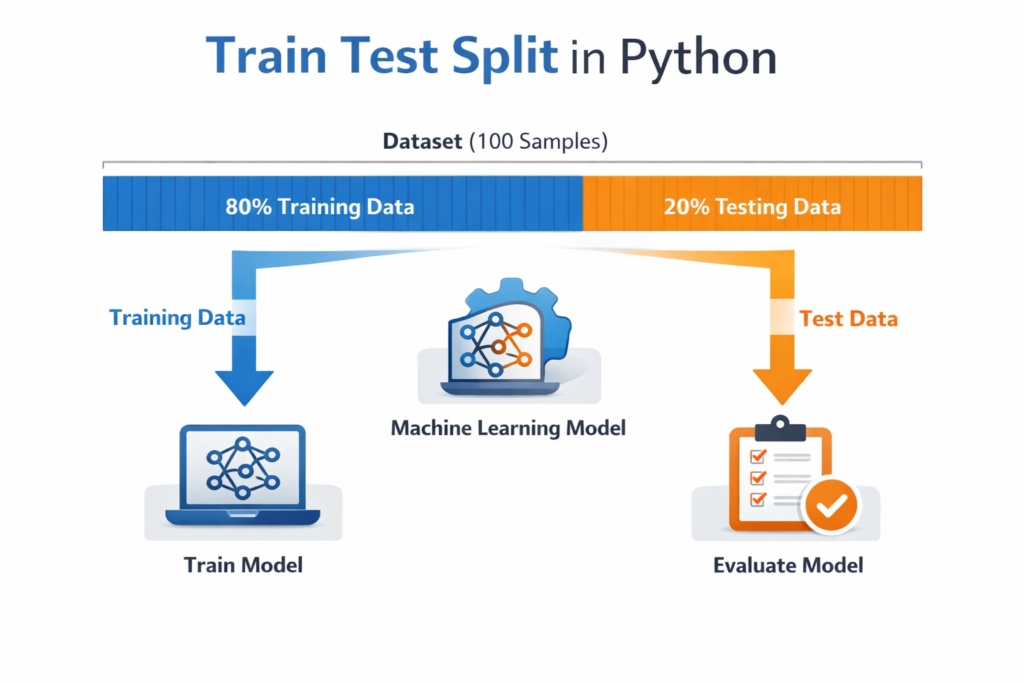
Training Data vs Testing Data Explained
To fully understand Train Test Split in Python, we must clearly understand the difference between training data and testing data.
Training Data
Training data is the portion of the dataset used to teach the machine learning model.
During this stage, the model learns patterns, relationships, and structures from the data.
For example, in a salary prediction model:
Training data might include:
| Experience | Salary |
|---|---|
| 1 year | 20000 |
| 3 years | 30000 |
| 5 years | 40000 |
The model learns how experience affects salary.
The model builds a mathematical relationship from this training data.
Testing Data
Testing data is used to evaluate the performance of the trained model.
The testing dataset is never shown to the model during training.
After the model is trained, we give it the testing data and see how accurate the predictions are.
For example:
| Experience | Actual Salary |
|---|---|
| 4 years | 35000 |
The model predicts a value.
Then we compare the predicted value with the real value.
This tells us how well the model performs on unseen data.
Using Train Test Split in Python ensures that the model is evaluated fairly.
Train / Validation / Test Split (Important Concept)
In many machine learning tutorials, you will see datasets divided into three parts instead of two.
These parts are:
- Training dataset
- Validation dataset
- Testing dataset
Each part serves a different purpose.
| Dataset | Purpose |
|---|---|
| Training | Model learning |
| Validation | Model tuning |
| Testing | Final evaluation |
The validation dataset helps adjust model parameters such as:
- learning rate
- model complexity
- hyperparameters
Typical dataset splits include:
70% training
15% validation
15% testing
or
60% training
20% validation
20% testing
However, beginners usually start with a simple Train Test Split in Python, which divides the dataset into only two parts.
For most beginner projects and tutorials, a two-way split is perfectly sufficient.
Later, when working on advanced machine learning models, you will encounter validation datasets more frequently.
Train Test Split in Python Using Scikit-Learn
In Python, the easiest way to perform Train Test Split in Python is by using the Scikit-Learn library.
Scikit-Learn is one of the most popular machine learning libraries in Python.
It provides powerful tools for:
- machine learning models
- preprocessing
- evaluation
- dataset splitting
First, install the library if it is not already installed.
pip install scikit-learn
Next, import the function used for dataset splitting.
from sklearn.model_selection import train_test_split
The train_test_split() function automatically divides the dataset into training and testing sets.
The basic syntax looks like this:
train_test_split(X, y, test_size, train_size, random_state)
Where:
- X represents input features
- y represents target values
- test_size controls the percentage of test data
- train_size controls training data size
- random_state ensures reproducibility
Using Train Test Split in Python with Scikit-Learn takes only a single line of code, which makes it extremely convenient for machine learning projects.
The easiest way to perform train test split in Python is by using the powerful Scikit-Learn library in Python, which provides many tools for machine learning.
You can explore more details in the official Scikit-Learn train_test_split documentation.
What is the Ideal Train Test Split Ratio
One common question beginners ask is:
What is the best dataset split ratio?
There is no universal rule, but some ratios are widely used.
80 / 20 Split
This is the most common ratio.
80% training data
20% testing data
This works well for most datasets.
70 / 30 Split
Used when datasets are smaller.
More data is reserved for testing.
90 / 10 Split
Used for very large datasets.
Large datasets already contain enough training examples.
The goal of Train Test Split in Python is to ensure:
- enough data for training
- enough data for reliable testing
Choosing the right ratio depends on the dataset size and project complexity.
Complete Train Test Split Python Example (Mini Machine Learning Workflow)
So far, we have learned the theory behind Train Test Split in Python. Now it’s time to see how it works in a real example.
Many tutorials stop right after splitting the dataset. However, a beginner needs to see the complete workflow, including:
- Splitting the dataset
- Training a model
- Making predictions
- Evaluating the model
In this section, we will build a simple machine learning example using Train Test Split in Python and a basic regression model.
Step 1: Import Required Libraries
First, we import the required libraries.
import pandas as pd
from sklearn.model_selection import train_test_split
from sklearn.linear_model import LinearRegression
from sklearn.metrics import mean_squared_error
Here is what each library does:
| Library | Purpose |
|---|---|
| pandas | Used to handle datasets |
| train_test_split | Splits the dataset |
| LinearRegression | Machine learning model |
| mean_squared_error | Evaluates prediction error |
These tools together allow us to build a simple machine learning pipeline.
Step 2: Create a Simple Dataset
For this tutorial, we will create a small dataset manually.
The dataset represents a relationship between work experience and salary.
data = {
    'experience':[1,2,3,4,5,6,7,8],
    'salary':[20000,25000,30000,35000,40000,45000,50000,55000]
}df = pd.DataFrame(data)
The dataset now looks like this:
| Experience | Salary |
|---|---|
| 1 | 20000 |
| 2 | 25000 |
| 3 | 30000 |
| 4 | 35000 |
| 5 | 40000 |
| 6 | 45000 |
| 7 | 50000 |
| 8 | 55000 |
In a real machine learning project, the dataset would usually come from:
- CSV files
- databases
- APIs
But the process of Train Test Split in Python remains the same.
In real projects, datasets are usually loaded using Pandas for data analysis in Python before applying machine learning techniques.
Step 3: Define Features and Target Variables
In machine learning, we divide data into:
- Features (X)
- Target variable (y)
Features are the input values used to make predictions.
The target variable is the value we want to predict.
In our dataset:
Experience → Feature
Salary → Target
X = df[['experience']]
y = df['salary']
Here:
- X contains the input variable
- y contains the output variable
This step prepares the dataset for Train Test Split in Python.
Step 4: Apply Train Test Split in Python
Now we split the dataset into training and testing sets.
X_train, X_test, y_train, y_test = train_test_split(
    X,
    y,
    test_size=0.2,
    random_state=42
)
This line performs Train Test Split in Python.
Let’s understand what is happening.
test_size = 0.2
This means:
20% of the dataset will be used for testing.
80% of the dataset will be used for training.
random_state = 42
This ensures that the split remains consistent every time the code runs.
Without random_state, the dataset split could change each time you execute the code.
Using a fixed random state makes experiments reproducible.
Step 5: Train the Machine Learning Model
After performing Train Test Split in Python, the next step is to train the machine learning model.
In this example we use Linear Regression in Scikit-Learn, one of the simplest machine learning models..
model = LinearRegression()
model.fit(X_train, y_train)
The fit() function trains the model using the training dataset.
During training, the model learns the relationship between:
Experience → Salary
The model now creates a mathematical formula that can predict salary based on experience.
Step 6: Make Predictions
Once the model is trained, we use it to make predictions on the testing dataset.
predictions = model.predict(X_test)
These predictions represent the model’s estimated salary values based on experience.
The predictions come from data the model has never seen before, which is exactly why Train Test Split in Python is important.
Step 7: Evaluate the Model
Now we evaluate how accurate the model is.
Model performance can be measured using metrics such as Mean Squared Error in machine learning.
mse = mean_squared_error(y_test, predictions)
print("Mean Squared Error:", mse)
Mean Squared Error measures how far the predictions are from the real values.
Lower MSE indicates better performance.
For example:
| Prediction | Actual | Error |
|---|---|---|
| 36000 | 35000 | 1000 |
If the model consistently produces small errors, it means the model is performing well.
This simple workflow demonstrates the real power of Train Test Split in Python.
Understanding Train Test Split Parameters
The train_test_split() function contains several parameters that control how the dataset is divided.
Understanding these parameters helps you use Train Test Split in Python effectively.
test_size Parameter
The test_size parameter determines the percentage of the dataset used for testing.
Example:
test_size = 0.2
This means:
20% testing data
80% training data
Example with different values:
test_size = 0.3
Now the dataset becomes:
70% training
30% testing
The test_size parameter is one of the most commonly used settings in Train Test Split in Python.
train_size Parameter
The train_size parameter controls how much data is used for training.
Example:
train_size = 0.75
This means:
75% training data
25% testing data
Although test_size is used more frequently, train_size provides additional flexibility when controlling dataset proportions.
Using Both train_size and test_size
You can also specify both parameters.
Example:
train_test_split(X, y, train_size=0.7, test_size=0.3)
This explicitly defines:
70% training
30% testing
When both parameters are defined, they must add up to less than or equal to 1.
Using both parameters helps beginners clearly control the dataset structure when using Train Test Split in Python.
random_state Parameter
The random_state parameter ensures that the dataset split is reproducible.
Example:
random_state = 42
Without random_state:
Each time you run the code, the dataset may split differently.
With random_state:
The same training and testing sets are produced every time.
This makes debugging and experimentation easier.
That is why most tutorials include random_state when using Train Test Split in Python.
Visual Explanation of Train Test Split
To better understand Train Test Split in Python, imagine a dataset with 100 rows.
Before splitting:
Dataset
100 samples
After applying an 80 / 20 split:
Training Data → 80 samples
Testing Data → 20 samples
Visual representation:
Dataset
████████████████████████████████████████████████████
After split
Training Data
████████████████████████████████████████
Testing Data
████████
The model learns patterns from the training section and is evaluated using the testing section.
This ensures that the evaluation reflects how the model will perform on new unseen data.
Common Mistakes Beginners Make When Using Train Test Split in Python
Even though Train Test Split in Python is easy to implement, beginners often make several mistakes that can lead to misleading results.
Understanding these mistakes will help you build more reliable machine learning models.
1. Training and Testing on the Same Dataset
One of the most common beginner mistakes is evaluating a model on the same dataset used for training.
When this happens, the model may appear extremely accurate because it has already seen the data.
However, this does not reflect real-world performance.
Example problem:
If a model memorizes training data patterns instead of learning general rules, it will fail when encountering new data.
Using Train Test Split in Python prevents this issue by ensuring the model is tested on unseen data.
2. Using a Very Small Test Dataset
Another mistake is allocating too little data for testing.
For example:
95% training data
5% testing data
This can produce unreliable evaluation results because the test dataset may not represent the overall dataset.
A better approach is using common ratios like:
- 80 / 20 split
- 70 / 30 split
These ratios provide enough data for both training and testing when using Train Test Split in Python.
3. Forgetting random_state
Beginners sometimes forget to include the random_state parameter.
Without random_state, the dataset split changes every time the code runs.
This makes it difficult to reproduce results or debug models.
Example:
train_test_split(X, y, test_size=0.2, random_state=42)
Setting random_state ensures consistent results whenever you run the experiment.
4. Data Leakage
Data leakage occurs when information from the test dataset accidentally influences the training process.
Proper data preprocessing in machine learning is essential to avoid issues such as data leakage and incorrect dataset splitting.
This often happens when preprocessing steps are performed before splitting the dataset.
Incorrect workflow:
- Normalize dataset
- Split dataset
Correct workflow:
- Split dataset
- Apply preprocessing to training data
Preventing leakage is critical when using Train Test Split in Python.
5. Splitting Data Incorrectly for Time-Based Datasets
Some datasets contain time-based information.
Examples include:
- stock prices
- weather forecasts
- sales predictions
In these cases, random splitting may break the time sequence.
Instead of random splitting, you should use time-based splitting, where earlier data is used for training and later data is used for testing.
Understanding the dataset type is important when applying Train Test Split in Python.
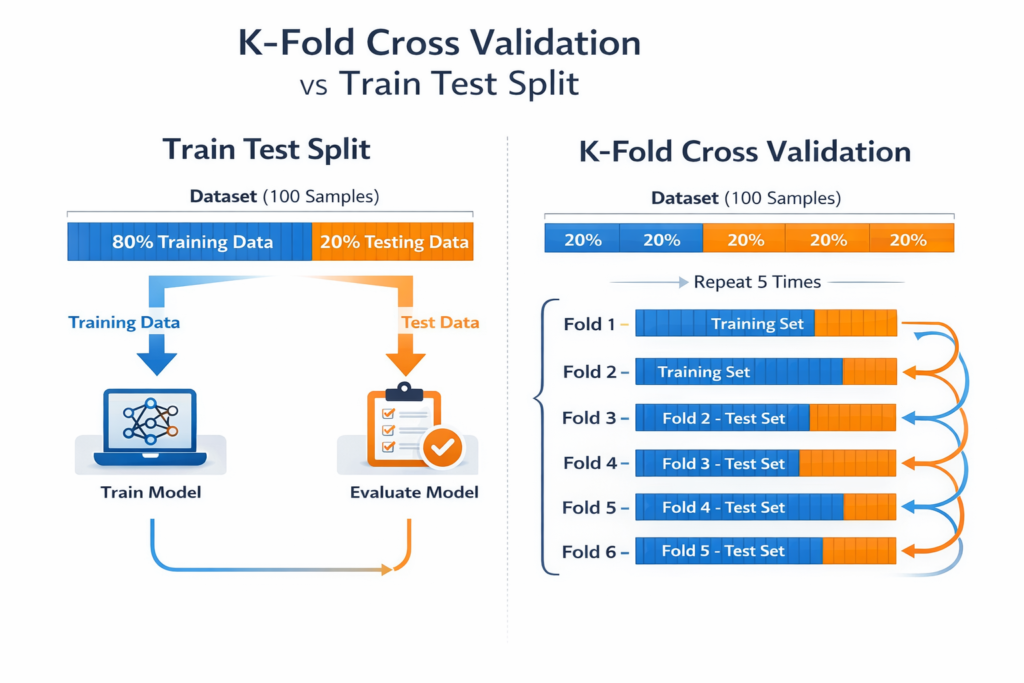
Train Test Split vs Cross Validation
While Train Test Split in Python is widely used, it is not the only evaluation technique.
Another powerful method is Cross Validation.
Both methods aim to evaluate model performance but work differently.
Train Test Split
In Train Test Split, the dataset is divided once into two parts:
- training dataset
- testing dataset
The model is trained once and evaluated once.
Example structure:
| Dataset | Purpose |
|---|---|
| Training Data | Model training |
| Testing Data | Model evaluation |
Advantages:
- simple to implement
- fast evaluation
- ideal for beginner projects
However, it may sometimes produce unreliable results if the dataset is small.
Cross Validation
Cross Validation improves model evaluation by using multiple dataset splits.
The most common type is K-Fold Cross Validation.
In K-Fold Cross Validation:
- The dataset is divided into K equal parts
- The model trains on K-1 parts
- The remaining part is used for testing
- The process repeats K times
Example with 5-fold cross validation:
| Fold | Training Data | Testing Data |
|---|---|---|
| 1 | 4 folds | 1 fold |
| 2 | 4 folds | 1 fold |
| 3 | 4 folds | 1 fold |
| 4 | 4 folds | 1 fold |
| 5 | 4 folds | 1 fold |
The final performance is calculated as the average of all evaluations.
When to Use Each Method
| Method | Best For |
|---|---|
| Train Test Split | Beginner projects |
| Cross Validation | Research and production models |
| Train / Validation / Test Split | Hyperparameter tuning |
For most beginner tutorials, Train Test Split in Python remains the simplest and most practical starting point.
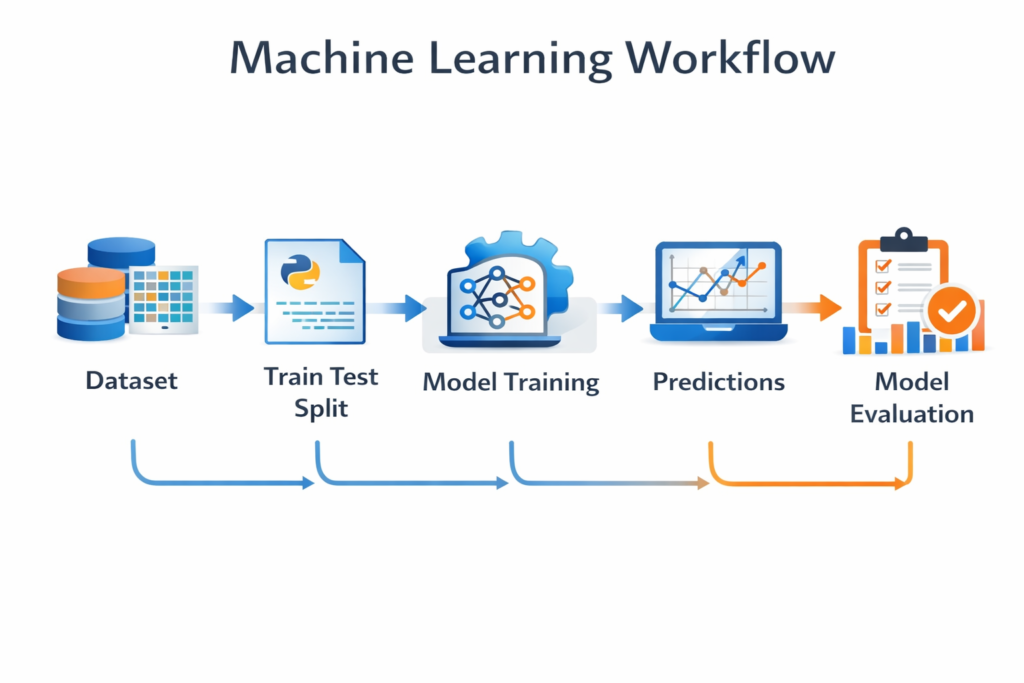
Where Train Test Split Fits in the Machine Learning Workflow
Understanding where Train Test Split in Python fits in the machine learning pipeline helps beginners see the bigger picture.
A typical machine learning workflow looks like this:
- Data collection
- Data cleaning
- Feature engineering
- Train Test Split
- Model training
- Model evaluation
- Model improvement
The dataset is usually split before training the model.
This ensures the model learns patterns only from the training dataset while the testing dataset remains unseen.
This separation is what allows us to measure real-world performance.
When to Use Train Test Split in Machine Learning Projects
You will encounter Train Test Split in Python in many machine learning applications.
Some common examples include:
Regression Models
Predicting continuous values such as:
- house prices
- salaries
- sales revenue
Train Test Split helps measure prediction accuracy.
Classification Models
Used for predicting categories such as:
- spam vs non-spam emails
- disease detection
- sentiment analysis
Testing datasets ensure that the classifier works on unseen data.
Natural Language Processing (NLP)
In NLP projects, Train Test Split in Python is used for tasks like:
- text classification
- sentiment analysis
- spam detection
Models must be evaluated on unseen text data to ensure reliability.
AI Prediction Systems
Many AI systems rely on proper dataset splitting.
Examples include:
- recommendation systems
- fraud detection
- customer behavior prediction
Without proper dataset splitting, model evaluation would be unreliable.
FAQs: Train Test Split in Python
What does train_test_split do in Python?
The train_test_split() function divides a dataset into training and testing subsets.
This allows machine learning models to learn from one part of the data and be evaluated on unseen data.
What is the best train test split ratio?
The most commonly used ratios are:
80 / 20
70 / 30
Large datasets sometimes use 90 / 10 splits.
The best ratio depends on dataset size and model complexity.
Why do we use random_state in train_test_split?
The random_state parameter ensures that the dataset split remains the same every time the code runs.
This makes experiments reproducible and easier to debug.
What is the difference between training data and testing data?
Training data is used to teach the machine learning model patterns.
Testing data is used to evaluate how well the model performs on unseen data.
Both datasets are essential when using Train Test Split in Python.
Is train test split enough for machine learning models?
For beginner machine learning projects, Train Test Split in Python is usually enough.
However, advanced projects often use Cross Validation or Train / Validation / Test splits for more reliable evaluation.
Conclusion
Understanding Train Test Split in Python is essential for anyone learning machine learning.
Without splitting the dataset, it becomes impossible to accurately measure how well a model performs on new data.
In this guide, we explored:
- what Train Test Split in Python means
- why dataset splitting is important
- how to implement it using Scikit-Learn
- a complete machine learning example including model training and evaluation
We also discussed common mistakes beginners make and how techniques like Cross Validation can further improve model evaluation.
As you continue learning machine learning, Train Test Split in Python will appear in almost every project you build.
Mastering this concept early will help you create models that are not only accurate during training but also reliable when deployed in real-world applications.
If you want to understand the full machine learning pipeline, read our complete guide on machine learning workflow in Python.

